
1. ਜਾਣ-ਪਛਾਣ
This manual provides detailed instructions for installing, configuring, and maintaining your GIGABYTE GA-B150M-D3H Micro ATX motherboard. The GA-B150M-D3H is designed to support 6th Generation Intel Core Processors and features Dual Channel DDR4 memory, PCIe Gen3 x4 M.2 connector, SATA Express, and 8-channel HD audio with Audio Noise Guard.
Please read this manual thoroughly before beginning installation to ensure proper setup and operation.
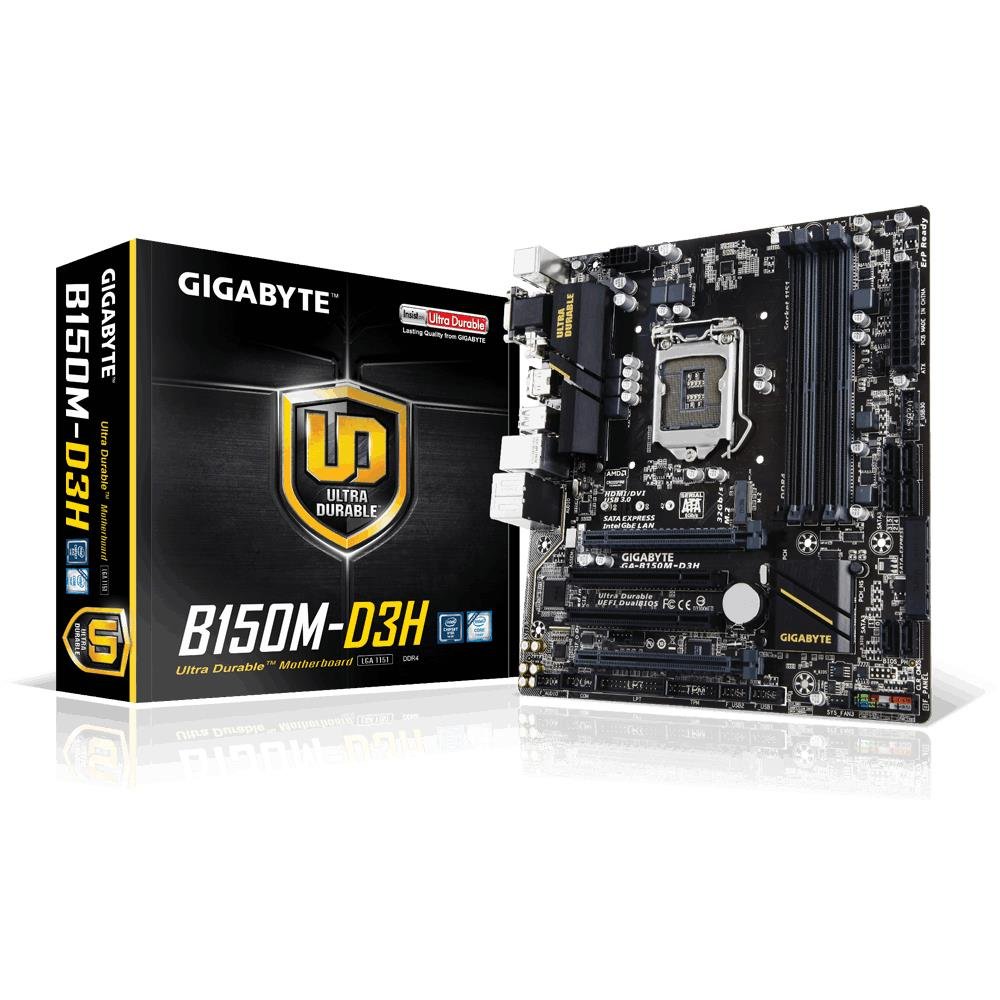
Image 1.1: GIGABYTE GA-B150M-D3H Micro ATX Motherboard. This image displays the overall layout of the motherboard, highlighting its compact Micro ATX form factor and various component slots.
2 ਸੁਰੱਖਿਆ ਜਾਣਕਾਰੀ
ਮਦਰਬੋਰਡ ਨੂੰ ਨੁਕਸਾਨ ਪਹੁੰਚਾਉਣ ਅਤੇ ਆਪਣੇ ਆਪ ਨੂੰ ਸੱਟ ਲੱਗਣ ਤੋਂ ਬਚਾਉਣ ਲਈ ਹੇਠ ਲਿਖੀਆਂ ਸੁਰੱਖਿਆ ਸਾਵਧਾਨੀਆਂ ਦੀ ਪਾਲਣਾ ਕਰੋ:
- ਕਿਸੇ ਵੀ ਹਿੱਸੇ ਨੂੰ ਛੂਹਣ ਤੋਂ ਪਹਿਲਾਂ ਹਮੇਸ਼ਾ ਕੰਧ ਦੇ ਆਊਟਲੈੱਟ ਤੋਂ ਪਾਵਰ ਕੋਰਡ ਨੂੰ ਡਿਸਕਨੈਕਟ ਕਰੋ।
- ਸਥਿਰ ਬਿਜਲੀ ਛੱਡਣ ਲਈ ਐਂਟੀ-ਸਟੈਟਿਕ ਗੁੱਟ ਦੀ ਪੱਟੀ ਪਹਿਨੋ ਜਾਂ ਜ਼ਮੀਨ 'ਤੇ ਲੱਗੀ ਧਾਤ ਦੀ ਵਸਤੂ ਨੂੰ ਵਾਰ-ਵਾਰ ਛੂਹੋ।
- ਸੰਵੇਦਨਸ਼ੀਲ ਹਿੱਸਿਆਂ ਨੂੰ ਛੂਹਣ ਤੋਂ ਬਚਣ ਲਈ ਮਦਰਬੋਰਡ ਨੂੰ ਇਸਦੇ ਕਿਨਾਰਿਆਂ ਤੋਂ ਫੜੋ।
- ਮਦਰਬੋਰਡ ਨੂੰ ਨਮੀ ਅਤੇ ਬਹੁਤ ਜ਼ਿਆਦਾ ਤਾਪਮਾਨ ਤੋਂ ਦੂਰ ਰੱਖੋ।
- ਜ਼ਿਆਦਾ ਗਰਮ ਹੋਣ ਤੋਂ ਰੋਕਣ ਲਈ ਕੰਪਿਊਟਰ ਕੇਸ ਦੇ ਅੰਦਰ ਸਹੀ ਹਵਾਦਾਰੀ ਯਕੀਨੀ ਬਣਾਓ।
3. ਪੈਕੇਜ ਸਮੱਗਰੀ
ਪੁਸ਼ਟੀ ਕਰੋ ਕਿ ਸਾਰੀਆਂ ਚੀਜ਼ਾਂ ਤੁਹਾਡੇ ਮਦਰਬੋਰਡ ਪੈਕੇਜ ਵਿੱਚ ਮੌਜੂਦ ਹਨ:
- GIGABYTE GA-B150M-D3H Motherboard
- ਯੂਜ਼ਰ ਮੈਨੂਅਲ
- I / O ਸ਼ੀਲਡ
- SATA ਕੇਬਲ
- ਡਰਾਈਵਰ ਸੀਡੀ/ਡੀਵੀਡੀ
ਨੋਟ: ਖੇਤਰ ਜਾਂ ਸੋਧ ਦੇ ਆਧਾਰ 'ਤੇ ਸਮੱਗਰੀ ਥੋੜ੍ਹੀ ਵੱਖਰੀ ਹੋ ਸਕਦੀ ਹੈ।
4. ਮਦਰਬੋਰਡ ਲੇਆਉਟ
Familiarize yourself with the various components and connectors on the GA-B150M-D3H motherboard.
Image 4.1: GIGABYTE GA-B150M-D3H Motherboard Layout. This image provides a visual reference for the location of key components such as the CPU socket, DIMM slots, PCIe slots, SATA ports, and M.2 connector.
ਮੁੱਖ ਭਾਗ:
- LGA 1151 CPU ਸਾਕਟ: For 6th Generation Intel Core Processors.
- DDR4 DIMM ਸਲਾਟ (4): Supports Dual Channel DDR4 memory up to 2133 MHz.
- PCIe ਸਲਾਟ: Includes PCIe Gen3 x16 for graphics cards and PCIe x1 slots for expansion.
- M.2 Connector: Supports PCIe NVMe & SATA SSDs with up to 32Gb/s data transfer.
- SATA Express Connector: For up to 16Gb/s data transfer.
- SATA 6Gb/s ਪੋਰਟ: For connecting traditional SATA storage devices.
- 24-ਪਿੰਨ ATX ਪਾਵਰ ਕਨੈਕਟਰ: ਮੁੱਖ ਪਾਵਰ ਇਨਪੁੱਟ।
- 8-ਪਿੰਨ ATX 12V ਪਾਵਰ ਕਨੈਕਟਰ: CPU ਪਾਵਰ ਇਨਪੁੱਟ।
- ਫਰੰਟ ਪੈਨਲ ਹੈਡਰ: For power button, reset button, LED indicators, and USB ports.
- ਆਡੀਓ ਕਨੈਕਟਰ: 8-channel HD Audio with high quality capacitors and Audio Noise Guard.
5. ਸੈੱਟਅੱਪ ਅਤੇ ਇੰਸਟਾਲੇਸ਼ਨ
ਆਪਣੇ ਮਦਰਬੋਰਡ ਅਤੇ ਹਿੱਸਿਆਂ ਦੀ ਸਹੀ ਇੰਸਟਾਲੇਸ਼ਨ ਲਈ ਇਨ੍ਹਾਂ ਕਦਮਾਂ ਦੀ ਪਾਲਣਾ ਕਰੋ।
5.1. CPU ਇੰਸਟਾਲ ਕਰਨਾ
- Locate the LGA 1151 CPU socket.
- CPU ਸਾਕਟ ਲੀਵਰ ਖੋਲ੍ਹੋ ਅਤੇ ਲੋਡ ਪਲੇਟ ਚੁੱਕੋ।
- CPU ਨੂੰ ਸਾਕਟ ਨਾਲ ਧਿਆਨ ਨਾਲ ਇਕਸਾਰ ਕਰੋ, ਇਹ ਯਕੀਨੀ ਬਣਾਉਂਦੇ ਹੋਏ ਕਿ CPU 'ਤੇ ਸੁਨਹਿਰੀ ਤਿਕੋਣ ਸਾਕਟ 'ਤੇ ਤਿਕੋਣ ਨਾਲ ਮੇਲ ਖਾਂਦਾ ਹੈ। CPU ਨੂੰ ਸਾਕਟ ਵਿੱਚ ਜ਼ਬਰਦਸਤੀ ਨਾ ਪਾਓ।
- ਲੋਡ ਪਲੇਟ ਨੂੰ ਹੇਠਾਂ ਕਰੋ ਅਤੇ ਇਸਨੂੰ ਲੀਵਰ ਨਾਲ ਸੁਰੱਖਿਅਤ ਕਰੋ।
5.2. CPU ਕੂਲਰ ਸਥਾਪਤ ਕਰਨਾ
Refer to your CPU cooler's instruction manual for specific installation steps. Ensure thermal paste is applied correctly between the CPU and cooler base.
5.3. ਮੈਮੋਰੀ (RAM) ਇੰਸਟਾਲ ਕਰਨਾ
- DDR4 DIMM ਸਲਾਟਾਂ ਦੇ ਦੋਵਾਂ ਸਿਰਿਆਂ 'ਤੇ ਕਲਿੱਪ ਖੋਲ੍ਹੋ।
- ਮੈਮੋਰੀ ਮੋਡੀਊਲ ਨੂੰ ਸਲਾਟ ਨਾਲ ਇਕਸਾਰ ਕਰੋ, ਇਹ ਯਕੀਨੀ ਬਣਾਉਂਦੇ ਹੋਏ ਕਿ ਮੋਡੀਊਲ 'ਤੇ ਨੌਚ ਸਲਾਟ ਵਿਚਲੀ ਕੁੰਜੀ ਨਾਲ ਮੇਲ ਖਾਂਦਾ ਹੈ।
- ਮੈਮੋਰੀ ਮੋਡੀਊਲ ਦੇ ਦੋਵਾਂ ਸਿਰਿਆਂ 'ਤੇ ਮਜ਼ਬੂਤੀ ਨਾਲ ਦਬਾਓ ਜਦੋਂ ਤੱਕ ਕਲਿੱਪ ਆਪਣੀ ਜਗ੍ਹਾ 'ਤੇ ਨਹੀਂ ਆ ਜਾਂਦੇ।
- For dual-channel performance, install memory modules in matching colored slots (e.g., DIMM1 and DIMM2).
5.4. ਐਕਸਪੈਂਸ਼ਨ ਕਾਰਡ ਸਥਾਪਤ ਕਰਨਾ
- Remove the metal bracket from the desired PCIe slot on your computer case.
- Align the expansion card with the PCIe slot and press down firmly until it is seated correctly.
- ਕਾਰਡ ਨੂੰ ਕੰਪਿਊਟਰ ਕੇਸ ਨਾਲ ਪੇਚ ਨਾਲ ਸੁਰੱਖਿਅਤ ਕਰੋ।
5.5. Connecting Storage Devices
- SATA ਡਿਵਾਈਸਾਂ: Connect one end of the SATA data cable to a SATA 6Gb/s port on the motherboard and the other end to your hard drive or SSD. Connect the SATA power cable from your power supply to the device.
- M.2 SSD: Insert the M.2 SSD into the M.2 slot at an angle, then gently push it down and secure it with the provided screw.
- SATA Express: If using a SATA Express device, connect it to the designated SATA Express connector.
5.6. ਫਰੰਟ ਪੈਨਲ ਕਨੈਕਟਰਾਂ ਨੂੰ ਜੋੜਨਾ
Connect the cables from your computer case's front panel (power button, reset button, HDD LED, power LED, front USB, front audio) to the corresponding headers on the motherboard. Refer to the motherboard layout diagram for exact locations and pin assignments.
5.7. ਬਿਜਲੀ ਸਪਲਾਈ ਨੂੰ ਜੋੜਨਾ
- Connect the 24-pin ATX main power connector from your power supply to the 24-pin power socket on the motherboard.
- Connect the 8-pin ATX 12V CPU power connector to the 8-pin socket near the CPU.
- ਯਕੀਨੀ ਬਣਾਓ ਕਿ ਸਾਰੇ ਬਿਜਲੀ ਕਨੈਕਸ਼ਨ ਸੁਰੱਖਿਅਤ ਹਨ।
6. ਓਪਰੇਟਿੰਗ ਹਦਾਇਤਾਂ
6.1. ਪਹਿਲਾ ਬੂਟ
After assembling all components, connect your monitor, keyboard, and mouse. Power on the system. The system should display the GIGABYTE splash screen and then enter the BIOS/UEFI setup or attempt to boot from a connected storage device.
6.2. BIOS/UEFI ਸੈੱਟਅੱਪ
BIOS/UEFI ਸੈੱਟਅੱਪ ਵਿੱਚ ਦਾਖਲ ਹੋਣ ਲਈ, ਦਬਾਓ ਡੀ.ਈ.ਐਲ key repeatedly during the boot process when the GIGABYTE logo appears. Here you can configure system settings, boot order, and monitor hardware status. The GA-B150M-D3H features GIGABYTE UEFI Dual BIOS for enhanced reliability.
6.3. ਡਰਾਈਵਰ ਇੰਸਟਾਲੇਸ਼ਨ
After installing your operating system, install the necessary drivers for the motherboard components. These can be found on the included driver CD/DVD or downloaded from the official GIGABYTE website. Key drivers include chipset, audio (Realtek ALC892 codec), LAN, and any integrated graphics drivers.
6.4. ਓਪਰੇਟਿੰਗ ਸਿਸਟਮ ਇੰਸਟਾਲੇਸ਼ਨ
Insert your operating system installation media (USB drive or DVD) and configure the boot order in the BIOS/UEFI to boot from it. Follow the on-screen instructions to install your preferred operating system (e.g., Windows 8.1, Windows 10).
7. ਰੱਖ-ਰਖਾਅ
7.1. ਸਫਾਈ
Regularly clean the interior of your computer case to prevent dust buildup, which can lead to overheating. Use compressed air to remove dust from fans, heatsinks, and motherboard components. Ensure the system is powered off and unplugged before cleaning.
7.2. BIOS ਅੱਪਡੇਟ
GIGABYTE periodically releases BIOS updates to improve system stability, compatibility, and performance. Visit the official GIGABYTE website for your motherboard model (GA-B150M-D3H) to check for the latest BIOS version and follow the provided instructions for updating. Exercise caution during BIOS updates, as an interruption can render the motherboard inoperable.
8. ਸਮੱਸਿਆ ਨਿਪਟਾਰਾ
ਇਹ ਭਾਗ ਉਹਨਾਂ ਆਮ ਸਮੱਸਿਆਵਾਂ ਨੂੰ ਸੰਬੋਧਿਤ ਕਰਦਾ ਹੈ ਜੋ ਤੁਹਾਨੂੰ ਆ ਸਕਦੀਆਂ ਹਨ।
8.1. No Power / System Does Not Turn On
- Check if the power supply is connected correctly to the motherboard (24-pin and 8-pin connectors).
- ਯਕੀਨੀ ਬਣਾਓ ਕਿ ਪਾਵਰ ਸਪਲਾਈ ਸਵਿੱਚ ਚਾਲੂ ਸਥਿਤੀ ਵਿੱਚ ਹੈ।
- Verify that the front panel power button cable is correctly connected to the motherboard header.
- ਕਿਸੇ ਹੋਰ ਸਿਸਟਮ ਜਾਂ ਪਾਵਰ ਸਪਲਾਈ ਟੈਸਟਰ ਨਾਲ ਪਾਵਰ ਸਪਲਾਈ ਦੀ ਜਾਂਚ ਕਰੋ।
8.2. ਕੋਈ ਡਿਸਪਲੇ ਆਉਟਪੁੱਟ ਨਹੀਂ
- Ensure the monitor is connected to the correct graphics output (either integrated graphics on the motherboard or a dedicated graphics card).
- ਗ੍ਰਾਫਿਕਸ ਕਾਰਡ ਅਤੇ ਮੈਮੋਰੀ ਮੋਡੀਊਲ ਦੁਬਾਰਾ ਸੈੱਟ ਕਰੋ।
- Try booting with only one memory module installed.
- Check if the monitor is powered on and set to the correct input source.
8.3. ਸਿਸਟਮ ਅਸਥਿਰਤਾ / ਕਰੈਸ਼
- ਇਹ ਯਕੀਨੀ ਬਣਾਉਣ ਲਈ ਕਿ ਉਹ ਸੁਰੱਖਿਅਤ ਓਪਰੇਟਿੰਗ ਸੀਮਾਵਾਂ ਦੇ ਅੰਦਰ ਹਨ, CPU ਅਤੇ GPU ਤਾਪਮਾਨ ਦੀ ਜਾਂਚ ਕਰੋ।
- Verify that all drivers are installed and up to date.
- ਨੁਕਸਦਾਰ RAM ਦੀ ਜਾਂਚ ਕਰਨ ਲਈ ਮੈਮੋਰੀ ਡਾਇਗਨੌਸਟਿਕ ਟੂਲ ਚਲਾਓ।
- ਯਕੀਨੀ ਬਣਾਓ ਕਿ ਬਿਜਲੀ ਸਪਲਾਈ ਸਾਰੇ ਹਿੱਸਿਆਂ ਨੂੰ ਲੋੜੀਂਦੀ ਅਤੇ ਸਥਿਰ ਬਿਜਲੀ ਪ੍ਰਦਾਨ ਕਰਦੀ ਹੈ।
9 ਨਿਰਧਾਰਨ
Detailed technical specifications for the GIGABYTE GA-B150M-D3H motherboard:
| ਵਿਸ਼ੇਸ਼ਤਾ | ਨਿਰਧਾਰਨ |
|---|---|
| ਮਾਡਲ ਦਾ ਨਾਮ | GA-B150M-D3H |
| ਫਾਰਮ ਫੈਕਟਰ | ਮਾਈਕ੍ਰੋ ATX (24.4cm x 22.5cm) |
| CPU ਸਾਕਟ | LGA 1151 |
| ਅਨੁਕੂਲ ਪ੍ਰੋਸੈਸਰ | 6ਵੀਂ ਪੀੜ੍ਹੀ ਦੇ ਇੰਟੇਲ ਕੋਰ ਪ੍ਰੋਸੈਸਰ |
| ਚਿੱਪਸੈੱਟ | ਇੰਟੇਲ B150 ਐਕਸਪ੍ਰੈਸ ਚਿੱਪਸੈੱਟ |
| ਮੈਮੋਰੀ ਤਕਨਾਲੋਜੀ | DDR4 |
| ਮੈਮੋਰੀ ਸਲੋਟ | 4 x DDR4 DIMM sockets (Dual Channel) |
| ਵੱਧ ਤੋਂ ਵੱਧ ਮੈਮੋਰੀ ਸਮਰੱਥਾ | 16 ਜੀ.ਬੀ |
| ਮੈਮੋਰੀ ਕਲਾਕ ਸਪੀਡ | 2133 MHz |
| PCIe ਸਲਾਟ | 1 x PCI Express x16, 1 x Total PCIe Ports |
| ਸਟੋਰੇਜ ਇੰਟਰਫੇਸ | PCIe Gen3 x4 M.2, SATA Express, SATA 6Gb/s |
| ਆਡੀਓ ਕੋਡੇਕ | Realtek ALC892 codec, 8-channel HD Audio |
| USB ਪੋਰਟ | Total 8 USB Ports (including USB 2.0) |
| ਮੁੱਖ ਪਾਵਰ ਕਨੈਕਟਰ | 24-Pin ATX |
| ਸੀਪੀਯੂ ਪਾਵਰ ਕੁਨੈਕਟਰ | 8-Pin ATX 12V |
| ਵਿਲੱਖਣ ਵਿਸ਼ੇਸ਼ਤਾਵਾਂ | GIGABYTE UEFI Dual BIOS, Audio Noise Guard with LED Trace Path Lighting, App Center (Easy Tune, Cloud Station) |
10. ਵਾਰੰਟੀ ਅਤੇ ਸਹਾਇਤਾ
For warranty information, please refer to the warranty card included in your product package or visit the official GIGABYTE webਸਾਈਟ। ਵਾਰੰਟੀ ਦੇ ਨਿਯਮ ਅਤੇ ਸ਼ਰਤਾਂ ਖੇਤਰ ਅਨੁਸਾਰ ਵੱਖ-ਵੱਖ ਹੋ ਸਕਦੀਆਂ ਹਨ।
For technical support, driver downloads, BIOS updates, and further product information, please visit the GIGABYTE official support webਸਾਈਟ:
https://www.gigabyte.com/Support
When contacting support, please have your motherboard model (GA-B150M-D3H) and serial number ready.