
Monitor Audio Apex AW-12-BK
Monitor Audio Apex AW-12 Subwoofer User Manual
Model: Apex AW-12-BK
ਜਾਣ-ਪਛਾਣ
Thank you for choosing the Monitor Audio Apex AW-12 Subwoofer. This compact, high-performance subwoofer is designed to deliver powerful and precise bass, enhancing your home audio experience. Featuring a 12-inch C-CAM driver, a 500-watt Class D amplifier, and a high-efficiency switched-mode power supply, the Apex AW-12 integrates seamlessly into any compatible A/V system. This manual provides essential information for safe installation, optimal operation, and proper maintenance of your subwoofer.
ਸੁਰੱਖਿਆ ਜਾਣਕਾਰੀ
Please read all safety instructions before operating the subwoofer. Keep this manual for future reference.
- ਪਾਵਰ ਸਰੋਤ: Connect the subwoofer only to an AC power source as indicated on the unit.
- ਹਵਾਦਾਰੀ: ਯੂਨਿਟ ਦੇ ਆਲੇ-ਦੁਆਲੇ ਢੁਕਵੀਂ ਹਵਾਦਾਰੀ ਯਕੀਨੀ ਬਣਾਓ। ਹਵਾਦਾਰੀ ਦੇ ਖੁੱਲ੍ਹਣ ਨੂੰ ਨਾ ਰੋਕੋ।
- ਪਾਣੀ ਅਤੇ ਨਮੀ: ਯੂਨਿਟ ਨੂੰ ਮੀਂਹ, ਨਮੀ, ਜਾਂ ਜ਼ਿਆਦਾ ਨਮੀ ਦੇ ਸੰਪਰਕ ਵਿੱਚ ਨਾ ਪਾਓ।
- ਤਾਪ: ਯੂਨਿਟ ਨੂੰ ਗਰਮੀ ਦੇ ਸਰੋਤਾਂ ਜਿਵੇਂ ਕਿ ਰੇਡੀਏਟਰ, ਹੀਟ ਰਜਿਸਟਰ, ਸਟੋਵ, ਜਾਂ ਹੋਰ ਉਪਕਰਣਾਂ ਤੋਂ ਦੂਰ ਰੱਖੋ ਜੋ ਗਰਮੀ ਪੈਦਾ ਕਰਦੇ ਹਨ।
- ਸਰਵਿਸਿੰਗ: ਇਸ ਉਤਪਾਦ ਦੀ ਖੁਦ ਸੇਵਾ ਕਰਨ ਦੀ ਕੋਸ਼ਿਸ਼ ਨਾ ਕਰੋ. ਸਾਰੀਆਂ ਸੇਵਾਵਾਂ ਨੂੰ ਯੋਗ ਸੇਵਾ ਕਰਮਚਾਰੀਆਂ ਦੇ ਹਵਾਲੇ ਕਰੋ.
- ਸਫਾਈ: ਸਫਾਈ ਕਰਨ ਤੋਂ ਪਹਿਲਾਂ ਬਿਜਲੀ ਦਾ ਕੁਨੈਕਸ਼ਨ ਕੱਟੋ। ਨਰਮ, ਸੁੱਕੇ ਕੱਪੜੇ ਦੀ ਵਰਤੋਂ ਕਰੋ।
ਉਤਪਾਦ ਵੱਧview
The Monitor Audio Apex AW-12 Subwoofer is designed for robust audio performance and aesthetic integration.

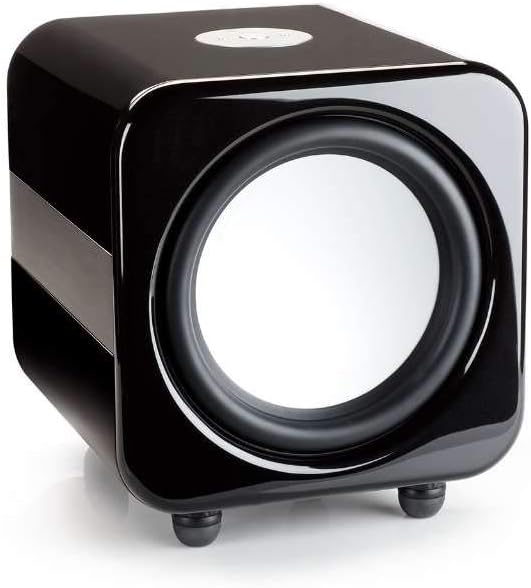

ਸਥਾਪਨਾ ਕਰਨਾ
1. ਪਲੇਸਮੈਂਟ
The Apex AW-12 is designed as a floor-standing subwoofer. For optimal performance, place the subwoofer on a solid, level surface. Experiment with different positions in your room to find the best bass response, typically in a corner or along a wall.
2. ਕੁਨੈਕਸ਼ਨ
Ensure all audio equipment is turned off before making connections.
- ਆਡੀਓ ਇਨਪੁਟ: Connect the subwoofer to your A/V receiver or processor's subwoofer output (LFE) using a high-quality RCA cable.
- 12V ਟਰਿੱਗਰ ਇਨਪੁਟ: If your A/V receiver or processor has a 12V trigger output, connect it to the subwoofer's 12V trigger input. This allows for automatic power activation/deactivation with your main system.
- ਪਾਵਰ ਕਨੈਕਸ਼ਨ: Once all audio connections are made, connect the supplied AC power cord to the subwoofer's power inlet and then to a suitable wall outlet.
ਓਪਰੇਟਿੰਗ
ਪਾਵਰ ਚਾਲੂ/ਬੰਦ
If using the 12V trigger input, the subwoofer will power on automatically when your connected A/V receiver or processor is turned on. Otherwise, locate the power switch on the subwoofer and set it to the 'ON' position.
Volume and EQ Controls
The Apex AW-12 features top-mounted controls for volume and EQ settings. Adjust the volume to blend seamlessly with your main speakers. The EQ settings allow you to fine-tune the bass response to suit your room acoustics and personal preference. Refer to your A/V receiver's manual for initial setup and calibration of subwoofer levels.
ਰੱਖ-ਰਖਾਅ
To ensure the longevity and optimal performance of your Monitor Audio Apex AW-12 Subwoofer, follow these maintenance guidelines:
- ਸਫਾਈ: Regularly wipe the cabinet with a soft, dry, lint-free cloth. Avoid using abrasive cleaners, waxes, or solvents, as these can damage the finish.
- ਧੂੜ: Use a soft brush or a vacuum cleaner with a brush attachment to gently remove dust from the driver and ventilation areas.
- ਵਾਤਾਵਰਣ: Keep the subwoofer in a stable environment, away from direct sunlight, extreme temperatures, and high humidity.
- ਨਿਰੀਖਣ: ਸਮੇਂ-ਸਮੇਂ 'ਤੇ ਸਾਰੇ ਕੇਬਲ ਕਨੈਕਸ਼ਨਾਂ ਦੀ ਜਾਂਚ ਕਰੋ ਤਾਂ ਜੋ ਇਹ ਯਕੀਨੀ ਬਣਾਇਆ ਜਾ ਸਕੇ ਕਿ ਉਹ ਸੁਰੱਖਿਅਤ ਹਨ।
ਸਮੱਸਿਆ ਨਿਪਟਾਰਾ
If you experience issues with your Apex AW-12 Subwoofer, consult the following table for common problems and solutions.
| ਸਮੱਸਿਆ | ਸੰਭਵ ਕਾਰਨ | ਹੱਲ |
|---|---|---|
| ਸਬ-ਵੂਫਰ ਤੋਂ ਕੋਈ ਆਵਾਜ਼ ਨਹੀਂ | Power not connected or turned on ਆਡੀਓ ਕੇਬਲ ਢਿੱਲੀ ਜਾਂ ਖਰਾਬ ਹੈ ਰਿਸੀਵਰ/ਪ੍ਰੋਸੈਸਰ ਸੈਟਿੰਗਾਂ ਗਲਤ ਹਨ | ਪਾਵਰ ਕੋਰਡ ਅਤੇ ਪਾਵਰ ਸਵਿੱਚ ਦੀ ਜਾਂਚ ਕਰੋ। Ensure audio cable is securely connected at both ends; try a different cable Verify subwoofer output is enabled and volume is up on your receiver/processor |
| ਵਿਗੜਿਆ ਜਾਂ ਕਮਜ਼ੋਰ ਬਾਸ | Subwoofer volume too high/low ਗਲਤ EQ ਸੈਟਿੰਗਾਂ ਮਾੜੀ ਪਲੇਸਮੈਂਟ | Adjust subwoofer volume on the unit and/or receiver Experiment with EQ settings Try repositioning the subwoofer in the room |
| Subwoofer does not turn on with receiver (12V trigger) | 12V trigger cable loose or faulty Receiver's 12V trigger output not active | Check 12V trigger cable connection Consult your receiver's manual to ensure 12V trigger output is enabled |
If the problem persists after trying these solutions, please contact Monitor Audio customer support.
ਨਿਰਧਾਰਨ
Key technical specifications for the Monitor Audio Apex AW-12 Subwoofer:
| ਵਿਸ਼ੇਸ਼ਤਾ | ਨਿਰਧਾਰਨ |
|---|---|
| ਮਾਡਲ | Apex AW-12-BK |
| ਸਪੀਕਰ ਦੀ ਕਿਸਮ | ਸਬਵੂਫਰ |
| ਸਬਵੂਫਰ ਵਿਆਸ | 12 ਇੰਚ (30.48 ਸੈ.ਮੀ.) |
| Ampਜੀਵਤ ਕਿਸਮ | ਕਲਾਸ ਡੀ |
| ਵਾਟtage / Max Output Power | 500 ਵਾਟਸ |
| ਪਾਵਰ ਸਰੋਤ | AC |
| ਸਮੱਗਰੀ | ਧਾਤੂ |
| ਰੰਗ | ਧਾਤੂ ਕਾਲਾ |
| ਮਾਪ (D x W x H) | 49.5 cm x 47.5 cm x 47.2 cm (19.5 in x 18.7 in x 18.6 in) |
| ਮਾਊਂਟਿੰਗ ਦੀ ਕਿਸਮ | ਫਲੋਰ ਸਟੈਂਡਿੰਗ |
ਵਾਰੰਟੀ ਜਾਣਕਾਰੀ
Monitor Audio products are manufactured to the highest quality standards. For detailed warranty terms and conditions, please refer to the warranty card included with your product or visit the official Monitor Audio webਸਾਈਟ। ਵਾਰੰਟੀ ਦਾਅਵਿਆਂ ਲਈ ਆਪਣੀ ਖਰੀਦ ਦਾ ਸਬੂਤ ਰੱਖੋ।
ਗਾਹਕ ਸਹਾਇਤਾ
If you require further assistance or have questions not covered in this manual, please contact Monitor Audio customer support or your authorized dealer. Contact information can typically be found on the official Monitor Audio webਸਾਈਟ 'ਤੇ ਜਾਂ ਤੁਹਾਡੇ ਉਤਪਾਦ ਪੈਕਿੰਗ 'ਤੇ।
Ask a question about this manual
Ask about setup, troubleshooting, compatibility, parts, safety, or missing instructions. Manuals+ will review the question and use this page’s manual context to help answer it.