
1. ਜਾਣ-ਪਛਾਣ
The Amkette Trubeats S50 is a versatile smart wireless Bluetooth speaker designed to enhance your audio experience. It features multiple connectivity options including Bluetooth, USB, Micro SD card, and AUX input, along with an integrated FM radio. The speaker also includes a digital clock with alarm functions and can be controlled via a dedicated smartphone application. Additionally, it can function as a power bank to charge your mobile devices.
2. ਪੈਕੇਜ ਸਮੱਗਰੀ
ਕਿਰਪਾ ਕਰਕੇ ਹੇਠ ਲਿਖੀਆਂ ਚੀਜ਼ਾਂ ਲਈ ਬਾਕਸ 'ਤੇ ਨਿਸ਼ਾਨ ਲਗਾਓ:
- Amkette Trubeats S50 Smart Wireless Bluetooth Speaker
- USB ਚਾਰਜਿੰਗ ਕੇਬਲ
- AUX ਕੇਬਲ
- ਉਪਭੋਗਤਾ ਮੈਨੁਅਲ (ਇਹ ਦਸਤਾਵੇਜ਼)
3. ਉਤਪਾਦ ਖਤਮview
Familiarize yourself with the various parts and controls of your Amkette Trubeats S50 speaker.
3.1 ਫਰੰਟ View

ਚਿੱਤਰ 1: ਸਾਹਮਣੇ view of the Amkette Trubeats S50 speaker, showing the speaker grille and LED display.
3.2 ਸਿਖਰਲਾ ਕੰਟਰੋਲ ਪੈਨਲ

Figure 2: Labeled diagram of the Amkette Trubeats S50 speaker's top control buttons: Mode, Volume Down/Previous, Play/Pause/Answer Call, Volume Up/Next, Clock, and Microphone.
- ਮੋਡ ਬਟਨ: Press to switch between Bluetooth, FM, AUX, USB, and Micro SD modes.
- K-/ Button: Press to decrease volume; long press for previous track/station.
- Play/Pause/Answer Call Button: Press to play/pause audio; press to answer/end calls.
- +/N Button: Press to increase volume; long press for next track/station.
- ਘੜੀ ਬਟਨ: Press to set time and alarms.
- ਮਾਈਕ੍ਰੋਫੋਨ: ਹੈਂਡਸ-ਫ੍ਰੀ ਕਾਲਿੰਗ ਲਈ।
3.3 Rear Ports and Switch

Figure 3: Labeled diagram of the Amkette Trubeats S50 speaker's rear ports: AUX, Micro SD, USB Host, USB DC, and On/Off switch.
- AUX ਇਨਪੁਟ: 3.5mm AUX ਕੇਬਲ ਦੀ ਵਰਤੋਂ ਕਰਕੇ ਬਾਹਰੀ ਆਡੀਓ ਡਿਵਾਈਸਾਂ ਨੂੰ ਕਨੈਕਟ ਕਰੋ।
- ਮਾਈਕਰੋ ਐਸਡੀ ਕਾਰਡ ਸਲਾਟ: ਆਡੀਓ ਪਲੇਬੈਕ ਲਈ ਇੱਕ ਮਾਈਕ੍ਰੋ SD ਕਾਰਡ ਪਾਓ।
- USB ਹੋਸਟ ਪੋਰਟ: Insert a USB drive for audio playback or use as a power bank.
- USB DC Input: Connect the USB charging cable to power the speaker.
- ਚਾਲੂ/ਬੰਦ ਸਵਿੱਚ: Power the speaker on or off.
4. ਸੈੱਟਅੱਪ
4.1 ਸਪੀਕਰ ਨੂੰ ਚਾਰਜ ਕਰਨਾ
- USB ਚਾਰਜਿੰਗ ਕੇਬਲ ਦੇ ਛੋਟੇ ਸਿਰੇ ਨੂੰ ਨਾਲ ਜੋੜੋ USB DC Input ਸਪੀਕਰ ਦੇ ਪਿਛਲੇ ਪਾਸੇ ਪੋਰਟ।
- USB ਚਾਰਜਿੰਗ ਕੇਬਲ ਦੇ ਵੱਡੇ ਸਿਰੇ ਨੂੰ USB ਪਾਵਰ ਅਡੈਪਟਰ (ਸ਼ਾਮਲ ਨਹੀਂ) ਜਾਂ ਕੰਪਿਊਟਰ ਦੇ USB ਪੋਰਟ ਨਾਲ ਕਨੈਕਟ ਕਰੋ।
- LED ਸੂਚਕ ਚਾਰਜਿੰਗ ਸਥਿਤੀ ਦਿਖਾਏਗਾ। ਪੂਰਾ ਚਾਰਜ ਹੋਣ ਵਿੱਚ ਆਮ ਤੌਰ 'ਤੇ ਲਗਭਗ 4 ਘੰਟੇ ਲੱਗਦੇ ਹਨ।
ਨੋਟ: The speaker does not have a visible battery level indicator. It is recommended to charge fully before first use and when the battery is low.
4.2 ਪਾਵਰ ਚਾਲੂ/ਬੰਦ
- ਪਾਵਰ ਚਾਲੂ ਕਰਨ ਲਈ, ਸਲਾਈਡ ਕਰੋ ਚਾਲੂ/ਬੰਦ ਸਵਿੱਚ on the rear of the speaker to the 'ON' position.
- ਪਾਵਰ ਬੰਦ ਕਰਨ ਲਈ, ਸਲਾਈਡ ਕਰੋ ਚਾਲੂ/ਬੰਦ ਸਵਿੱਚ 'ਬੰਦ' ਸਥਿਤੀ ਵਿੱਚ।
5. ਓਪਰੇਟਿੰਗ ਹਦਾਇਤਾਂ
5.1 ਬਲੂਟੁੱਥ ਪੇਅਰਿੰਗ

Figure 4: Speaker in Bluetooth pairing mode, indicated by 'BT' on the display.
- Power on the speaker. It will automatically enter Bluetooth pairing mode, indicated by 'BT' flashing on the LED display.
- ਆਪਣੇ ਸਮਾਰਟਫੋਨ ਜਾਂ ਹੋਰ ਡਿਵਾਈਸ ਤੇ ਬਲੂਟੁੱਥ ਨੂੰ ਸਮਰੱਥ ਬਣਾਉ.
- ਲਈ ਖੋਜ available devices and select "Amkette S50" from the list.
- Once paired, the speaker will emit a confirmation tone, and 'BT' will stop flashing.
- ਹੁਣ ਤੁਸੀਂ ਸਪੀਕਰ ਰਾਹੀਂ ਆਪਣੀ ਡਿਵਾਈਸ ਤੋਂ ਆਡੀਓ ਚਲਾ ਸਕਦੇ ਹੋ।
5.2 AUX ਇਨਪੁੱਟ ਦੀ ਵਰਤੋਂ ਕਰਨਾ

Figure 5: Speaker connected to a smartphone via AUX cable for wired audio playback.
- 3.5mm AUX ਕੇਬਲ ਦੇ ਇੱਕ ਸਿਰੇ ਨੂੰ ਇਸ ਨਾਲ ਜੋੜੋ ਆਕਸ ਇਨਪੁਟ ਸਪੀਕਰ ਦੇ ਪਿਛਲੇ ਪਾਸੇ ਪੋਰਟ।
- Connect the other end of the AUX cable to the audio output jack of your external device (e.g., smartphone, MP3 player, laptop).
- ਦਬਾਓ ਮੋਡ ਬਟਨ repeatedly until the speaker enters AUX mode.
- ਆਪਣੇ ਕਨੈਕਟ ਕੀਤੇ ਡਿਵਾਈਸ ਤੋਂ ਆਡੀਓ ਚਲਾਓ।
5.3 Using USB/Micro SD Card
- ਵਿੱਚ ਇੱਕ USB ਡਰਾਈਵ ਪਾਓ USB ਹੋਸਟ ਪੋਰਟ or a Micro SD card into the ਮਾਈਕ੍ਰੋ SD ਕਾਰਡ ਸਲਾਟ ਸਪੀਕਰ ਦੇ ਪਿਛਲੇ ਪਾਸੇ.
- ਆਪਣੇ ਆਡੀਓ ਨੂੰ ਯਕੀਨੀ ਬਣਾਓ files (MP3 format recommended) are stored on the drive/card.
- ਦਬਾਓ ਮੋਡ ਬਟਨ repeatedly until the speaker enters USB or Micro SD mode. Playback will begin automatically.
- ਦੀ ਵਰਤੋਂ ਕਰੋ K-/ ਅਤੇ +/N buttons for track navigation and volume control.
5.4 ਐਫਐਮ ਰੇਡੀਓ ਓਪਰੇਸ਼ਨ

Figure 6: Speaker displaying FM frequency, with app control for station selection.
- ਦਬਾਓ ਮੋਡ ਬਟਨ repeatedly until the speaker enters FM radio mode.
- ਆਟੋ ਸਕੈਨ: In FM mode, long press the ਚਲਾਓ/ਰੋਕੋ ਉਪਲਬਧ FM ਸਟੇਸ਼ਨਾਂ ਲਈ ਆਟੋਮੈਟਿਕ ਸਕੈਨ ਸ਼ੁਰੂ ਕਰਨ ਲਈ ਬਟਨ। ਸਪੀਕਰ ਖੋਜੇ ਗਏ ਸਟੇਸ਼ਨਾਂ ਨੂੰ ਸੁਰੱਖਿਅਤ ਕਰੇਗਾ।
- ਮੈਨੁਅਲ ਟਿingਨਿੰਗ: ਦੀ ਵਰਤੋਂ ਕਰੋ K-/ ਅਤੇ +/N ਬਟਨ ਸੁਰੱਖਿਅਤ ਸਟੇਸ਼ਨਾਂ 'ਤੇ ਨੈਵੀਗੇਟ ਕਰਨ ਲਈ.
- For precise tuning and station management, use the Amkette Trubeats Smart Speaker App (see section 5.7).
5.5 Digital Clock and Alarm Setup

Figure 7: Speaker displaying the current time on its LED screen.
- ਸਮਾਂ ਨਿਰਧਾਰਤ ਕਰਨਾ: ਨੂੰ ਦਬਾ ਕੇ ਰੱਖੋ ਘੜੀ ਬਟਨ. The hour display will flash. Use the K-/ ਅਤੇ +/N ਘੰਟੇ ਨੂੰ ਐਡਜਸਟ ਕਰਨ ਲਈ ਬਟਨ। ਦਬਾਓ ਘੜੀ ਬਟਨ again to set minutes, and adjust with K-/ ਅਤੇ +/N. ਦਬਾਓ ਘੜੀ ਬਟਨ once more to confirm.
- ਅਲਾਰਮ ਸੈੱਟ ਕਰਨਾ: ਸੰਖੇਪ ਵਿੱਚ ਦਬਾਓ ਘੜੀ ਬਟਨ to cycle through Alarm 1 and Alarm 2 settings. When an alarm time is displayed, long press the ਘੜੀ ਬਟਨ to enter alarm setting mode. Adjust hour and minute using K-/ ਅਤੇ +/N, confirming each with a short press of the ਘੜੀ ਬਟਨ. You can also set the alarm source (FM/SD Card/USB) via the app.
5.6 ਪਾਵਰ ਬੈਂਕ ਵਜੋਂ ਵਰਤੋਂ
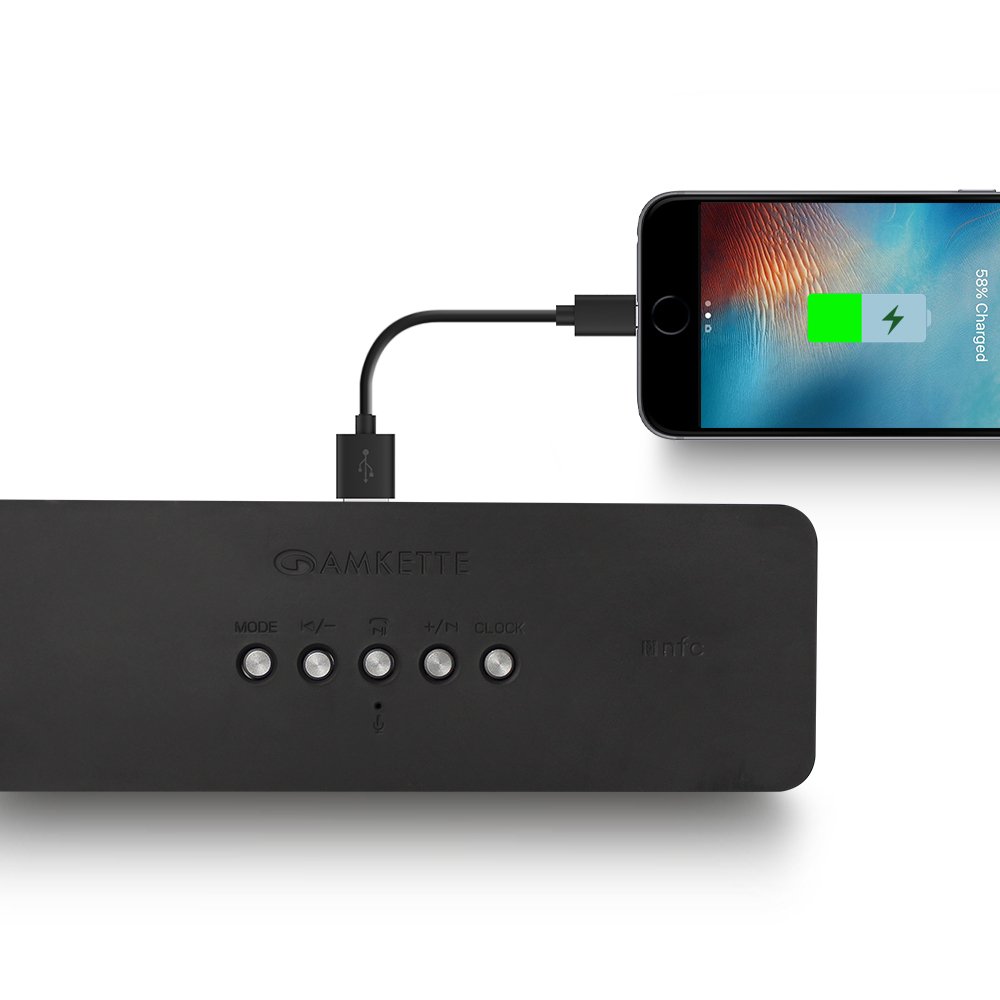
Figure 8: Speaker providing power to a smartphone through its USB Host port.
The Amkette Trubeats S50 can charge your smartphone or other USB-powered devices. Connect your device's charging cable to the USB ਹੋਸਟ ਪੋਰਟ on the rear of the speaker. The speaker's internal battery will then supply power to your device.
5.7 App Control (Android Only)

Figure 9: Smartphone displaying the Amkette Trubeats Smart Speaker App interface.
For enhanced control, download the Amkette Trubeats Smart Speaker App from the Google Play Store (for Android phones). The app allows you to:
- ਵੱਖ-ਵੱਖ ਆਡੀਓ ਮੋਡਾਂ ਵਿਚਕਾਰ ਸਵਿਚ ਕਰੋ।
- Control volume and track playback.
- Manage FM radio stations and perform precise tuning.
- Set and customize alarms, including alarm source.
Ensure your speaker is connected via Bluetooth to your smartphone for app functionality.
5.8 ਕਾਲ ਹੈਂਡਲਿੰਗ
When connected via Bluetooth to a smartphone, the speaker can be used for hands-free calling:
- ਕਾਲ ਦਾ ਜਵਾਬ ਦਿਓ: ਦਬਾਓ Play/Pause/Answer Call Button ਇੱਕ ਵਾਰ
- ਕਾਲ ਸਮਾਪਤ ਕਰੋ: ਦਬਾਓ Play/Pause/Answer Call Button ਇੱਕ ਵਾਰ ਕਾਲ ਦੌਰਾਨ।
- ਕਾਲ ਅਸਵੀਕਾਰ ਕਰੋ: ਲੰਬੇ ਸਮੇਂ ਤੱਕ ਦਬਾਓ Play/Pause/Answer Call Button.
6. ਰੱਖ-ਰਖਾਅ
- ਸਪੀਕਰ ਨੂੰ ਬਹੁਤ ਜ਼ਿਆਦਾ ਤਾਪਮਾਨ, ਸਿੱਧੀ ਧੁੱਪ ਅਤੇ ਨਮੀ ਤੋਂ ਦੂਰ ਰੱਖੋ।
- ਸਪੀਕਰ ਨੂੰ ਨਰਮ, ਸੁੱਕੇ ਕੱਪੜੇ ਨਾਲ ਸਾਫ਼ ਕਰੋ। ਘਸਾਉਣ ਵਾਲੇ ਕਲੀਨਰ ਜਾਂ ਘੋਲਕ ਦੀ ਵਰਤੋਂ ਨਾ ਕਰੋ।
- ਸਪੀਕਰ ਨੂੰ ਸੁੱਟਣ ਜਾਂ ਇਸ 'ਤੇ ਜ਼ੋਰਦਾਰ ਪ੍ਰਭਾਵ ਪਾਉਣ ਤੋਂ ਬਚੋ।
- ਜਦੋਂ ਲੰਬੇ ਸਮੇਂ ਲਈ ਵਰਤੋਂ ਵਿੱਚ ਨਾ ਹੋਵੇ, ਤਾਂ ਸਪੀਕਰ ਨੂੰ ਠੰਢੀ, ਸੁੱਕੀ ਜਗ੍ਹਾ 'ਤੇ ਸਟੋਰ ਕਰੋ ਅਤੇ ਬੈਟਰੀ ਦੀ ਸਿਹਤ ਬਣਾਈ ਰੱਖਣ ਲਈ ਇਸਨੂੰ ਸਮੇਂ-ਸਮੇਂ 'ਤੇ ਚਾਰਜ ਕਰੋ।
7. ਸਮੱਸਿਆ ਨਿਪਟਾਰਾ
| ਸਮੱਸਿਆ | ਸੰਭਵ ਕਾਰਨ | ਹੱਲ |
|---|---|---|
| ਸਪੀਕਰ ਚਾਲੂ ਨਹੀਂ ਹੁੰਦਾ। | ਬੈਟਰੀ ਖਤਮ ਹੋ ਗਈ ਹੈ। | ਸਪੀਕਰ ਨੂੰ ਪੂਰੀ ਤਰ੍ਹਾਂ ਚਾਰਜ ਕਰੋ। |
| ਸਪੀਕਰ ਤੋਂ ਕੋਈ ਆਵਾਜ਼ ਨਹੀਂ ਆ ਰਹੀ। | ਵੌਲਯੂਮ ਬਹੁਤ ਘੱਟ ਹੈ; ਗਲਤ ਮੋਡ ਚੁਣਿਆ ਗਿਆ ਹੈ; ਡਿਵਾਈਸ ਸਹੀ ਢੰਗ ਨਾਲ ਕਨੈਕਟ ਨਹੀਂ ਹੈ। | Increase speaker and source device volume. Ensure correct mode (Bluetooth, AUX, etc.) is selected. Reconnect the device. |
| ਬਲੂਟੁੱਥ ਜੋੜੀ ਫੇਲ੍ਹ ਹੋਈ. | ਸਪੀਕਰ ਜੋੜਾ ਮੋਡ ਵਿੱਚ ਨਹੀਂ ਹੈ; ਡਿਵਾਈਸ ਬਹੁਤ ਦੂਰ ਹੈ; ਦਖਲਅੰਦਾਜ਼ੀ। | Ensure speaker is in pairing mode ('BT' flashing). Move device closer to speaker. Turn off other Bluetooth devices. |
| ਮਾੜੀ FM ਰੇਡੀਓ ਰਿਸੈਪਸ਼ਨ। | ਕਮਜ਼ੋਰ ਸਿਗਨਲ; ਵਾਤਾਵਰਣ ਦਖਲਅੰਦਾਜ਼ੀ। | Relocate the speaker to an area with better reception. Perform an auto-scan again. |
| ਐਪ ਸਪੀਕਰ ਨਾਲ ਕਨੈਕਟ ਨਹੀਂ ਹੋ ਰਹੀ। | Bluetooth not connected; app issue. | Ensure speaker is paired via Bluetooth to your phone. Restart the app and try again. |
8 ਨਿਰਧਾਰਨ
- ਮਾਡਲ: S50
- ਬ੍ਰਾਂਡ: ਅਮੈਕੇਟ
- ਸਪੀਕਰ ਦੀ ਕਿਸਮ: Portable Bluetooth Speaker (Outdoor)
- ਕਨੈਕਟੀਵਿਟੀ: Bluetooth, USB, Micro SD, AUX, FM Radio
- ਵਾਇਰਲੈੱਸ ਸੰਚਾਰ ਤਕਨਾਲੋਜੀ: ਬਲੂਟੁੱਥ
- ਕੰਟਰੋਲ ਵਿਧੀ: Buttons, App (Android)
- ਆਡੀਓ ਆਉਟਪੁੱਟ ਮੋਡ: ਸਟੀਰੀਓ
- ਆਡੀਓ ਵਾਟtage: 10 ਵਾਟਸ
- ਪਾਵਰ ਸਰੋਤ: ਬੈਟਰੀ ਦੁਆਰਾ ਸੰਚਾਲਿਤ
- ਬੈਟਰੀ ਲਾਈਫ: 12 ਘੰਟੇ ਤੱਕ (ਔਸਤ)
- ਚਾਰਜ ਕਰਨ ਦਾ ਸਮਾਂ: ਲਗਭਗ 4 ਘੰਟੇ
- ਅਨੁਕੂਲ ਉਪਕਰਣ: Laptop, Mobile, Tablet
- ਮਾਪ (LxWxH): 26.7 x 10.9 x 7.9 ਸੈ.ਮੀ
- ਆਈਟਮ ਦਾ ਭਾਰ: 703 ਗ੍ਰਾਮ
- ਵਾਟਰਪ੍ਰੂਫ਼: ਹਾਂ
- ਮਾਊਂਟਿੰਗ ਦੀ ਕਿਸਮ: ਟੇਬਲਟੌਪ ਮਾਊਂਟ
9. ਵਾਰੰਟੀ ਅਤੇ ਸਹਾਇਤਾ
The Amkette Trubeats S50 Smart Wireless Bluetooth Speaker comes with a 1-ਸਾਲ ਦੀ ਵਾਰੰਟੀ ਖਰੀਦ ਦੀ ਮਿਤੀ ਤੋਂ। ਇਹ ਵਾਰੰਟੀ ਆਮ ਵਰਤੋਂ ਅਧੀਨ ਨਿਰਮਾਣ ਨੁਕਸਾਂ ਨੂੰ ਕਵਰ ਕਰਦੀ ਹੈ।
For warranty claims, technical assistance, or any other support inquiries, please contact Amkette customer support through their official webਸਾਈਟ ਜਾਂ ਤੁਹਾਡੇ ਖਰੀਦ ਦਸਤਾਵੇਜ਼ਾਂ ਦੇ ਨਾਲ ਪ੍ਰਦਾਨ ਕੀਤੀ ਗਈ ਸੰਪਰਕ ਜਾਣਕਾਰੀ।
ਕਿਰਪਾ ਕਰਕੇ ਵਾਰੰਟੀ ਦੇ ਉਦੇਸ਼ਾਂ ਲਈ ਖਰੀਦ ਦੇ ਸਬੂਤ ਵਜੋਂ ਆਪਣੀ ਖਰੀਦ ਰਸੀਦ ਨੂੰ ਸੰਭਾਲ ਕੇ ਰੱਖੋ।