
ਜਾਣ-ਪਛਾਣ
This manual provides essential instructions for the safe operation, setup, and maintenance of your Protocol Director HD Foldable Drone. Please read this manual thoroughly before operating the drone to ensure proper function and to prevent damage or injury.
The Protocol Director HD is a foldable drone equipped with a live streaming HD camera, designed for capturing aerial video and photos. It features an intuitive 2.4 GHz remote control, an altitude sensor for stable flight, and a free downloadable app for enhanced camera control and flight path drawing.
ਸੁਰੱਖਿਆ ਸਾਵਧਾਨੀਆਂ
- ਡਰੋਨ ਨੂੰ ਹਮੇਸ਼ਾ ਖੁੱਲ੍ਹੇ, ਬਿਨਾਂ ਰੁਕਾਵਟ ਵਾਲੇ ਖੇਤਰਾਂ ਵਿੱਚ, ਲੋਕਾਂ, ਜਾਨਵਰਾਂ ਅਤੇ ਰੁਕਾਵਟਾਂ ਤੋਂ ਦੂਰ ਚਲਾਓ।
- Do not operate near airports, restricted airspace, or sensitive facilities.
- ਬਿਜਲੀ ਦੀਆਂ ਤਾਰਾਂ, ਰੁੱਖਾਂ ਅਤੇ ਪਾਣੀ ਦੇ ਸਰੋਤਾਂ ਤੋਂ ਸੁਰੱਖਿਅਤ ਦੂਰੀ ਬਣਾਈ ਰੱਖੋ।
- ਹਰੇਕ ਉਡਾਣ ਤੋਂ ਪਹਿਲਾਂ ਇਹ ਯਕੀਨੀ ਬਣਾਓ ਕਿ ਸਾਰੇ ਪ੍ਰੋਪੈਲਰ ਸੁਰੱਖਿਅਤ ਢੰਗ ਨਾਲ ਜੁੜੇ ਹੋਏ ਹਨ ਅਤੇ ਬਿਨਾਂ ਕਿਸੇ ਨੁਕਸਾਨ ਦੇ ਹਨ।
- ਤੇਜ਼ ਹਵਾਵਾਂ ਜਾਂ ਪ੍ਰਤੀਕੂਲ ਮੌਸਮ ਵਿੱਚ ਨਾ ਉੱਡੋ।
- ਉਂਗਲਾਂ ਅਤੇ ਵਾਲਾਂ ਨੂੰ ਘੁੰਮਦੇ ਪ੍ਰੋਪੈਲਰਾਂ ਤੋਂ ਦੂਰ ਰੱਖੋ।
- Adult supervision is recommended for users under 18 years of age. Recommended age for operation is 14 years and up.
- Only use original Protocol replacement parts and accessories.
- ਡਰੋਨ ਜਾਂ ਇਸਦੇ ਹਿੱਸਿਆਂ ਨੂੰ ਸੋਧਣ ਦੀ ਕੋਸ਼ਿਸ਼ ਨਾ ਕਰੋ।
- ਜਦੋਂ ਵਰਤੋਂ ਵਿੱਚ ਨਾ ਹੋਵੇ ਤਾਂ ਡਰੋਨ ਅਤੇ ਰਿਮੋਟ ਕੰਟਰੋਲ ਬੰਦ ਕਰ ਦਿਓ।
ਪੈਕੇਜ ਸਮੱਗਰੀ
ਪੁਸ਼ਟੀ ਕਰੋ ਕਿ ਸਾਰੀਆਂ ਚੀਜ਼ਾਂ ਪੈਕੇਜ ਵਿੱਚ ਮੌਜੂਦ ਹਨ:
- Protocol Director HD Foldable Drone with Camera
- Remote Control with Phone Mount
- USB ਚਾਰਜਿੰਗ ਕੇਬਲ
- 2 x Drone Batteries
- ਯਾਤਰਾ ਬੈਗ
- ਨਿਰਦੇਸ਼ ਦਸਤਾਵੇਜ਼ (ਇਹ ਦਸਤਾਵੇਜ਼)
- Spare Parts: Blades, Screwdriver

Image: The Protocol Director HD Foldable Drone, showcasing its compact design with propellers extended and camera visible at the front.
ਸਥਾਪਨਾ ਕਰਨਾ
1. ਡਰੋਨ ਬੈਟਰੀ ਚਾਰਜ ਕਰਨਾ
- Insert one of the drone batteries into the USB charging cable.
- Connect the USB charging cable to a USB power source (e.g., computer USB port, USB wall adapter).
- USB ਕੇਬਲ 'ਤੇ ਚਾਰਜਿੰਗ ਇੰਡੀਕੇਟਰ ਲਾਈਟ ਚਾਰਜਿੰਗ ਦੌਰਾਨ ਜਗਮਗਾਏਗੀ ਅਤੇ ਪੂਰੀ ਤਰ੍ਹਾਂ ਚਾਰਜ ਹੋਣ 'ਤੇ ਬੰਦ ਹੋ ਜਾਵੇਗੀ।
- ਚਾਰਜ ਹੋਣ ਵਿੱਚ ਆਮ ਤੌਰ 'ਤੇ ਲਗਭਗ 60-90 ਮਿੰਟ ਲੱਗਦੇ ਹਨ। ਓਵਰਚਾਰਜ ਨਾ ਕਰੋ।
2. ਰਿਮੋਟ ਕੰਟਰੋਲ ਬੈਟਰੀਆਂ ਨੂੰ ਸਥਾਪਿਤ ਕਰਨਾ
- ਰਿਮੋਟ ਕੰਟਰੋਲ ਦੇ ਪਿਛਲੇ ਪਾਸੇ ਬੈਟਰੀ ਦਾ ਡੱਬਾ ਖੋਲ੍ਹੋ।
- 4 AA ਬੈਟਰੀਆਂ ਪਾਓ (ਸ਼ਾਮਲ ਨਹੀਂ), ਸਹੀ ਪੋਲਰਿਟੀ (+/-) ਨੂੰ ਯਕੀਨੀ ਬਣਾਉਂਦੇ ਹੋਏ।
- ਬੈਟਰੀ ਦੇ ਡੱਬੇ ਨੂੰ ਸੁਰੱਖਿਅਤ ਢੰਗ ਨਾਲ ਬੰਦ ਕਰੋ।

Image: The drone's remote control with a smartphone securely mounted, displaying a live feed from the drone's camera.
3. ਡਰੋਨ ਨੂੰ ਖੋਲ੍ਹਨਾ
- Gently unfold each of the four rotor arms until they click into place.
- ਉਡਾਣ ਭਰਨ ਤੋਂ ਪਹਿਲਾਂ ਇਹ ਯਕੀਨੀ ਬਣਾਓ ਕਿ ਸਾਰੇ ਹੱਥ ਪੂਰੀ ਤਰ੍ਹਾਂ ਫੈਲੇ ਹੋਏ ਅਤੇ ਤਾਲੇਬੰਦ ਹਨ।
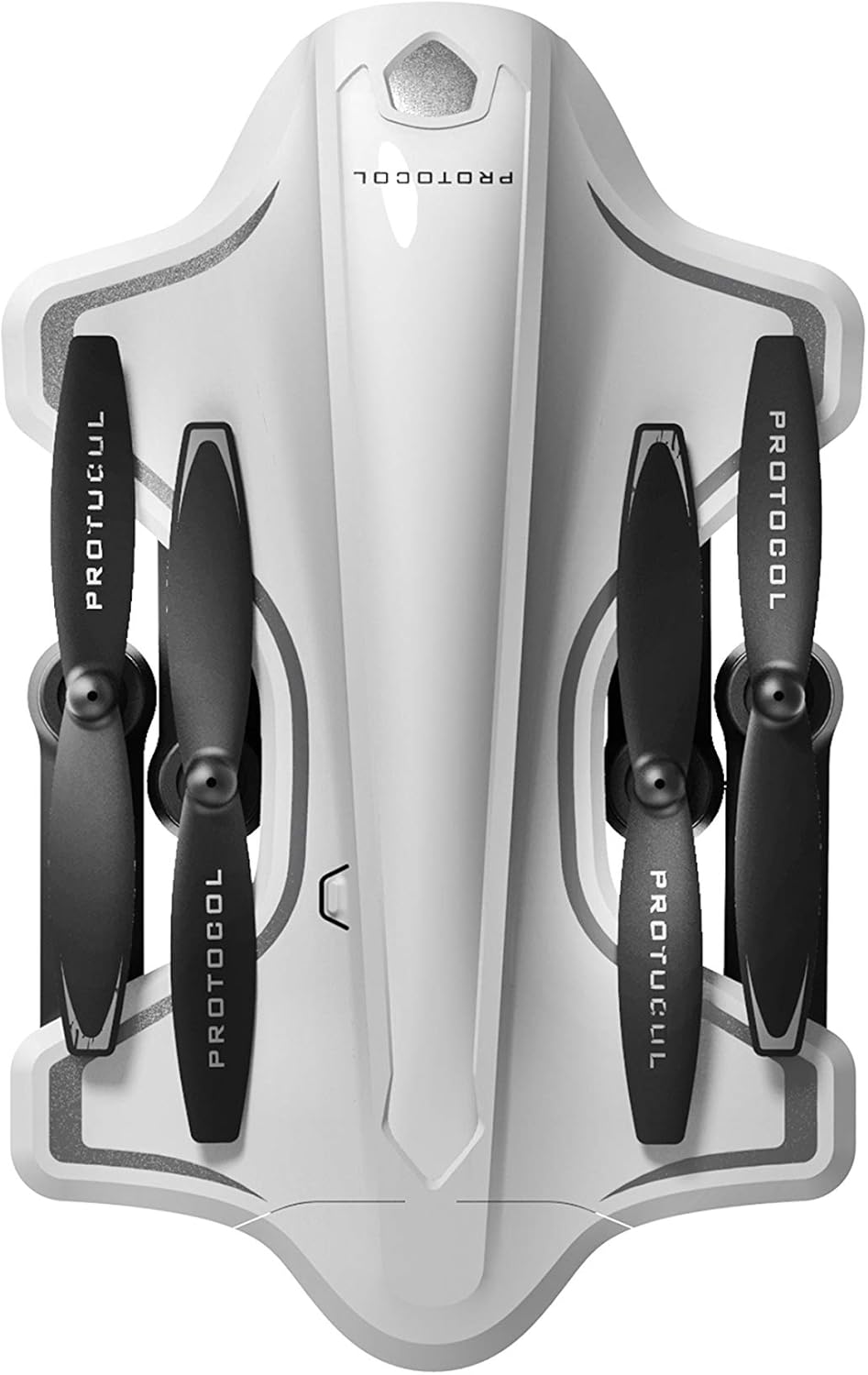
Image: The Protocol Director HD Foldable Drone in its compact, folded configuration, ready for transport.
4. ਡਰੋਨ ਬੈਟਰੀ ਲਗਾਉਣਾ
- ਡਰੋਨ 'ਤੇ ਬੈਟਰੀ ਡੱਬੇ ਦਾ ਪਤਾ ਲਗਾਓ।
- Insert the fully charged drone battery, ensuring it is securely seated.
- ਬੈਟਰੀ ਕੰਪਾਰਟਮੈਂਟ ਕਵਰ ਨੂੰ ਬੰਦ ਕਰੋ।
5. Downloading the App (Optional for Camera Features)
- ਲਈ ਖੋਜ the "Protocol Director HD" app in your smartphone's app store (iOS or Android).
- Download and install the free application.
- Mount your smartphone onto the remote control's phone mount.
ਓਪਰੇਟਿੰਗ ਨਿਰਦੇਸ਼
1. ਪਾਵਰ ਚਾਲੂ ਅਤੇ ਪੇਅਰਿੰਗ
- ਡਰੋਨ ਨੂੰ ਇੱਕ ਫਲੈਟ, ਪੱਧਰ ਦੀ ਸਤਹ 'ਤੇ ਰੱਖੋ.
- Turn on the drone by pressing the power button. The drone's lights will flash.
- ਰਿਮੋਟ ਕੰਟਰੋਲ ਚਾਲੂ ਕਰੋ.
- ਖੱਬੀ ਜਾਏਸਟਿਕ (ਥ੍ਰੌਟਲ) ਨੂੰ ਪੂਰੀ ਤਰ੍ਹਾਂ ਉੱਪਰ ਧੱਕੋ, ਫਿਰ ਪੂਰੀ ਤਰ੍ਹਾਂ ਹੇਠਾਂ। ਡਰੋਨ ਦੀਆਂ ਲਾਈਟਾਂ ਠੋਸ ਹੋ ਜਾਣਗੀਆਂ, ਜੋ ਸਫਲ ਜੋੜਾ ਬਣਾਉਣ ਦਾ ਸੰਕੇਤ ਦਿੰਦੀਆਂ ਹਨ।
2. ਜਾਇਰੋਸਕੋਪ ਨੂੰ ਕੈਲੀਬ੍ਰੇਟ ਕਰਨਾ
ਜੋੜਾ ਬਣਾਉਣ ਤੋਂ ਬਾਅਦ, ਸਥਿਰ ਉਡਾਣ ਲਈ ਜਾਇਰੋਸਕੋਪ ਨੂੰ ਕੈਲੀਬਰੇਟ ਕਰਨ ਦੀ ਸਿਫਾਰਸ਼ ਕੀਤੀ ਜਾਂਦੀ ਹੈ:
- With the drone on a flat surface, push both joysticks down and to the right simultaneously for a few seconds.
- The drone's lights will flash rapidly and then become solid, indicating calibration is complete.
3. ਮੁੱਢਲੇ ਉਡਾਣ ਨਿਯੰਤਰਣ
The Protocol Director HD features auto launch, hover, and land functions due to its altitude sensor.
- Auto Launch: Press the dedicated auto launch button on the remote. The drone will ascend to a stable hovering altitude.
- ਥ੍ਰੋਟਲ (ਖੱਬਾ ਜੋਇਸਟਿਕ):
- Push up: Increase altitude
- Push down: Decrease altitude
- Push left/right: Rotate drone left/right (yaw)
- ਦਿਸ਼ਾ-ਨਿਰਦੇਸ਼ ਕੰਟਰੋਲ (ਸੱਜਾ ਜੋਇਸਟਿਕ):
- ਪੁਸ਼ ਅੱਪ: ਅੱਗੇ ਉੱਡੋ
- Push down: Fly backward
- Push left: Fly left (strafe)
- Push right: Fly right (strafe)
- ਆਟੋ ਲੈਂਡ: Press the dedicated auto land button. The drone will slowly descend and land.
- ਗਤੀ ਚੋਣ: Use the speed button on the remote to cycle through three selectable speeds (low, medium, high).
4. Camera and App Features
Connect your smartphone to the drone's Wi-Fi network (usually named "Protocol_Drone_XXXXXX") to access live streaming and advanced camera functions via the app.
- ਲਾਈਵ ਸਟ੍ਰੀਮਿੰਗ: View ਡਰੋਨ ਦਾ ਕੈਮਰਾ ਤੁਹਾਡੇ ਸਮਾਰਟਫੋਨ 'ਤੇ ਰੀਅਲ-ਟਾਈਮ ਵਿੱਚ ਫੀਡ ਕਰਦਾ ਹੈ।
- ਵੀਡੀਓ ਰਿਕਾਰਡਿੰਗ: Initiate and stop video recording (480p resolution) through the app.
- ਫੋਟੋ ਕੈਪਚਰ: Take still images through the app.
- Multiple Camera Angles: The app supports three different camera angles (Aerial, POV, Selfie) for varied content creation.
- ਆਡੀਓ ਰਿਕਾਰਡਿੰਗ: The app allows for audio recording alongside video.
- Draw Your Own Flight Path: Utilize the app's feature to draw a flight path on your screen, and the drone will follow it.
- VR Capability: The app is VR capable; VR goggles are sold separately.
ਰੱਖ-ਰਖਾਅ
- ਪ੍ਰੋਪੈਲਰ ਨਿਰੀਖਣ: Regularly check propellers for cracks, bends, or damage. Replace any damaged propellers using the provided spare parts and screwdriver.
- ਸਫਾਈ: ਡਰੋਨ ਅਤੇ ਰਿਮੋਟ ਕੰਟਰੋਲ ਨੂੰ ਸਾਫ਼ ਕਰਨ ਲਈ ਨਰਮ, ਸੁੱਕੇ ਕੱਪੜੇ ਦੀ ਵਰਤੋਂ ਕਰੋ। ਤਰਲ ਪਦਾਰਥਾਂ ਜਾਂ ਕਠੋਰ ਰਸਾਇਣਾਂ ਦੀ ਵਰਤੋਂ ਕਰਨ ਤੋਂ ਬਚੋ।
- ਬੈਟਰੀ ਦੇਖਭਾਲ:
- ਬੈਟਰੀਆਂ ਨੂੰ ਓਵਰਚਾਰਜ ਨਾ ਕਰੋ।
- ਬੈਟਰੀਆਂ ਨੂੰ ਠੰਢੀ, ਸੁੱਕੀ ਥਾਂ 'ਤੇ ਸਟੋਰ ਕਰੋ।
- Remove batteries from the drone and remote control during long periods of non-use.
- ਸਟੋਰੇਜ: Fold the drone arms for compact storage in the provided travel bag when not in use. Store in a cool, dry environment.
ਸਮੱਸਿਆ ਨਿਪਟਾਰਾ
| ਸਮੱਸਿਆ | ਸੰਭਵ ਕਾਰਨ | ਹੱਲ |
|---|---|---|
| ਡਰੋਨ ਚਾਲੂ ਨਹੀਂ ਹੁੰਦਾ। | ਬੈਟਰੀ ਚਾਰਜ ਨਹੀਂ ਹੋਈ ਜਾਂ ਗਲਤ ਤਰੀਕੇ ਨਾਲ ਸਥਾਪਿਤ ਕੀਤੀ ਗਈ। | ਯਕੀਨੀ ਬਣਾਓ ਕਿ ਬੈਟਰੀ ਪੂਰੀ ਤਰ੍ਹਾਂ ਚਾਰਜ ਹੋਈ ਹੈ ਅਤੇ ਸਹੀ ਢੰਗ ਨਾਲ ਪਾਈ ਗਈ ਹੈ। |
| ਰਿਮੋਟ ਕੰਟਰੋਲ ਚਾਲੂ ਨਹੀਂ ਹੁੰਦਾ। | AA batteries are dead or incorrectly installed. | Replace AA batteries, checking polarity. |
| Drone and remote do not pair. | Pairing sequence not followed correctly. | Ensure drone is on, then remote. Push left joystick up then down completely. |
| ਉਡਾਣ ਦੌਰਾਨ ਡਰੋਨ ਉੱਡਦਾ ਰਹਿੰਦਾ ਹੈ। | Gyroscope needs calibration; uneven surface at launch. | Land the drone, place on a flat surface, and recalibrate the gyroscope (both joysticks down and right). |
| One propeller does not spin. | Propeller damaged or motor issue. | Check for obstructions. Replace damaged propeller. If issue persists, contact support. |
| ਸਮਾਰਟਫੋਨ 'ਤੇ ਕੋਈ ਲਾਈਵ ਵੀਡੀਓ ਫੀਡ ਨਹੀਂ। | Not connected to drone's Wi-Fi; app not open. | Ensure smartphone is connected to the drone's Wi-Fi network and the app is running. |
ਨਿਰਧਾਰਨ
| ਬ੍ਰਾਂਡ | ਪ੍ਰੋਟੋਕੋਲ |
| ਮਾਡਲ ਦਾ ਨਾਮ | Director HD |
| ਮਾਡਲ ਨੰਬਰ | 6182-7RCHA |
| ਮਾਪ (ਫੋਲਡ) | ਲਗਭਗ 4.75 ਇੰਚ (ਲੰਬਾਈ) |
| ਮਾਪ (ਵਿਸਤ੍ਰਿਤ) | Approximately 9 inches (length, including blades) |
| ਭਾਰ | 0.94 ਕਿਲੋਗ੍ਰਾਮ (940 ਗ੍ਰਾਮ) |
| ਕੈਮਰਾ ਰੈਜ਼ੋਲਿਊਸ਼ਨ | 480p (Video Capture) |
| ਕਨੈਕਟੀਵਿਟੀ | Wi-Fi (for app control and live streaming), 2.4 GHz (for remote control) |
| ਸਥਿਰਤਾ | 6-axis motion-sensitive auto stabilizers, Altitude sensor |
| ਸਪੀਡ ਮੋਡ | Three selectable speeds |
| ਡਰੋਨ ਬੈਟਰੀ | ਰੀਚਾਰਜ ਹੋਣ ਯੋਗ (2 ਸ਼ਾਮਲ) |
| ਰਿਮੋਟ ਕੰਟਰੋਲ ਬੈਟਰੀ | 4 x AA ਬੈਟਰੀਆਂ (ਸ਼ਾਮਲ ਨਹੀਂ) |
| ਸਮੱਗਰੀ | Plastic (Crash-resistant) |
| ਸਿਫਾਰਸ਼ੀ ਉਮਰ | 14 ਸਾਲ ਅਤੇ ਵੱਧ |
ਵਾਰੰਟੀ ਅਤੇ ਸਹਾਇਤਾ
For warranty information, technical support, or to purchase replacement parts, please visit the official Protocol webਸਾਈਟ 'ਤੇ ਜਾਓ ਜਾਂ ਉਨ੍ਹਾਂ ਦੇ ਗਾਹਕ ਸੇਵਾ ਵਿਭਾਗ ਨਾਲ ਸੰਪਰਕ ਕਰੋ। ਖਰੀਦਦਾਰੀ ਦੇ ਸਬੂਤ ਵਜੋਂ ਆਪਣੀ ਖਰੀਦ ਰਸੀਦ ਰੱਖੋ।
Webਸਾਈਟ: www.protocolny.com (ਉਦਾਹਰਨampਲਿੰਕ, ਅਸਲ ਲਿੰਕ ਵੱਖਰਾ ਹੋ ਸਕਦਾ ਹੈ)
ਸੰਪਰਕ: Refer to the Protocol website for contact details, including phone numbers or email support.