
AuKing M8-F
AuKing ਪ੍ਰੋਜੈਕਟਰ ਯੂਜ਼ਰ ਮੈਨੂਅਲ
Model: M8-F
ਜਾਣ-ਪਛਾਣ
This manual provides essential information for the safe and efficient operation of your AuKing Mini Projector. Please read it thoroughly before use and retain it for future reference.
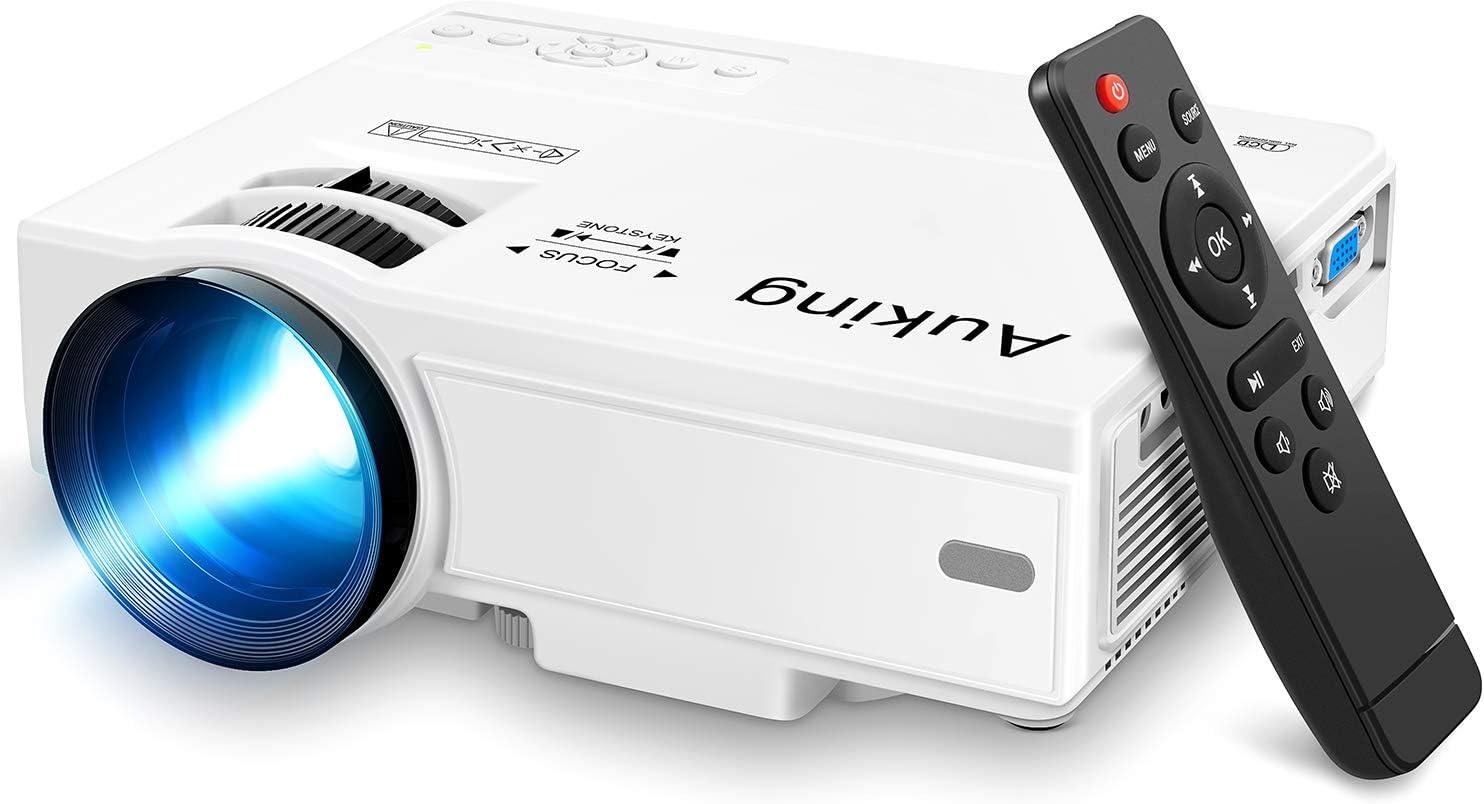
Image: The AuKing Mini Projector, a compact white device, is shown alongside its black remote control. The projector features a prominent lens and control buttons on its top surface.
ਉਤਪਾਦ ਵਿਸ਼ੇਸ਼ਤਾਵਾਂ
- ਫੁੱਲ HD 1080P ਸਪੋਰਟ: Experience clear and sharp detailed images with the latest color reproduction technology for a vibrant viewਪ੍ਰਭਾਵ.
- Large Projection Screen: ਇੱਕ ਇਮਰਸਿਵ ਦਾ ਆਨੰਦ ਮਾਣੋ viewing experience with a projection size ranging from 35 to 200 inches, suitable for distances between 3.6ft and 16.4ft.
- ਬਲਬ ਦੀ ਲੰਬੀ ਉਮਰ: The powerful cooling system effectively dissipates heat, extending the lamp's life up to 55,000 hours for over 15 years of use.
- Low Noise & Dual Stereo Speakers: Advanced noise reduction technology reduces fan noise by 80%. Built-in dual stereo speakers provide clear sound quality. External speakers can be connected for enhanced audio.
- ਮਲਟੀਪਲ ਡਿਵਾਈਸ ਕਨੈਕਸ਼ਨ: Equipped with HDMI, VGA, AV, and USB interfaces, compatible with smartphones, laptops, pads, USB drives, and TV boxes. (Note: An extra HDMI adapter may be needed for phone connection, and copyrighted apps like Netflix, Prime Video, Hulu require a TV Stick or Roku.)

Image: A split image demonstrating the AuKing projector's superior color reproduction and 1080P support compared to a generic projector.
ਬਾਕਸ ਵਿੱਚ ਕੀ ਹੈ
Your AuKing Projector package includes:
- ਔਕਿੰਗ ਮਿੰਨੀ ਪ੍ਰੋਜੈਕਟਰ
- ਰਿਮੋਟ ਕੰਟਰੋਲ
- ਪਾਵਰ ਕੇਬਲ
- ਏਵੀ ਕੇਬਲ
- HDMI ਕੇਬਲ
- ਯੂਜ਼ਰ ਮੈਨੂਅਲ
ਸੈੱਟਅੱਪ ਗਾਈਡ
1. ਪਲੇਸਮੈਂਟ
Choose a suitable location for your projector. It can be placed on a table, mounted on a tripod, or ceiling-mounted. Ensure the projection surface is flat and clear.

Image: Demonstrates various placement options for the AuKing projector, including tripod installation, ceiling mount, and simple table placement.
2 ਪਾਵਰ ਕਨੈਕਸ਼ਨ
ਪਾਵਰ ਕੇਬਲ ਨੂੰ ਪ੍ਰੋਜੈਕਟਰ ਨਾਲ ਅਤੇ ਫਿਰ ਪਾਵਰ ਆਊਟਲੈਟ ਨਾਲ ਜੋੜੋ।
3. ਡਿਵਾਈਸ ਕਨੈਕਸ਼ਨ
Connect your desired input device (e.g., laptop, USB drive, smartphone) to the projector using the appropriate cable (HDMI, USB, AV, VGA). For smartphone connections, an additional HDMI adapter may be required (sold separately).

Image: Illustrates the projector's compatibility with multiple devices, showing connections for smartphones, laptops/PCs, PS4, DVD players, memory cards, and USB drives.
4. ਫੋਕਸ ਅਤੇ ਕੀਸਟੋਨ ਐਡਜਸਟਮੈਂਟ
Use the FOCUS and KEYSTONE rings on the projector to adjust the image clarity and shape until it appears rectangular and sharp on your screen.
ਓਪਰੇਟਿੰਗ ਨਿਰਦੇਸ਼
1. ਪਾਵਰ ਚਾਲੂ/ਬੰਦ
ਡਿਵਾਈਸ ਨੂੰ ਚਾਲੂ ਜਾਂ ਬੰਦ ਕਰਨ ਲਈ ਪ੍ਰੋਜੈਕਟਰ ਜਾਂ ਰਿਮੋਟ ਕੰਟਰੋਲ 'ਤੇ ਪਾਵਰ ਬਟਨ ਦਬਾਓ।
2. ਇਨਪੁਟ ਸਰੋਤ ਚੋਣ
Use the "Source" button on the remote or projector to select the correct input source (HDMI, USB, AV, VGA) corresponding to your connected device.
3. ਮੀਡੀਆ ਪਲੇਬੈਕ
Navigate through your media files using the remote control. For streaming services like Netflix, Prime Video, or Hulu, ensure you are using a compatible TV Stick or Roku device connected to the projector due to copyright restrictions.

ਚਿੱਤਰ: ਇੱਕ ਲਿਵਿੰਗ ਰੂਮ ਸੈੱਟਅੱਪ ਸ਼ੋਅਕasing the projector's ability to create a large 200-inch projection, providing an immersive home theater experience.
4. ਆਡੀਓ ਆਉਟਪੁੱਟ
The projector has built-in dual stereo speakers. For a higher sound quality, connect external speakers via the audio output port.
ਰੱਖ-ਰਖਾਅ
To ensure optimal performance and longevity of your AuKing projector:
- ਧੂੜ ਸਫਾਈ: Regularly clean the lens with a soft, lint-free cloth. Avoid abrasive cleaners.
- ਹਵਾਦਾਰੀ: Ensure the projector's ventilation ports are not blocked to allow proper airflow and prevent overheating. The advanced cooling system is designed to manage heat effectively.
- ਸਟੋਰੇਜ: ਜਦੋਂ ਲੰਬੇ ਸਮੇਂ ਲਈ ਵਰਤੋਂ ਵਿੱਚ ਨਾ ਹੋਵੇ, ਤਾਂ ਪ੍ਰੋਜੈਕਟਰ ਨੂੰ ਸਿੱਧੀ ਧੁੱਪ ਅਤੇ ਬਹੁਤ ਜ਼ਿਆਦਾ ਤਾਪਮਾਨਾਂ ਤੋਂ ਦੂਰ, ਠੰਢੀ, ਸੁੱਕੀ ਜਗ੍ਹਾ 'ਤੇ ਸਟੋਰ ਕਰੋ।

Image: An illustration highlighting the projector's advanced cooling system, showing arrows indicating airflow to prevent overheating and extend lamp ਜੀਵਨ
ਸਮੱਸਿਆ ਨਿਪਟਾਰਾ
| ਸਮੱਸਿਆ | ਸੰਭਵ ਕਾਰਨ | ਹੱਲ |
|---|---|---|
| No image or "No Signal" | ਗਲਤ ਇਨਪੁੱਟ ਸਰੋਤ ਚੁਣਿਆ ਗਿਆ; ਢਿੱਲਾ ਕੇਬਲ ਕਨੈਕਸ਼ਨ; ਡਿਵਾਈਸ ਚਾਲੂ ਨਹੀਂ ਹੈ। | Select the correct input source. Check all cable connections. Ensure the input device is powered on. |
| ਧੁੰਦਲਾ ਚਿੱਤਰ | ਫੋਕਸ ਤੋਂ ਬਾਹਰ; ਗਲਤ ਕੀਸਟੋਨ ਐਡਜਸਟਮੈਂਟ। | Adjust the FOCUS ring until the image is clear. Adjust the KEYSTONE ring to correct image distortion. |
| ਕੋਈ ਆਵਾਜ਼ ਨਹੀਂ | ਆਵਾਜ਼ ਬਹੁਤ ਘੱਟ ਹੈ; ਮਿਊਟ ਹੈ; ਬਾਹਰੀ ਸਪੀਕਰ ਸਹੀ ਢੰਗ ਨਾਲ ਕਨੈਕਟ ਨਹੀਂ ਹਨ। | Increase volume. Unmute the projector. Check external speaker connections. |
| ਪ੍ਰੋਜੈਕਟਰ ਓਵਰਹੀਟਿੰਗ | ਹਵਾਦਾਰੀ ਵਿੱਚ ਰੁਕਾਵਟ; ਗਰਮ ਵਾਤਾਵਰਣ ਵਿੱਚ ਲੰਬੇ ਸਮੇਂ ਤੱਕ ਵਰਤੋਂ। | Ensure vents are clear. Turn off and allow to cool. Use in a well-ventilated area. |
ਨਿਰਧਾਰਨ
| ਵਿਸ਼ੇਸ਼ਤਾ | ਵੇਰਵੇ |
|---|---|
| ਬ੍ਰਾਂਡ | AuKing |
| ਮਾਡਲ ਨੰਬਰ | ਐਮ 8-ਐਫ |
| ਡਿਸਪਲੇ ਰੈਜ਼ੋਲਿਊਸ਼ਨ | 1920 x 1080 (Full HD supported) |
| ਪ੍ਰੋਜੈਕਸ਼ਨ ਦਾ ਆਕਾਰ | 35-200 ਇੰਚ |
| ਪ੍ਰੋਜੈਕਸ਼ਨ ਦੂਰੀ | 3.6 ਫੁੱਟ ਤੋਂ 16.4 ਫੁੱਟ |
| Lamp ਜੀਵਨ | 55,000 ਘੰਟੇ ਤੱਕ |
| ਕਨੈਕਟੀਵਿਟੀ ਤਕਨਾਲੋਜੀ | ਵੀਜੀਏ, ਯੂਐਸਬੀ, ਐਚਡੀਐਮਆਈ, ਏਵੀ |
| ਸਪੀਕਰ ਦੀ ਕਿਸਮ | Built-In Dual Stereo Speakers |
| ਆਈਟਮ ਦਾ ਭਾਰ | 2.87 ਪੌਂਡ |
| ਉਤਪਾਦ ਮਾਪ | 7.95 x 6.3 x 2.91 ਇੰਚ |
ਵਾਰੰਟੀ ਅਤੇ ਸਹਾਇਤਾ
AuKing offers a 2 ਸਾਲ ਦੀ ਉਤਪਾਦ ਬਦਲਣ ਦੀ ਵਾਰੰਟੀ and lifetime after-sales service for your projector. If you encounter any issues or have questions, please do not hesitate to contact our support team. We are committed to providing 100% customer satisfaction.
ਸਹਾਇਤਾ ਲਈ, ਕਿਰਪਾ ਕਰਕੇ ਇੱਥੇ ਜਾਓ AuKing Store on Amazon ਜਾਂ ਆਪਣੀ ਉਤਪਾਦ ਪੈਕੇਜਿੰਗ ਵਿੱਚ ਦਿੱਤੀ ਗਈ ਸੰਪਰਕ ਜਾਣਕਾਰੀ ਵੇਖੋ।
Ask a question about this manual
Ask about setup, troubleshooting, compatibility, parts, safety, or missing instructions. Manuals+ will review the question and use this page’s manual context to help answer it.