
TRACEABLE Excursion-Trac
Traceable Excursion-Trac Data Logger Thermometer User Manual
Model: Excursion-Trac
ਜਾਣ-ਪਛਾਣ
The Traceable Excursion-Trac Data Logger Thermometer is designed for precise temperature monitoring and data recording. This device simultaneously displays current, minimum, and maximum temperatures, and features a rolling memory for extensive data storage. It is equipped with a submersible probe and offers customizable alarm functions to ensure critical temperature conditions are maintained and recorded.
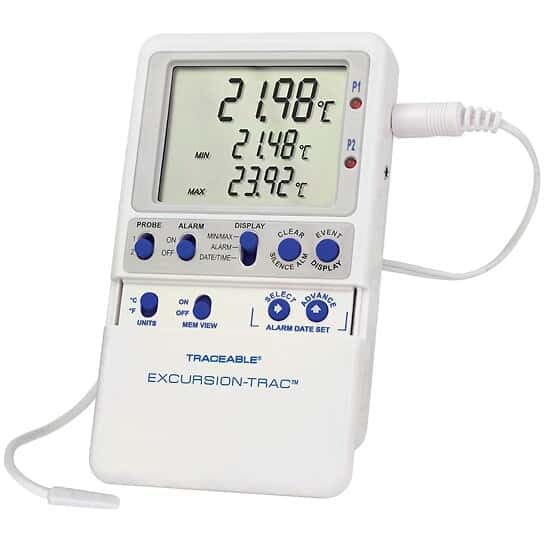
Image: The Traceable Excursion-Trac Data Logger Thermometer, showing its digital display and connected bullet probe.
ਪੈਕੇਜ ਸਮੱਗਰੀ
ਅਨਪੈਕਿੰਗ ਕਰਨ ਵੇਲੇ ਇਹ ਪੁਸ਼ਟੀ ਕਰੋ ਕਿ ਸਾਰੀਆਂ ਚੀਜ਼ਾਂ ਮੌਜੂਦ ਹਨ:
- Traceable Excursion-Trac Data Logger Thermometer Unit
- Bullet Probe with 10-ft (3-m) Cable
- USB ਫਲੈਸ਼ ਡਰਾਈਵ
- Flip-Open Stand
- Hook-and-Loop Strips
- Magnetic Strips
- Wall-Mount Receptacle
- Batteries (pre-installed or separate)
- NIST-Traceable Calibration Certificate with Data
ਸਥਾਪਨਾ ਕਰਨਾ
- ਬੈਟਰੀ ਸਥਾਪਨਾ: If batteries are not pre-installed, open the battery compartment on the back of the unit and insert the specified batteries, observing correct polarity.
- ਪੜਤਾਲ ਕੁਨੈਕਸ਼ਨ: Connect the bullet probe cable to the designated port on the thermometer unit. Ensure a secure connection.
- ਸ਼ੁਰੂਆਤੀ ਪਲੇਸਮੈਂਟ: Position the thermometer unit using the flip-open stand for a benchtop, or utilize the hook-and-loop strips, magnetic strips, or wall-mount receptacle for secure placement. The 10-ft (3-m) submersible micro-cable allows the probe to be placed in the desired monitoring location, even permitting doors to close over the cable.
- ਪਾਵਰ ਚਾਲੂ: Press the power button (if available) or ensure the unit is active. The display should illuminate, showing current temperature readings.
ਓਪਰੇਟਿੰਗ ਨਿਰਦੇਸ਼
ਮੁੱਢਲੀ ਕਾਰਵਾਈ
- ਡਿਸਪਲੇ: The LCD simultaneously shows the current temperature, minimum recorded temperature (MIN), and maximum recorded temperature (MAX).
- ਯੂਨਿਟ: Use the 'UNITS' button to toggle between Celsius (°C) and Fahrenheit (°F) temperature scales.
- ਮੈਮੋਰੀ View: The 'MEM VIEW' function allows review ਸਟੋਰ ਕੀਤੇ ਡੇਟਾ ਦਾ।
ਡਾਟਾ ਲੌਗਿੰਗ
- The device features rolling memory, capable of retaining the most recent 525,600 temperature observations.
- ਡਾਟਾ ਟ੍ਰਾਂਸਫਰ: To transfer recorded data, insert the provided USB flash drive into the unit's USB port. The data will be saved as a CSV file, accessible on any computer without special software.
- ਸਾਫ਼ ਮੈਮੋਰੀ: After downloading data and alarm events, the memory can be cleared to continue recording new data. Refer to the device's specific buttons (e.g., 'CLEAR') for this function.
ਅਲਾਰਮ ਫੰਕਸ਼ਨ
- The thermometer allows setting limits for and storing up to 10 unique alarm events.
- ਅਲਾਰਮ ਸੈੱਟ ਕਰਨਾ: Use the 'ALARM' and 'SELECT/ADVANCE' buttons to set desired high and low temperature alarm thresholds.
- Smart-Alarm Function: The Smart-Alarm provides both visual and audible alerts. It continues to alert even if conditions return to the normal temperature range, ensuring that any excursion is noted.
- ਚੁੱਪ ਅਲਾਰਮ: An 'ALARM SILENCE' button is available to temporarily mute audible alerts.
ਰੱਖ-ਰਖਾਅ
- ਸਫਾਈ: ਇਕਾਈ ਨੂੰ ਵਿਗਿਆਪਨ ਨਾਲ ਸਾਫ਼ ਕਰੋamp cloth. Do not submerge the main unit in water. The bullet probe is submersible and can be cleaned as needed.
- ਬੈਟਰੀ ਬਦਲਣਾ: When the battery indicator appears or the unit fails to power on, replace the batteries. Refer to the battery compartment for the correct battery type.
- ਜਾਂਚ ਦੇਖਭਾਲ: Handle the probe and its cable with care to prevent damage. Avoid sharp bends or excessive pulling on the cable.
ਸਮੱਸਿਆ ਨਿਪਟਾਰਾ
| ਮੁੱਦਾ | ਸੰਭਵ ਕਾਰਨ | ਹੱਲ |
|---|---|---|
| ਯੂਨਿਟ ਚਾਲੂ ਨਹੀਂ ਹੁੰਦਾ ਜਾਂ ਡਿਸਪਲੇ ਖਾਲੀ ਹੈ। | ਮਰੀਆਂ ਜਾਂ ਗਲਤ ਢੰਗ ਨਾਲ ਸਥਾਪਿਤ ਬੈਟਰੀਆਂ। | ਸਹੀ ਪੋਲਰਿਟੀ ਨੂੰ ਯਕੀਨੀ ਬਣਾਉਂਦੇ ਹੋਏ, ਬੈਟਰੀਆਂ ਬਦਲੋ। |
| ਗਲਤ ਤਾਪਮਾਨ ਰੀਡਿੰਗ। | Probe not properly connected or damaged. | Ensure probe is securely connected. Inspect probe and cable for visible damage. |
| Data not transferring to USB drive. | USB drive not properly inserted or full. | Re-insert USB drive. Ensure the drive has sufficient space. Try a different USB drive if available. |
| Alarm not sounding or not clearing. | Alarm settings incorrect or alarm silenced. | Verify alarm thresholds. Check if the alarm has been manually silenced. |
ਨਿਰਧਾਰਨ
| ਵਿਸ਼ੇਸ਼ਤਾ | ਵੇਰਵੇ |
|---|---|
| ਮਾਡਲ ਨੰਬਰ | Excursion-Trac |
| ਤਾਪਮਾਨ ਰੇਂਜ | –58 to 158 Degrees Fahrenheit (-50 to 70 Degrees Celsius) |
| ਮਤਾ | 0.01 ਡਿਗਰੀ |
| ਸ਼ੁੱਧਤਾ | 0.25 ਡਿਗਰੀ ਸੈਲਸੀਅਸ |
| ਡਾਟਾ ਲੌਗਿੰਗ ਸਮਰੱਥਾ | 525,600 temperature observations (rolling memory) |
| ਕਨੈਕਟੀਵਿਟੀ | USB (for CSV data transfer) |
| ਡਿਸਪਲੇ ਦੀ ਕਿਸਮ | LCD |
| ਵਿਸ਼ੇਸ਼ ਵਿਸ਼ੇਸ਼ਤਾ | Alarm (Smart-Alarm function) |
| ਪੜਤਾਲ ਦੀ ਕਿਸਮ | Bullet Probe, Submersible, 10-ft (3-m) cable |
| ਸਮੱਗਰੀ | ਪਲਾਸਟਿਕ |
| ਉਤਪਾਦ ਦੇਖਭਾਲ | ਸਾਫ਼ ਕਰੋ |
| ਸਰਟੀਫਿਕੇਸ਼ਨ | NIST- ਖੋਜਣਯੋਗ ਕੈਲੀਬ੍ਰੇਸ਼ਨ |
ਸਹਾਇਤਾ ਅਤੇ ਵਾਰੰਟੀ
For technical assistance, product inquiries, or warranty information, please contact the manufacturer, Cole-Parmer, or visit their official website. Specific warranty details were not provided in the product data.
ਨਿਰਮਾਤਾ: COLE-PARMER
ਬ੍ਰਾਂਡ: ਭਰੋਸੇਯੋਗ
Supportਨਲਾਈਨ ਸਹਾਇਤਾ: www.coleparmer.com
Ask a question about this manual
Ask about setup, troubleshooting, compatibility, parts, safety, or missing instructions. Manuals+ will review the question and use this page’s manual context to help answer it.