
1. ਉਤਪਾਦ ਖਤਮview
The HyperX Cloud Orbit S is a premium gaming headset designed for an unparalleled audio experience. It features advanced Audeze planar magnetic drivers and Waves Nx head tracking and 3D audio technology, delivering breathtaking clarity and precision. This headset is compatible with PC, Xbox, PS4, Mac, Mobile, and Switch.

Figure 1: HyperX Cloud Orbit S Gaming Headset.
2. ਸੈੱਟਅੱਪ ਗਾਈਡ
2.1 ਪੈਕੇਜ ਸਮੱਗਰੀ
- HyperX Cloud Orbit S Headset
- ਵੱਖ ਕਰਨ ਯੋਗ ਸ਼ੋਰ-ਰੱਦ ਕਰਨ ਵਾਲਾ ਮਾਈਕ੍ਰੋਫ਼ੋਨ
- USB-C ਤੋਂ USB-C ਕੇਬਲ
- USB-C ਤੋਂ USB-A ਕੇਬਲ
- 3.5mm ਆਡੀਓ ਕੇਬਲ

Figure 2: All items included in the HyperX Cloud Orbit S package.
2.2 ਆਪਣੇ ਹੈੱਡਸੈੱਟ ਨੂੰ ਜੋੜਨਾ
The HyperX Cloud Orbit S offers versatile connectivity options to suit your gaming setup.
- USB-C ਤੋਂ USB-C: For direct digital audio connection to compatible devices.
- USB-C ਤੋਂ USB-A: For digital audio connection to devices with standard USB-A ports.
- 3.5mm ਆਡੀਓ ਕੇਬਲ: For analog audio connection to devices with a 3.5mm jack.

Figure 3: Headset connected with its detachable microphone and USB-C cable.

Figure 4: The three different detachable cable options for the headset.
For a visual guide on setting up your HyperX Cloud Orbit S, watch the official product video:
Video 1: HyperX Cloud Orbit and Orbit S - Product Video. This video provides an overview of the headset's features and connectivity.
2.3 ਸਾਫਟਵੇਅਰ ਇੰਸਟਾਲੇਸ਼ਨ (ਵਿਕਲਪਿਕ)
For advanced audio customization, including sound profiles and HRTF personalization, download and install the HyperX Orbit software from the official HyperX website. This software allows you to fine-tune your audio experience to your preferences.

Figure 5: HyperX Orbit software interface for advanced audio customization.
3. ਆਪਣੇ ਹੈੱਡਸੈੱਟ ਨੂੰ ਚਲਾਉਣਾ
3.1 ਔਨਬੋਰਡ ਕੰਟਰੋਲ
The headset features intuitive onboard controls for easy access to essential functions:
- ਵਾਲੀਅਮ ਵ੍ਹੀਲ: ਸਮੁੱਚੇ ਆਡੀਓ ਵਾਲੀਅਮ ਨੂੰ ਵਿਵਸਥਿਤ ਕਰਦਾ ਹੈ।
- Mic Volume Wheel: ਮਾਈਕ੍ਰੋਫ਼ੋਨ ਇਨਪੁੱਟ ਵਾਲੀਅਮ ਨੂੰ ਵਿਵਸਥਿਤ ਕਰਦਾ ਹੈ।
- 3D Audio Button: Toggles Waves Nx 3D audio on/off.
- ਮਾਈਕ ਮਿਊਟ ਬਟਨ: ਮਾਈਕ੍ਰੋਫੋਨ ਨੂੰ ਮਿਊਟ ਜਾਂ ਅਨਮਿਊਟ ਕਰੋ।
- ਪਾਵਰ ਬਟਨ: ਹੈੱਡਸੈੱਟ ਨੂੰ ਚਾਲੂ/ਬੰਦ ਕਰਦਾ ਹੈ।

ਚਿੱਤਰ 6: ਪਾਸੇ view of the headset highlighting the control layout.

ਚਿੱਤਰ 7: ਵਿਸਤ੍ਰਿਤ view of the headset's ports and controls.
3.2 ਮਾਈਕ੍ਰੋਫ਼ੋਨ ਵਰਤੋਂ
Attach the detachable noise-cancelling microphone to the designated port on the left earcup. Position the microphone close to your mouth for optimal voice clarity. The integrated pop filter helps reduce plosive sounds.
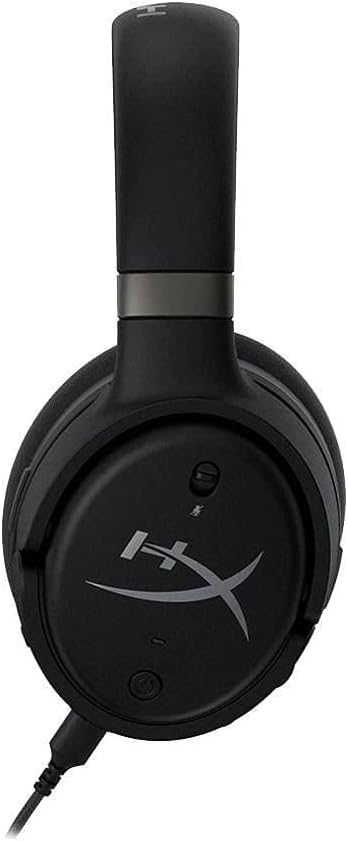
Figure 8: Headset with the detachable microphone in use.
3.3 Waves Nx 3D Audio and Head Tracking
The Waves Nx technology creates a fully immersive 3D audio environment. Head tracking tracks your head's position to stabilize the soundscape, making you feel like you're in the center of the action. This feature enhances realism in games and media.

Figure 9: User experiencing immersive audio with the headset.

Figure 10: Head tracking technology provides a stable soundscape as the user moves their head.
Discover the immersive capabilities of the HyperX Cloud Orbit S in this commercial:
Video 2: HyperX Cloud Orbit - Commercial. Showcases the headset's immersive audio and head tracking features.
4. ਦੇਖਭਾਲ ਅਤੇ ਰੱਖ-ਰਖਾਅ
- ਈਅਰਕੱਪ ਅਤੇ ਹੈੱਡਬੈਂਡ ਨੂੰ ਨਿਯਮਿਤ ਤੌਰ 'ਤੇ ਨਰਮ, ਸੁੱਕੇ ਕੱਪੜੇ ਨਾਲ ਸਾਫ਼ ਕਰੋ।
- ਹੈੱਡਸੈੱਟ ਨੂੰ ਬਹੁਤ ਜ਼ਿਆਦਾ ਤਾਪਮਾਨ ਜਾਂ ਨਮੀ ਦੇ ਸੰਪਰਕ ਵਿੱਚ ਆਉਣ ਤੋਂ ਬਚੋ।
- Store the headset in a safe place to prevent physical damage, especially to the headband and earcup joints.
- Handle detachable cables with care to prevent fraying or damage to connectors.
5. ਆਮ ਮੁੱਦਿਆਂ ਦਾ ਨਿਪਟਾਰਾ ਕਰਨਾ
| ਸਮੱਸਿਆ | ਸੰਭਵ ਕਾਰਨ | ਹੱਲ |
|---|---|---|
| ਕੋਈ ਆਡੀਓ ਆਉਟਪੁੱਟ ਨਹੀਂ | Incorrect cable connection, low volume, muted audio. | Ensure cables are securely connected. Check headset and device volume levels. Confirm audio is not muted on the headset or device. |
| ਮਾਈਕ੍ਰੋਫੋਨ ਕੰਮ ਨਹੀਂ ਕਰ ਰਿਹਾ | Microphone detached, muted, or incorrect input settings. | Ensure microphone is fully inserted. Check mic mute button. Verify microphone input is selected in your device's sound settings. |
| Static or white noise | Interference, low signal quality, or inherent amplifier noise. | Try connecting to a different USB port or device. Ensure no strong electromagnetic interference sources are nearby. A slight noise floor may be present with active ampਪਾਬੰਦੀ. |
| Headset discomfort | ਗਲਤ ਫਿੱਟ ਜਾਂ ਲੰਬੇ ਸਮੇਂ ਤੱਕ ਵਰਤੋਂ। | Adjust the headband for a comfortable fit. Take breaks during extended use. The memory foam earcups are designed for comfort. |
6. ਤਕਨੀਕੀ ਨਿਰਧਾਰਨ
| ਵਿਸ਼ੇਸ਼ਤਾ | ਨਿਰਧਾਰਨ |
|---|---|
| ਮਾਡਲ ਦਾ ਨਾਮ | Cloud Orbit S |
| ਕਨੈਕਟੀਵਿਟੀ ਤਕਨਾਲੋਜੀ | Wired (USB-C, USB-A, 3.5mm) |
| ਆਡੀਓ ਡਰਾਈਵਰ ਦੀ ਕਿਸਮ | Planar Magnetic Driver (Audeze) |
| ਬਾਰੰਬਾਰਤਾ ਸੀਮਾ | 20 ਹਰਟਜ਼ - 20,000 ਹਰਟਜ਼ |
| ਆਈਟਮ ਦਾ ਭਾਰ | 368 ਗ੍ਰਾਮ (13 ਔਂਸ) |
| ਸ਼ਾਮਿਲ ਭਾਗ | Headset, removable microphone |
| ਅਨੁਕੂਲ ਜੰਤਰ | PC, Xbox, PS4, Mac, Mobile, Switch |
7. ਵਾਰੰਟੀ ਅਤੇ ਸਹਾਇਤਾ
For warranty information and technical support, please refer to the documentation included with your product or visit the official HyperX support channels. Keep your proof of purchase for warranty claims.