
1. ਜਾਣ-ਪਛਾਣ
ਖਰੀਦਣ ਲਈ ਧੰਨਵਾਦ।asing the MUSE M-10 Red Radio Alarm Clock. This manual provides essential information for the safe and efficient operation of your device. Please read these instructions carefully before use and retain them for future reference.

Figure 1: MUSE M-10 Red Radio Alarm Clock. This image shows the front view of the red alarm clock with its digital LED display showing '12:00' and various control buttons on the top panel.
2. ਸੁਰੱਖਿਆ ਨਿਰਦੇਸ਼
- ਉਪਕਰਣ ਦੇ ਸੰਚਾਲਨ ਤੋਂ ਪਹਿਲਾਂ ਸਾਰੀਆਂ ਹਦਾਇਤਾਂ ਨੂੰ ਪੜ੍ਹੋ.
- Do not expose this appliance to rain or moisture to prevent fire or shock hazards.
- Ensure the power adapter is easily accessible.
- ਸਿਰਫ਼ ਨਿਰਮਾਤਾ ਦੁਆਰਾ ਨਿਰਦਿਸ਼ਟ ਅਟੈਚਮੈਂਟਾਂ/ਅਸੈੱਸਰੀਜ਼ ਦੀ ਵਰਤੋਂ ਕਰੋ।
- ਉਤਪਾਦ ਨੂੰ ਸਿੱਧੀ ਧੁੱਪ ਜਾਂ ਗਰਮੀ ਦੇ ਸਰੋਤਾਂ ਦੇ ਨੇੜੇ ਨਾ ਰੱਖੋ।
- Avoid placing the product on surfaces that are unstable or subject to vibration.
- ਸੀ ਨਾ ਖੋਲ੍ਹੋasing; ਸਾਰੀ ਸੇਵਾ ਯੋਗ ਕਰਮਚਾਰੀਆਂ ਨੂੰ ਸੌਂਪੋ।
- ਸਥਾਨਕ ਨਿਯਮਾਂ ਦੀ ਪਾਲਣਾ ਕਰਦੇ ਹੋਏ, ਵਰਤੀਆਂ ਗਈਆਂ ਬੈਟਰੀਆਂ ਦਾ ਜ਼ਿੰਮੇਵਾਰੀ ਨਾਲ ਨਿਪਟਾਰਾ ਕਰੋ।
3. ਉਤਪਾਦ ਖਤਮview
3.1 ਫਰੰਟ ਪੈਨਲ ਅਤੇ ਡਿਸਪਲੇ
The front panel features a clear 0.6-inch white LED display for time and alarm indicators.
3.2 ਸਿਖਰ ਪੈਨਲ ਨਿਯੰਤਰਣ
The top panel houses all control buttons for easy access:
- MEM: Memory button for saving and recalling radio presets.
- ਸੈੱਟ: Button for setting time and alarm parameters.
- AL1: Alarm 1 setting button.
- AL2: Alarm 2 setting button.
- << HR: Hour adjustment button (backward).
- MIN >>: Minute adjustment button (forward).
- ਸਨੂਜ਼: Activates the snooze function during an alarm.
- ਨੀਂਦ: ਸਲੀਪ ਟਾਈਮਰ ਫੰਕਸ਼ਨ ਨੂੰ ਸਰਗਰਮ ਕਰਦਾ ਹੈ।
- ਡਿਮਰ: ਡਿਸਪਲੇ ਦੀ ਚਮਕ ਨੂੰ ਵਿਵਸਥਿਤ ਕਰਦਾ ਹੈ।

ਚਿੱਤਰ 2: ਵੱਧview of the MUSE M-10 Red Radio Alarm Clock's functions, including its 0.6-inch white LED display, PLL radio, 20 FM presets, dimmer, dual alarm, snooze, and sleep features.
4. ਸੈੱਟਅੱਪ
4.1 ਪਾਵਰ ਕੁਨੈਕਸ਼ਨ
Connect the provided AC adapter to the DC IN jack on the rear of the unit and then plug it into a standard wall outlet. The unit will power on and the display will light up.
4.2 ਬੈਟਰੀ ਬੈਕਅੱਪ ਇੰਸਟਾਲੇਸ਼ਨ
For time and alarm settings backup during a power outage, install 2 x AAA batteries (not included) into the battery compartment located on the bottom of the unit. Ensure correct polarity (+/-) when inserting batteries.
5. ਓਪਰੇਟਿੰਗ ਹਦਾਇਤਾਂ
5.1 ਸਮਾਂ ਨਿਰਧਾਰਤ ਕਰਨਾ
- ਨੂੰ ਦਬਾ ਕੇ ਰੱਖੋ SET ਘੰਟੇ ਦੇ ਅੰਕ ਫਲੈਸ਼ ਹੋਣ ਤੱਕ ਬਟਨ।
- ਦੀ ਵਰਤੋਂ ਕਰੋ << HR or MIN >> ਘੰਟੇ ਨੂੰ ਅਨੁਕੂਲ ਕਰਨ ਲਈ ਬਟਨ.
- ਦਬਾਓ SET ਦੁਬਾਰਾ, ਅਤੇ ਮਿੰਟ ਦੇ ਅੰਕ ਫਲੈਸ਼ ਹੋ ਜਾਣਗੇ।
- ਦੀ ਵਰਤੋਂ ਕਰੋ << HR or MIN >> ਮਿੰਟਾਂ ਨੂੰ ਅਨੁਕੂਲ ਕਰਨ ਲਈ ਬਟਨ.
- ਦਬਾਓ SET ਇੱਕ ਵਾਰ ਫਿਰ ਪੁਸ਼ਟੀ ਕਰਨ ਅਤੇ ਸਮਾਂ ਸੈਟਿੰਗ ਮੋਡ ਤੋਂ ਬਾਹਰ ਆਉਣ ਲਈ।
5.2 ਅਲਾਰਮ ਸੈੱਟ ਕਰਨਾ (ਅਲਾਰਮ 1 ਅਤੇ ਅਲਾਰਮ 2)
ਇਸ ਯੂਨਿਟ ਵਿੱਚ ਦੋ ਸੁਤੰਤਰ ਅਲਾਰਮ ਹਨ।
- ਨੂੰ ਦਬਾ ਕੇ ਰੱਖੋ AL1 (ਜਾਂ AL2) ਬਟਨ ਉਦੋਂ ਤੱਕ ਵੱਜਦਾ ਹੈ ਜਦੋਂ ਤੱਕ ਅਲਾਰਮ ਘੰਟੇ ਦੇ ਅੰਕ ਫਲੈਸ਼ ਨਹੀਂ ਹੁੰਦੇ।
- ਦੀ ਵਰਤੋਂ ਕਰੋ << HR or MIN >> ਲੋੜੀਂਦਾ ਅਲਾਰਮ ਘੰਟਾ ਸੈੱਟ ਕਰਨ ਲਈ ਬਟਨ।
- ਦਬਾਓ AL1 (ਜਾਂ AL2) again, and the alarm minute digits will flash.
- ਦੀ ਵਰਤੋਂ ਕਰੋ << HR or MIN >> ਲੋੜੀਂਦੇ ਅਲਾਰਮ ਮਿੰਟ ਸੈੱਟ ਕਰਨ ਲਈ ਬਟਨ।
- ਦਬਾਓ AL1 (ਜਾਂ AL2) again to select the alarm source: ਬਜ਼ਰ or ਰੇਡੀਓ.
- ਦਬਾਓ AL1 (ਜਾਂ AL2) once more to confirm and activate the alarm. An alarm icon will appear on the display.
5.3 ਐਫਐਮ ਰੇਡੀਓ ਓਪਰੇਸ਼ਨ
The unit has a PLL FM radio with 20 preset stations.
- ਟਿingਨਿੰਗ: ਦਬਾਓ << HR or MIN >> buttons to manually tune the radio frequency. Press and hold these buttons for automatic scanning to the next available station.
- ਪ੍ਰੀਸੈਟਸ ਨੂੰ ਸੁਰੱਖਿਅਤ ਕਰਨਾ: ਆਪਣੇ ਲੋੜੀਂਦੇ ਸਟੇਸ਼ਨ 'ਤੇ ਟਿਊਨ ਕਰੋ। ਦਬਾਓ ਅਤੇ ਹੋਲਡ ਕਰੋ ਐਮ.ਈ.ਐਮ button until 'P01' (or the next available preset number) flashes. Use << HR or MIN >> ਇੱਕ ਪ੍ਰੀਸੈਟ ਨੰਬਰ ਚੁਣਨ ਲਈ, ਫਿਰ ਦਬਾਓ ਐਮ.ਈ.ਐਮ ਦੁਬਾਰਾ ਬਚਾਉਣ ਲਈ.
- ਰੀਸੀਲਿੰਗ ਪ੍ਰੀਸੈਟਸ: ਸੰਖੇਪ ਵਿੱਚ ਦਬਾਓ ਐਮ.ਈ.ਐਮ button to cycle through saved preset stations.
5.4 ਸਨੂਜ਼ ਫੰਕਸ਼ਨ
ਜਦੋਂ ਅਲਾਰਮ ਵੱਜਦਾ ਹੈ, ਤਾਂ ਦਬਾਓ ਸਨੂਜ਼ ਲਗਭਗ 9 ਮਿੰਟਾਂ ਲਈ ਅਲਾਰਮ ਨੂੰ ਅਸਥਾਈ ਤੌਰ 'ਤੇ ਚੁੱਪ ਕਰਨ ਲਈ ਬਟਨ। ਇਸ ਸਮੇਂ ਤੋਂ ਬਾਅਦ ਅਲਾਰਮ ਦੁਬਾਰਾ ਵੱਜੇਗਾ।
5.5 ਸਲੀਪ ਟਾਈਮਰ ਫੰਕਸ਼ਨ
ਦਬਾਓ ਸੌਂਵੋ button repeatedly to set a sleep timer (e.g., 90, 60, 30, 15 minutes, or OFF). The radio will play for the selected duration and then automatically turn off.
5.6 ਡਿਸਪਲੇ ਡਿਮਰ
ਦਬਾਓ ਡਿਮਰ button repeatedly to cycle through display brightness levels: High, Low, or Off.

Figure 3: Key features of the MUSE M-10 Red Radio Alarm Clock, including snooze, radio or buzzer alarm, dimmable display, and FM PLL radio with 20 presets.
6. ਰੱਖ-ਰਖਾਅ
- ਸਫਾਈ: ਯੂਨਿਟ ਨੂੰ ਨਰਮ, ਸੁੱਕੇ ਕੱਪੜੇ ਨਾਲ ਪੂੰਝੋ। ਘਸਾਉਣ ਵਾਲੇ ਕਲੀਨਰ ਜਾਂ ਘੋਲਕ ਦੀ ਵਰਤੋਂ ਨਾ ਕਰੋ।
- ਬੈਟਰੀ ਬਦਲਣਾ: ਬੈਕਅੱਪ ਬੈਟਰੀਆਂ ਨੂੰ ਹਰ ਸਾਲ ਬਦਲੋ ਜਾਂ ਜਦੋਂ ਡਿਸਪਲੇ ਪਾਵਰ ਜਾਂ ਦੌਰਾਨ ਮੱਧਮ ਹੋਣ ਦੇ ਸੰਕੇਤ ਦਿਖਾਉਂਦਾ ਹੈ।tages.
- ਸਟੋਰੇਜ: ਜੇਕਰ ਯੂਨਿਟ ਨੂੰ ਲੰਬੇ ਸਮੇਂ ਲਈ ਸਟੋਰ ਕਰ ਰਹੇ ਹੋ, ਤਾਂ ਲੀਕੇਜ ਨੂੰ ਰੋਕਣ ਲਈ ਬੈਕਅੱਪ ਬੈਟਰੀਆਂ ਨੂੰ ਹਟਾ ਦਿਓ।
7. ਸਮੱਸਿਆ ਨਿਪਟਾਰਾ
| ਸਮੱਸਿਆ | ਸੰਭਵ ਕਾਰਨ | ਹੱਲ |
|---|---|---|
| ਕੋਈ ਪਾਵਰ/ਡਿਸਪਲੇ ਬੰਦ ਨਹੀਂ | ਪਾਵਰ ਅਡੈਪਟਰ ਜੁੜਿਆ ਨਹੀਂ ਹੈ ਜਾਂ ਖਰਾਬ ਹੈ। | Check power adapter connection. Try a different outlet. |
| ਅਲਾਰਮ ਨਹੀਂ ਵੱਜਦਾ | ਅਲਾਰਮ ਕਿਰਿਆਸ਼ੀਲ ਨਹੀਂ ਹੈ ਜਾਂ ਗਲਤ ਢੰਗ ਨਾਲ ਸੈੱਟ ਨਹੀਂ ਕੀਤਾ ਗਿਆ ਹੈ। | Ensure alarm icon is visible on display. Re-check alarm time and source settings. |
| ਮਾੜਾ ਰੇਡੀਓ ਰਿਸੈਪਸ਼ਨ | FM ਐਂਟੀਨਾ ਵਧਿਆ ਨਹੀਂ ਹੈ ਜਾਂ ਸਿਗਨਲ ਖੇਤਰ ਖਰਾਬ ਹੈ। | Fully extend the FM wire antenna. Adjust its position for better reception. |
| ਪਾਵਰ OU ਤੋਂ ਬਾਅਦ ਸਮਾਂ/ਸੈਟਿੰਗਾਂ ਖਤਮ ਹੋ ਗਈਆਂtage | ਬੈਕਅੱਪ ਬੈਟਰੀਆਂ ਸਥਾਪਤ ਨਹੀਂ ਹਨ ਜਾਂ ਖਤਮ ਹੋ ਗਈਆਂ ਹਨ। | Install new AAA batteries for backup. |
8 ਨਿਰਧਾਰਨ
- ਮਾਡਲ: ਐਮ-10 ਰੈੱਡ
- ਬ੍ਰਾਂਡ: ਮਿਊਜ਼
- ਡਿਸਪਲੇ: 0.6-inch White LED, Digital
- ਰੇਡੀਓ: FM PLL Radio with 20 Presets
- ਅਲਾਰਮ: ਦੋਹਰਾ ਅਲਾਰਮ (ਬਜ਼ਰ ਜਾਂ ਰੇਡੀਓ)
- ਵਿਸ਼ੇਸ਼ ਵਿਸ਼ੇਸ਼ਤਾਵਾਂ: Snooze, Sleep Timer, Display Dimmer (High/Low/Off)
- ਪਾਵਰ ਸਰੋਤ: AC Adapter (included), 2 x AAA batteries for backup (not included)
- ਮਾਪ (L x W x H): 12 x 7 x 10.9 ਸੈਂਟੀਮੀਟਰ (ਲਗਭਗ 4.7 x 2.8 x 4.3 ਇੰਚ)
- ਭਾਰ: 200 ਗ੍ਰਾਮ (ਲਗਭਗ 0.44 ਪੌਂਡ)
- ਸਮੱਗਰੀ: ਪਲਾਸਟਿਕ
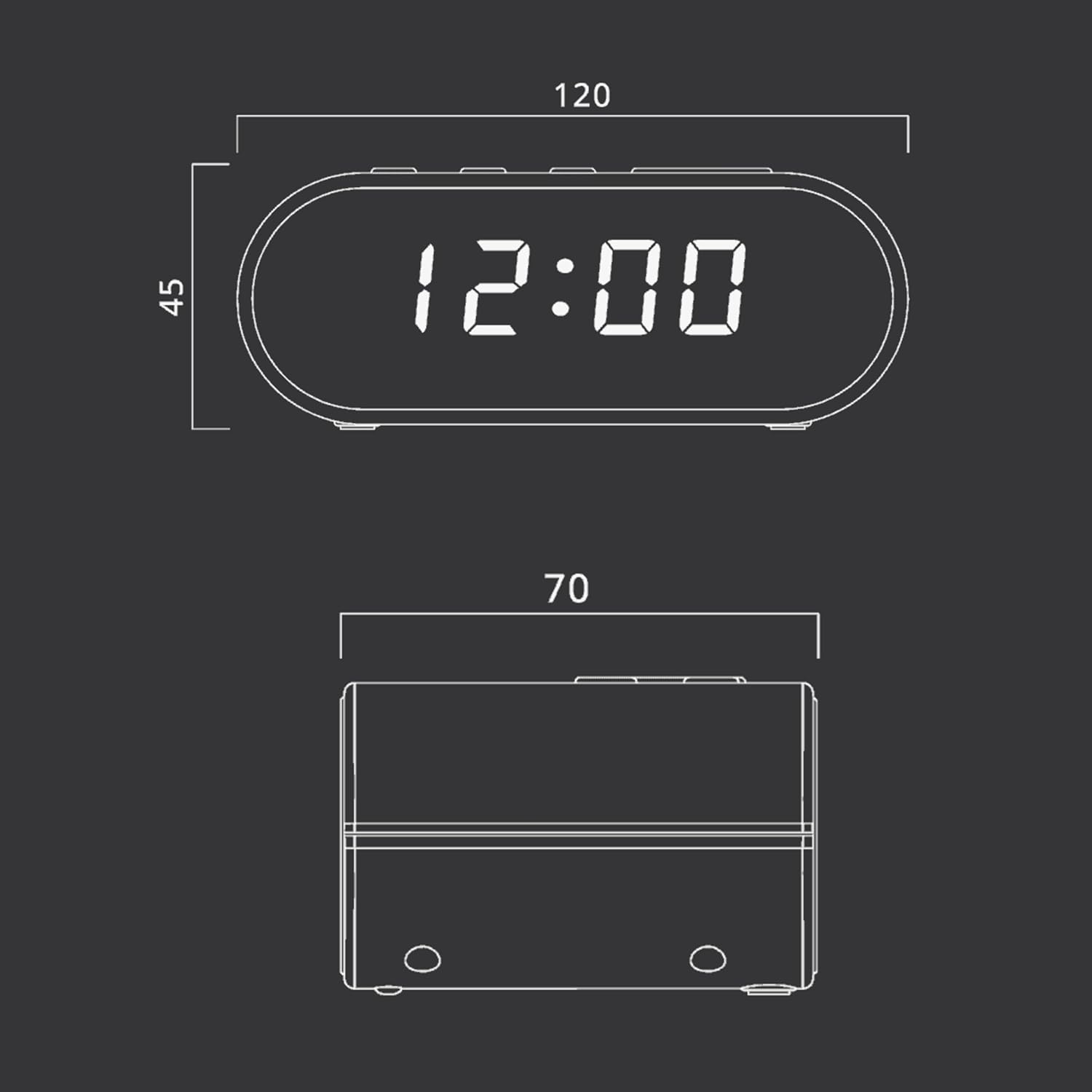
Figure 4: Dimensional drawing of the MUSE M-10 Red Radio Alarm Clock, showing its length (120mm), width (70mm), and height (45mm).
9. ਵਾਰੰਟੀ ਅਤੇ ਸਹਾਇਤਾ
For warranty information or technical support, please refer to the warranty card included with your product or contact your local MUSE distributor. Keep your purchase receipt as proof of purchase.