
1. ਜਾਣ-ਪਛਾਣ
The Unitek Y-3036 is a tool-free external enclosure designed for 2.5-inch SATA I/II/III Hard Disk Drives (HDDs) and Solid State Drives (SSDs). It provides a convenient solution for connecting your 2.5-inch drives to a computer via USB 3.0, offering fast data transfer speeds and easy portability. This manual provides detailed instructions for the proper installation, operation, and maintenance of your Unitek Y-3036 enclosure.
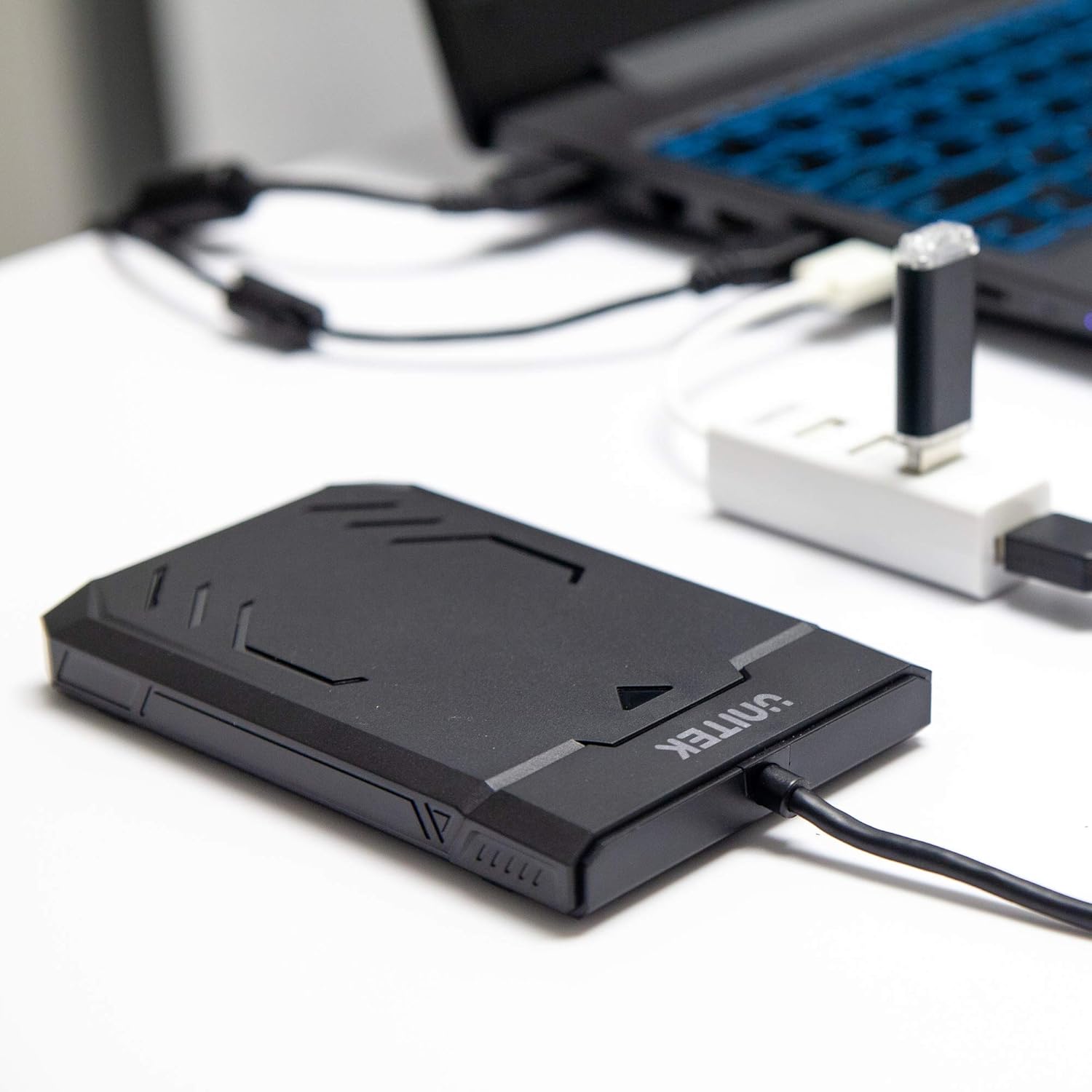
Image 1.1: Unitek Y-3036 enclosure connected to a laptop.
2. ਪੈਕੇਜ ਸਮੱਗਰੀ
ਕਿਰਪਾ ਕਰਕੇ ਪੁਸ਼ਟੀ ਕਰੋ ਕਿ ਸਾਰੀਆਂ ਚੀਜ਼ਾਂ ਤੁਹਾਡੇ ਪੈਕੇਜ ਵਿੱਚ ਮੌਜੂਦ ਹਨ:
- Unitek Y-3036 2.5-inch Hard Drive Enclosure with integrated USB 3.0 cable
- Foam pad for drive stability
- ਨਿਰਦੇਸ਼ ਦਸਤਾਵੇਜ਼ (ਇਹ ਦਸਤਾਵੇਜ਼)

Image 2.1: Enclosure with integrated cable and foam pad.
3 ਨਿਰਧਾਰਨ
| ਮਾਡਲ | Unitek Y-3036 |
| ਅਨੁਕੂਲ ਡਰਾਈਵ ਪ੍ਰਕਾਰ | 2.5-inch SATA I/II/III HDD/SSD (up to 9.5mm thickness) |
| ਇੰਟਰਫੇਸ | USB 3.0 (USB 2.0 ਨਾਲ ਬੈਕਵਰਡ ਅਨੁਕੂਲ) |
| ਡਾਟਾ ਟ੍ਰਾਂਸਫਰ ਦਰ | Up to 6Gbps (SATA III), supports UASP |
| ਮਾਪ (L x W x H) | 130mm x 85mm x 15mm (5.12" x 3.27" x 0.59") |
| ਸਮੱਗਰੀ | ਪਲਾਸਟਿਕ |
| ਵਿਸ਼ੇਸ਼ਤਾਵਾਂ | Tool-free assembly, Plug & Play, LED indicator, Sleep function, Built-in USB cable |

ਚਿੱਤਰ 3.1: ਉਤਪਾਦ ਦੇ ਮਾਪ।
4. ਸੈੱਟਅੱਪ ਅਤੇ ਇੰਸਟਾਲੇਸ਼ਨ
The Unitek Y-3036 enclosure features a tool-free design for easy installation of your 2.5-inch HDD or SSD.
- ਐਨਕਲੋਜ਼ਰ ਖੋਲ੍ਹੋ: ਇਸਨੂੰ ਖੋਲ੍ਹਣ ਲਈ ਦੀਵਾਰ ਦੇ ਉੱਪਰਲੇ ਕਵਰ ਨੂੰ ਹੌਲੀ-ਹੌਲੀ ਸਲਾਈਡ ਕਰੋ।
- ਡਰਾਈਵ ਪਾਓ: Align your 2.5-inch SATA HDD or SSD with the SATA connector inside the enclosure. Carefully push the drive into the connector until it is firmly seated. Ensure the drive is oriented correctly.
- Add Foam Pad (Optional): If your drive is thinner than 9.5mm, you may use the included foam pad to secure it snugly within the enclosure and prevent movement. Place the foam pad on top of the drive before closing the cover.
- ਐਨਕਲੋਜ਼ਰ ਬੰਦ ਕਰੋ: Slide the top cover back into place until it clicks securely.

Image 4.1: Enclosure open with a 2.5-inch HDD inserted.

ਚਿੱਤਰ 4.2: ਵਿਸਤ੍ਰਿਤ view of drive insertion.
5. ਓਪਰੇਟਿੰਗ ਹਦਾਇਤਾਂ
Once your drive is installed in the enclosure, follow these steps to use it with your computer:
- ਕੰਪਿਊਟਰ ਨਾਲ ਜੁੜੋ: Plug the integrated USB 3.0 cable from the enclosure into an available USB port on your computer. For optimal performance, use a USB 3.0 port.
- LED ਸੂਚਕ: The enclosure features an LED indicator. When connected, the LED will illuminate, indicating power. It will flash during data transfer activity.
- ਡਰਾਈਵ ਪਛਾਣ: Your operating system should automatically detect the new drive. If it's a new drive, you may need to initialize and format it through your operating system's disk management utility before it appears in 'My Computer' or 'Finder'.
- ਸੁਰੱਖਿਅਤ ਹਟਾਉਣਾ: Always safely eject the drive from your operating system before disconnecting the USB cable to prevent data corruption.
6. ਰੱਖ-ਰਖਾਅ
To ensure the longevity and optimal performance of your Unitek Y-3036 enclosure:
- ਸਫਾਈ: ਦੀਵਾਰ ਦੇ ਬਾਹਰਲੇ ਹਿੱਸੇ ਨੂੰ ਸਾਫ਼ ਕਰਨ ਲਈ ਨਰਮ, ਸੁੱਕੇ ਕੱਪੜੇ ਦੀ ਵਰਤੋਂ ਕਰੋ। ਤਰਲ ਕਲੀਨਰ ਜਾਂ ਘੋਲਨ ਵਾਲੇ ਪਦਾਰਥਾਂ ਦੀ ਵਰਤੋਂ ਕਰਨ ਤੋਂ ਬਚੋ।
- ਸਟੋਰੇਜ: ਜਦੋਂ ਵਰਤੋਂ ਵਿੱਚ ਨਾ ਹੋਵੇ, ਤਾਂ ਦੀਵਾਰ ਨੂੰ ਸਿੱਧੀ ਧੁੱਪ ਅਤੇ ਬਹੁਤ ਜ਼ਿਆਦਾ ਤਾਪਮਾਨਾਂ ਤੋਂ ਦੂਰ ਇੱਕ ਠੰਢੀ, ਸੁੱਕੀ ਜਗ੍ਹਾ 'ਤੇ ਸਟੋਰ ਕਰੋ।
- ਹੈਂਡਲਿੰਗ: Handle the enclosure with care to avoid drops or impacts, which could damage the internal drive or the enclosure itself.
7. ਸਮੱਸਿਆ ਨਿਪਟਾਰਾ
If you encounter issues with your Unitek Y-3036 enclosure, refer to the following common problems and solutions:
- ਡਰਾਈਵ ਨਹੀਂ ਮਿਲੀ:
- ਯਕੀਨੀ ਬਣਾਓ ਕਿ USB ਕੇਬਲ ਐਨਕਲੋਜ਼ਰ ਅਤੇ ਕੰਪਿਊਟਰ ਦੋਵਾਂ ਨਾਲ ਸੁਰੱਖਿਅਤ ਢੰਗ ਨਾਲ ਜੁੜੀ ਹੋਈ ਹੈ।
- ਆਪਣੇ ਕੰਪਿਟਰ ਤੇ ਇੱਕ ਵੱਖਰੇ USB ਪੋਰਟ ਨਾਲ ਕਨੈਕਟ ਕਰਨ ਦੀ ਕੋਸ਼ਿਸ਼ ਕਰੋ.
- Verify that the 2.5-inch HDD/SSD is properly seated in the enclosure's SATA connector.
- ਆਪਣੇ ਕੰਪਿਊਟਰ ਦੇ ਡਿਸਕ ਮੈਨੇਜਮੈਂਟ (ਵਿੰਡੋਜ਼) ਜਾਂ ਡਿਸਕ ਯੂਟਿਲਿਟੀ (ਮੈਕਓਐਸ) ਦੀ ਜਾਂਚ ਕਰੋ ਕਿ ਕੀ ਡਰਾਈਵ ਪਛਾਣੀ ਗਈ ਹੈ ਪਰ ਸ਼ੁਰੂ ਨਹੀਂ ਕੀਤੀ ਗਈ ਹੈ ਜਾਂ ਫਾਰਮੈਟ ਨਹੀਂ ਕੀਤੀ ਗਈ ਹੈ।
- Test the enclosure with a different 2.5-inch SATA drive, or test your drive directly with another enclosure/adapter if available.
- ਹੌਲੀ ਟ੍ਰਾਂਸਫਰ ਸਪੀਡ:
- ਯਕੀਨੀ ਬਣਾਓ ਕਿ ਤੁਸੀਂ ਆਪਣੇ ਕੰਪਿਊਟਰ 'ਤੇ USB 3.0 ਪੋਰਟ ਨਾਲ ਜੁੜੇ ਹੋਏ ਹੋ। USB 2.0 ਪੋਰਟ ਹੌਲੀ ਗਤੀ 'ਤੇ ਕੰਮ ਕਰਨਗੇ।
- ਜਾਂਚ ਕਰੋ ਕਿ ਤੁਹਾਡਾ ਓਪਰੇਟਿੰਗ ਸਿਸਟਮ ਅਤੇ ਡਰਾਈਵਰ ਅੱਪ ਟੂ ਡੇਟ ਹਨ।
- The actual speed depends on the performance of the installed HDD/SSD.
- LED ਇੰਡੀਕੇਟਰ ਰੋਸ਼ਨੀ ਨਹੀਂ ਕਰ ਰਿਹਾ:
- Confirm the USB cable is fully plugged into a powered USB port.
- ਕੋਈ ਵੱਖਰਾ USB ਪੋਰਟ ਅਜ਼ਮਾਓ।
8 ਸੁਰੱਖਿਆ ਜਾਣਕਾਰੀ
ਕਿਰਪਾ ਕਰਕੇ ਹੇਠਾਂ ਦਿੱਤੇ ਸੁਰੱਖਿਆ ਦਿਸ਼ਾ-ਨਿਰਦੇਸ਼ਾਂ ਦੀ ਪਾਲਣਾ ਕਰੋ:
- ਘੇਰੇ ਨੂੰ ਪਾਣੀ, ਨਮੀ, ਜਾਂ ਬਹੁਤ ਜ਼ਿਆਦਾ ਤਾਪਮਾਨਾਂ ਦੇ ਸੰਪਰਕ ਵਿੱਚ ਨਾ ਰੱਖੋ।
- Avoid dropping or subjecting the enclosure to severe impacts.
- Do not attempt to open or modify the enclosure beyond the intended drive installation. This may void any warranty and could cause damage.
- ਬੱਚਿਆਂ ਦੀ ਪਹੁੰਚ ਤੋਂ ਦੂਰ ਰੱਖੋ।
9. ਵਾਰੰਟੀ ਅਤੇ ਸਹਾਇਤਾ
Unitek products are designed for reliability and performance. For warranty information or technical support, please refer to the official Unitek website or contact your local retailer. Keep your purchase receipt as proof of purchase for warranty claims.