
1. ਜਾਣ-ਪਛਾਣ
Thank you for choosing the AIYIMA A05 TPA3221 Power Amplifier. This compact 2.0 channel stereo amplifier is designed to deliver high-fidelity audio to passive speakers, featuring both Bluetooth and RCA input options. This manual provides detailed instructions for setup, operation, and maintenance to ensure optimal performance and longevity of your device.
2. ਸੁਰੱਖਿਆ ਨਿਰਦੇਸ਼
- ਬਿਜਲੀ ਦੀ ਸਪਲਾਈ: Use only the specified power adapter (DC 12-32V) to prevent damage. Ensure the power outlet voltage ਅਨੁਕੂਲ ਹੈ.
- ਹਵਾਦਾਰੀ: ਨੂੰ ਰੱਖੋ amplifier in a well-ventilated area. Do not block ventilation openings. Avoid placing it on soft surfaces that may obstruct airflow.
- ਨਮੀ: Keep the device away from water, humidity, and liquids. Do not operate with wet hands.
- ਤਾਪ: Avoid direct sunlight, heat sources, or extreme temperatures.
- ਸਫਾਈ: ਸਫਾਈ ਕਰਨ ਤੋਂ ਪਹਿਲਾਂ ਬਿਜਲੀ ਕੱਟ ਦਿਓ। ਨਰਮ, ਸੁੱਕੇ ਕੱਪੜੇ ਦੀ ਵਰਤੋਂ ਕਰੋ। ਤਰਲ ਜਾਂ ਐਰੋਸੋਲ ਕਲੀਨਰ ਦੀ ਵਰਤੋਂ ਨਾ ਕਰੋ।
- ਸਰਵਿਸਿੰਗ: ਯੂਨਿਟ ਦੀ ਮੁਰੰਮਤ ਜਾਂ ਡਿਸਸੈਂਬਲ ਖੁਦ ਕਰਨ ਦੀ ਕੋਸ਼ਿਸ਼ ਨਾ ਕਰੋ। ਸਾਰੀ ਸਰਵਿਸਿੰਗ ਯੋਗ ਕਰਮਚਾਰੀਆਂ ਨੂੰ ਭੇਜੋ।
- ਬੱਚੇ: ਬੱਚਿਆਂ ਦੀ ਪਹੁੰਚ ਤੋਂ ਦੂਰ ਰੱਖੋ।
3. ਪੈਕੇਜ ਸਮੱਗਰੀ
ਕਿਰਪਾ ਕਰਕੇ ਹੇਠ ਲਿਖੀਆਂ ਚੀਜ਼ਾਂ ਲਈ ਪੈਕੇਜ ਦੀ ਜਾਂਚ ਕਰੋ:
- AIYIMA A05 Bluetooth 5.0 Amplifier x 1
- ਬਲੂਟੁੱਥ ਐਂਟੀਨਾ x 1
- ਯੂਜ਼ਰ ਮੈਨੂਅਲ x 1
- ਵਾਰੰਟੀ ਕਾਰਡ x 1
- DC 32V ਪਾਵਰ ਅਡਾਪਟਰ x 1

ਚਿੱਤਰ 3.1: Contents of the AIYIMA A05 amplifier package, including the amplifier unit, Bluetooth antenna, user manual, warranty card, and power adapter.
4. ਉਤਪਾਦ ਖਤਮview
4.1 ਫਰੰਟ ਪੈਨਲ ਕੰਟਰੋਲ
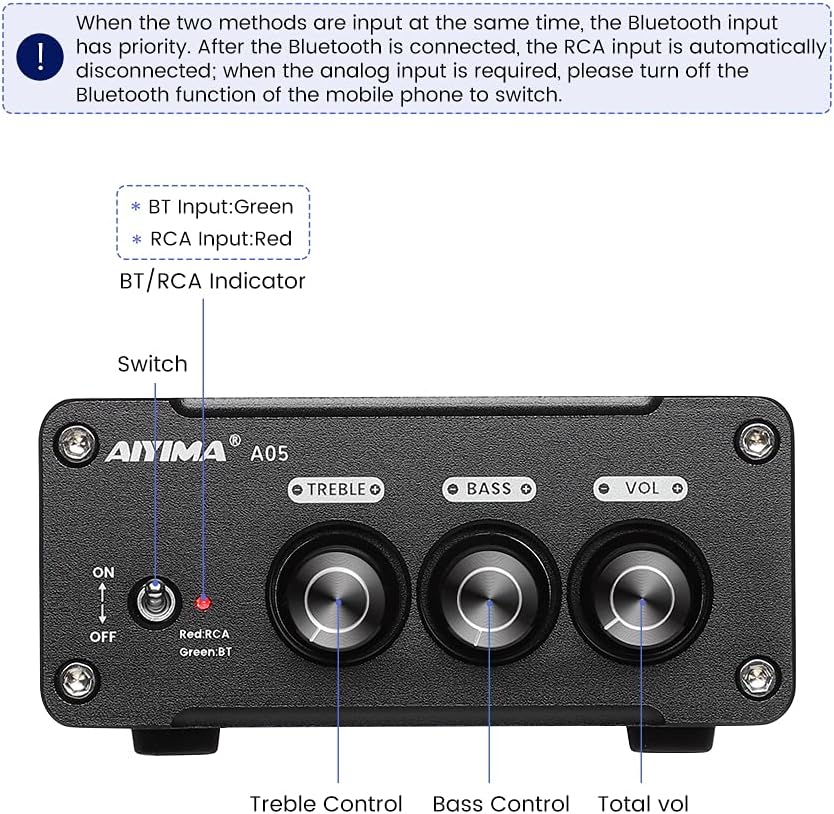
ਚਿੱਤਰ 4.1: Front panel of the AIYIMA A05 amplifier, showing the power switch, input indicator, treble, bass, and volume controls.
- ਪਾਵਰ ਸਵਿੱਚ (ਚਾਲੂ/ਬੰਦ): ਨੂੰ ਬਦਲੋ ampਜੀਵਨਸ਼ਕਤੀ ਦੀ ਸ਼ਕਤੀ.
- BT/RCA Indicator: Displays the active input source. Green indicates Bluetooth (BT) input, Red indicates RCA input.
- ਟ੍ਰਬਲ ਕੰਟਰੋਲ: ਉੱਚ-ਆਵਿਰਤੀ ਆਡੀਓ ਆਉਟਪੁੱਟ ਨੂੰ ਵਿਵਸਥਿਤ ਕਰਦਾ ਹੈ।
- ਬਾਸ ਕੰਟਰੋਲ: ਘੱਟ-ਫ੍ਰੀਕੁਐਂਸੀ ਆਡੀਓ ਆਉਟਪੁੱਟ ਨੂੰ ਐਡਜਸਟ ਕਰਦਾ ਹੈ।
- ਵਾਲੀਅਮ ਕੰਟਰੋਲ: Adjusts the overall audio output level.

ਚਿੱਤਰ 4.2: ਬੰਦ ਕਰਣਾ view of the power switch and the BT/RCA input indicator on the front panel.

ਚਿੱਤਰ 4.3: ਬੰਦ ਕਰਣਾ view of the Treble, Bass, and Volume control knobs.
4.2 ਰੀਅਰ ਪੈਨਲ ਕਨੈਕਸ਼ਨ

ਚਿੱਤਰ 4.4: Rear panel of the AIYIMA A05 amplifier, showing the Bluetooth antenna port, RCA audio input, speaker outputs, and DC power input.
- ANT (Bluetooth Antenna Port): Connect the included Bluetooth antenna here for wireless audio reception.
- AUDIO IN (RCA Input): Connect audio sources (e.g., CD player, TV, DAC) using RCA cables.
- SPEAKER (Audio Output): Connect passive speakers using speaker wires. Ensure correct polarity (+ to + and - to -).
- DC 24-32V (Power Input): Connect the provided DC power adapter.
5. ਸੈੱਟਅੱਪ ਨਿਰਦੇਸ਼
Follow these steps to set up your AIYIMA A05 ampਜੀਵਤ:
- Connect Bluetooth Antenna: Screw the included Bluetooth antenna into the ANT port on the rear panel.
- ਸਪੀਕਰ ਕਨੈਕਟ ਕਰੋ: Connect your passive speakers to the SPEAKER output terminals on the rear panel. Ensure the positive (+) terminal of the amplifier connects to the positive (+) terminal of the speaker, and the negative (-) terminal connects to the negative (-).
- Connect Audio Source (RCA): If using a wired audio source, connect it to the AUDIO IN (RCA) ports on the rear panel using appropriate RCA cables.
- ਪਾਵਰ ਕਨੈਕਟ ਕਰੋ: Connect the DC power adapter to the DC 24-32V input port on the rear panel, then plug the adapter into a wall outlet.
- ਪਾਵਰ ਚਾਲੂ: Flip the power switch on the front panel to the "ON" position. The input indicator will light up.

ਚਿੱਤਰ 5.1: ਦਾ ਪਿਛਲਾ ਪੈਨਲ amplifier with Bluetooth antenna, RCA cables, speaker wires, and power adapter connected.
6. ਓਪਰੇਟਿੰਗ ਹਦਾਇਤਾਂ
6.1 ਪਾਵਰ ਚਾਲੂ/ਬੰਦ
'ਤੇ ਪਾਵਰ ਕਰਨ ਲਈ amplifier, flip the front panel switch to the "ON" position. To power off, flip the switch to the "OFF" position.
6.2 ਬਲੂਟੁੱਥ ਕਨੈਕਸ਼ਨ
- ਯਕੀਨੀ ਬਣਾਓ amplifier is powered on and the BT/RCA indicator is green, indicating Bluetooth mode. If it's red, ensure no RCA cable is connected or disconnect it.
- ਆਪਣੇ ਮੋਬਾਈਲ ਡਿਵਾਈਸ (ਫੋਨ, ਟੈਬਲੇਟ, ਆਦਿ) 'ਤੇ, ਬਲੂਟੁੱਥ ਨੂੰ ਸਮਰੱਥ ਬਣਾਓ ਅਤੇ ਉਪਲਬਧ ਡਿਵਾਈਸਾਂ ਦੀ ਖੋਜ ਕਰੋ।
- ਜੋੜਾ ਬਣਾਉਣ ਲਈ ਡਿਵਾਈਸਾਂ ਦੀ ਸੂਚੀ ਵਿੱਚੋਂ "AIYIMA A05" ਚੁਣੋ।
- Once paired, the indicator light will remain green, and you can play audio from your device through the ampਜੀਵ
6.3 RCA Input Usage
- Connect your audio source to the RCA input ports on the rear panel.
- ਯਕੀਨੀ ਬਣਾਓ amplifier is powered on. The BT/RCA indicator should be red, indicating RCA input mode.
- If the indicator is green (Bluetooth mode), ensure Bluetooth is disconnected on any paired device, or turn off Bluetooth on your mobile device to switch to RCA input.
6.4 Adjusting Audio
- ਵਾਲੀਅਮ: Rotate the "VOL" knob clockwise to increase volume and counter-clockwise to decrease.
- ਤਗੜਾ: Rotate the "TREBLE" knob to adjust high-frequency sounds to your preference.
- ਬਾਸ: Rotate the "BASS" knob to adjust low-frequency sounds to your preference.
7. ਰੱਖ-ਰਖਾਅ
- ਸਫਾਈ: Disconnect the power adapter before cleaning. Use a soft, dry, lint-free cloth to wipe the surface of the amplifier. Do not use harsh chemicals or abrasive materials.
- ਸਟੋਰੇਜ: If not in use for an extended period, store the ampਲਿਫਾਇਰ ਨੂੰ ਠੰਢੀ, ਸੁੱਕੀ ਜਗ੍ਹਾ 'ਤੇ, ਸਿੱਧੀ ਧੁੱਪ ਅਤੇ ਬਹੁਤ ਜ਼ਿਆਦਾ ਤਾਪਮਾਨਾਂ ਤੋਂ ਦੂਰ ਰੱਖੋ।
- ਕਨੈਕਸ਼ਨ: ਸਮੇਂ-ਸਮੇਂ 'ਤੇ ਸਾਰੇ ਕੇਬਲ ਕਨੈਕਸ਼ਨਾਂ ਦੀ ਜਾਂਚ ਕਰੋ ਤਾਂ ਜੋ ਇਹ ਯਕੀਨੀ ਬਣਾਇਆ ਜਾ ਸਕੇ ਕਿ ਉਹ ਸੁਰੱਖਿਅਤ ਹਨ ਅਤੇ ਖੋਰ ਤੋਂ ਮੁਕਤ ਹਨ।
8. ਸਮੱਸਿਆ ਨਿਪਟਾਰਾ
If you encounter issues with your AIYIMA A05 ampਜੀਵਨਦਾਤਾ, ਕਿਰਪਾ ਕਰਕੇ ਹੇਠ ਲਿਖੀਆਂ ਆਮ ਸਮੱਸਿਆਵਾਂ ਅਤੇ ਹੱਲ ਵੇਖੋ:
| ਸਮੱਸਿਆ | ਸੰਭਵ ਕਾਰਨ | ਹੱਲ |
|---|---|---|
| ਕੋਈ ਧੁਨੀ ਆਉਟਪੁੱਟ ਨਹੀਂ |
|
|
| Distorted or buzzing sound |
|
|
| ਬਲੂਟੁੱਥ ਕਨੈਕਟ ਨਹੀਂ ਹੋ ਰਿਹਾ |
|
|
| Loud noise/ticking on startup |
|
|
If the problem persists after trying these solutions, please contact AIYIMA customer support for further assistance.
9 ਨਿਰਧਾਰਨ

ਚਿੱਤਰ 9.1: Dimensions of the AIYIMA A05 amplifier: 107mm (4.2in) width, 87mm (3.4in) depth, 36mm (1.4in) height.
| ਵਿਸ਼ੇਸ਼ਤਾ | ਨਿਰਧਾਰਨ |
|---|---|
| ਮਾਡਲ | A05 |
| ਆਉਟਪੁੱਟ ਪਾਵਰ | 105 Watts (at 4 Ω) |
| ਚੈਨਲਾਂ ਦੀ ਗਿਣਤੀ | 2.0 (ਸਟੀਰੀਓ) |
| ਬਲੂਟੁੱਥ ਸੰਸਕਰਣ | QCC3034 APTX Bluetooth 5.0 |
| ਚਿੱਪਸੈੱਟ | TPAX NUMX |
| ਘੱਟੋ-ਘੱਟ ਸਪਲਾਈ ਵੋਲtage | 12 ਵੋਲਟ (DC) |
| ਅਧਿਕਤਮ ਸਪਲਾਈ ਵਾਲੀਅਮtage | 32 ਵੋਲਟ (DC) |
| ਆਈਟਮ ਦਾ ਭਾਰ | 500 ਗ੍ਰਾਮ |
| ਮਾਪ (ਲਗਭਗ) | 107mm (W) x 87mm (D) x 36mm (H) |
10. ਵਾਰੰਟੀ ਅਤੇ ਸਹਾਇਤਾ
AIYIMA A05 amplifier comes with a warranty. Please refer to the included Warranty Card for specific terms and conditions. For technical support, troubleshooting assistance, or warranty claims, please contact AIYIMA customer service through the retailer where the product was purchased or visit the official AIYIMA webਸਾਈਟ.
ਔਨਲਾਈਨ ਸਰੋਤ: For additional information and support, you may visit the AIYIMA store page: AIYIMA Official Store