
ਜਾਣ-ਪਛਾਣ
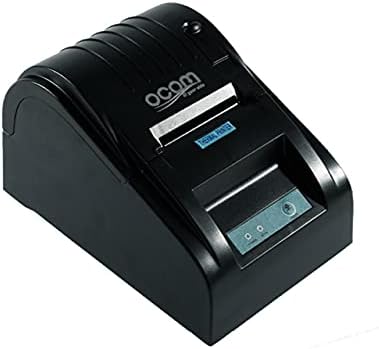
This image shows the OCOM OCPP-585A-U-B Thermal Receipt Printer from a slightly elevated front-right angle. The printer is black with a sleek, compact design. The paper output slot is visible at the top, and the control panel with 'POWER' and 'MODE' indicators is located on the front.
This manual provides detailed instructions for the OCOM OCPP-585A-U-B Thermal Receipt Printer. Please read this manual carefully before using the printer to ensure proper operation and longevity.
ਸੈੱਟਅੱਪ ਗਾਈਡ
1 ਅਨਪੈਕਿੰਗ
Carefully remove the printer and all accessories from the packaging. Verify that all components are present: printer unit, power adapter, USB cable, and a roll of thermal paper.
2. ਥਰਮਲ ਪੇਪਰ ਲੋਡ ਕਰਨਾ
- Open the paper cover by pushing the cover open button (usually located on the side or front).
- Insert the thermal paper roll into the paper compartment, ensuring the printing side of the paper faces the print head. The paper should feed smoothly from the bottom of the roll.
- Pull out a small length of paper beyond the paper exit slot.
- ਕਾਗਜ਼ ਦੇ ਢੱਕਣ ਨੂੰ ਮਜ਼ਬੂਤੀ ਨਾਲ ਬੰਦ ਕਰੋ ਜਦੋਂ ਤੱਕ ਇਹ ਆਪਣੀ ਜਗ੍ਹਾ 'ਤੇ ਨਹੀਂ ਆ ਜਾਂਦਾ।
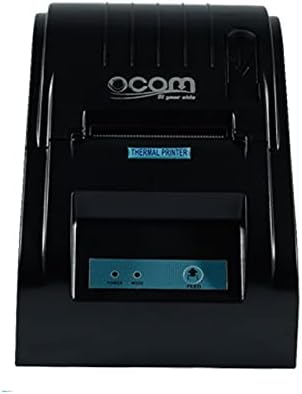
This image displays the OCOM OCPP-585A-U-B Thermal Receipt Printer from a direct top-down perspective. The paper compartment is visible, showing a thermal paper roll correctly inserted. The 'THERMAL PRINTER' label and the control panel with 'POWER' and 'MODE' indicators are clearly visible.
3. ਪ੍ਰਿੰਟਰ ਨੂੰ ਜੋੜਨਾ
- Connect the power adapter to the printer's power input port and then plug it into a power outlet.
- Connect the USB cable to the printer's USB port and the other end to your computer or POS system.
- ਪ੍ਰਿੰਟਰ ਚਾਲੂ ਕਰਨ ਲਈ ਪਾਵਰ ਬਟਨ ਦਬਾਓ। ਪਾਵਰ ਇੰਡੀਕੇਟਰ ਲਾਈਟ ਜਗਮਗਾਏਗੀ।
ਓਪਰੇਟਿੰਗ ਨਿਰਦੇਸ਼
ਬੇਸਿਕ ਪ੍ਰਿੰਟਿੰਗ
Once connected and powered on, the printer is ready to receive print commands from your connected device. Ensure the correct printer driver is installed on your computer/POS system.
- ਉਹ ਦਸਤਾਵੇਜ਼ ਜਾਂ ਐਪਲੀਕੇਸ਼ਨ ਖੋਲ੍ਹੋ ਜਿਸ ਤੋਂ ਤੁਸੀਂ ਪ੍ਰਿੰਟ ਕਰਨਾ ਚਾਹੁੰਦੇ ਹੋ।
- Select 'Print' from the file ਮੀਨੂ।
- Choose 'OCOM OCPP-585A-U-B' as your printer.
- Adjust print settings if necessary (e.g., paper size, print quality).
- 'ਪ੍ਰਿੰਟ' 'ਤੇ ਕਲਿੱਕ ਕਰੋ।
Self-Test Print
To perform a self-test print, ensure the printer is off. Hold down the 'FEED' button (if available, or a combination of buttons as per specific model) while turning on the printer. Release the button once printing begins. This will print a configuration page, confirming basic printer functionality.
ਰੱਖ-ਰਖਾਅ
ਪ੍ਰਿੰਟ ਹੈਡ ਦੀ ਸਫਾਈ
Regular cleaning of the print head ensures optimal print quality and extends printer life.
- ਪ੍ਰਿੰਟਰ ਬੰਦ ਕਰੋ ਅਤੇ ਪਾਵਰ ਕੋਰਡ ਨੂੰ ਅਨਪਲੱਗ ਕਰੋ।
- ਕਾਗਜ਼ ਦਾ ਢੱਕਣ ਖੋਲ੍ਹੋ.
- ਇੱਕ ਸੂਤੀ ਫੰਬੇ ਦੀ ਵਰਤੋਂ ਹਲਕੇ ਤੌਰ 'ਤੇ ਕਰੋ dampened with isopropyl alcohol to gently wipe the thermal print head (the dark strip inside the printer).
- ਕਵਰ ਬੰਦ ਕਰਨ ਅਤੇ ਪ੍ਰਿੰਟਰ ਚਾਲੂ ਕਰਨ ਤੋਂ ਪਹਿਲਾਂ ਪ੍ਰਿੰਟ ਹੈੱਡ ਨੂੰ ਪੂਰੀ ਤਰ੍ਹਾਂ ਸੁੱਕਣ ਦਿਓ।
ਕਾਗਜ਼ੀ ਰਸਤਾ ਸਾਫ਼ ਕਰਨਾ
ਨਰਮ ਬੁਰਸ਼ ਜਾਂ ਸੰਕੁਚਿਤ ਹਵਾ ਦੀ ਵਰਤੋਂ ਕਰਕੇ ਕਾਗਜ਼ ਦੇ ਰਸਤੇ ਤੋਂ ਕਿਸੇ ਵੀ ਕਾਗਜ਼ ਦੀ ਧੂੜ ਜਾਂ ਮਲਬੇ ਨੂੰ ਹਟਾਓ।
ਸਮੱਸਿਆ ਨਿਪਟਾਰਾ
| ਸਮੱਸਿਆ | ਸੰਭਵ ਕਾਰਨ | ਹੱਲ |
|---|---|---|
| ਪ੍ਰਿੰਟਰ ਚਾਲੂ ਨਹੀਂ ਹੋ ਰਿਹਾ ਹੈ | Power cable loose; Power outlet faulty | Check power connections; Try a different outlet |
| ਕੋਈ ਪ੍ਰਿੰਟ ਆਉਟਪੁੱਟ ਨਹੀਂ | Paper loaded incorrectly; Out of paper; Driver not installed/selected | Reload paper correctly; Replace paper roll; Install/select correct printer driver |
| Faint or blank print | Thermal paper loaded upside down; Print head dirty; Paper quality issue | Flip paper roll; Clean print head; Try new thermal paper |
| ਪ੍ਰਿੰਟਰ ਆਫ਼ਲਾਈਨ | USB cable disconnected; Printer driver issue | Reconnect USB cable; Reinstall printer driver |
ਨਿਰਧਾਰਨ
| ਵਿਸ਼ੇਸ਼ਤਾ | ਵੇਰਵੇ |
|---|---|
| ਪਹਿਲੀ ਉਪਲਬਧ ਤਾਰੀਖ | 2021 ਜੂਨ 20 |
| ਨਿਰਮਾਤਾ | OCOM |
| ASIN | B097LSGP62 |
| ਆਈਟਮ ਮਾਡਲ ਨੰਬਰ | OCPP-585-U-B |
| ਬ੍ਰਾਂਡ ਦਾ ਨਾਮ | OCOM |
| ਕਨੈਕਟੀਵਿਟੀ ਤਕਨਾਲੋਜੀ | USB |
| ਪ੍ਰਿੰਟਰ ਤਕਨਾਲੋਜੀ | ਥਰਮਲ |
| ਰੰਗ | ਕਾਲਾ |
| ਮਾਡਲ ਦਾ ਨਾਮ | OCPP 585 U B |
| ਪ੍ਰਿੰਟ ਮੀਡੀਆ | ਲੇਬਲ |
| ਸਕੈਨਰ ਦੀ ਕਿਸਮ | ਰਸੀਦ |
ਵਾਰੰਟੀ ਅਤੇ ਸਹਾਇਤਾ
This OCOM printer typically comes with a standard manufacturer's warranty. Please refer to the warranty card included with your product for specific terms and conditions, or visit the official OCOM webਵਿਸਤ੍ਰਿਤ ਵਾਰੰਟੀ ਜਾਣਕਾਰੀ ਲਈ ਸਾਈਟ.
For technical support, driver downloads, or further assistance, please visit the OCOM official support website or contact their customer service. Keep your model number (OCPP-585A-U-B) and purchase details ready when seeking support.