
1. ਜਾਣ-ਪਛਾਣ
Welcome to the instruction manual for your AMAFACE Kids Wireless Earbuds K62. These earbuds are designed to provide a comfortable and enjoyable audio experience with features tailored for children, including a unique panda-themed charging case, Bluetooth 5.1 connectivity, and intuitive touch controls. Please read this manual carefully to ensure proper use and maintenance of your device.

Figure 1: AMAFACE K62 Kids Wireless Earbuds with Panda Charging Case
2. ਉਤਪਾਦ ਖਤਮview
2.1 ਪੈਕੇਜ ਸਮੱਗਰੀ
- AMAFACE K62 Wireless Earbuds (Left and Right)
- ਪਾਂਡਾ ਚਾਰਜਿੰਗ ਕੇਸ
- USB-C ਚਾਰਜਿੰਗ ਕੇਬਲ
- ਸਿਲੀਕੋਨ ਕੰਨਾਂ ਦੇ ਟਿਪਸ ਦੇ ਕਈ ਆਕਾਰ (S, M, L)
- ਯੂਜ਼ਰ ਮੈਨੂਅਲ
2.2 ਮੁੱਖ ਵਿਸ਼ੇਸ਼ਤਾਵਾਂ
- True Wireless Stereo (TWS) with Bluetooth 5.1
- ਆਸਾਨ ਕਾਰਵਾਈ ਲਈ ਸਮਾਰਟ ਟੱਚ ਕੰਟਰੋਲ
- IPX5 Sweat Resistance
- Ergonomic and Lightweight Design
- ਸ਼ੋਰ ਘਟਾਉਣ ਦੀ ਤਕਨਾਲੋਜੀ

Figure 2: Open Panda Charging Case with Earbuds

Figure 3: Included Silicone Ear Tips (S, M, L)
3. ਸੈੱਟਅੱਪ
3.1 ਈਅਰਬਡਸ ਅਤੇ ਕੇਸ ਨੂੰ ਚਾਰਜ ਕਰਨਾ
Before first use, fully charge the earbuds and the charging case. Connect the provided USB-C charging cable to the charging port on the back of the panda case and to a compatible USB power source. The indicator lights on the case will show the charging status.

Figure 4: Charging Port on Panda Case
3.2 ਇੱਕ ਡਿਵਾਈਸ ਨਾਲ ਪੇਅਰਿੰਗ
- ਯਕੀਨੀ ਬਣਾਓ ਕਿ ਈਅਰਬੱਡ ਚਾਰਜ ਕੀਤੇ ਗਏ ਹਨ।
- Open the panda charging case. The earbuds will automatically power on and enter pairing mode.
- On your device (phone, tablet, etc.), go to Bluetooth settings and enable Bluetooth.
- Look for 'K62' in the list of available devices and select it to connect.
- ਇੱਕ ਵਾਰ ਕਨੈਕਟ ਹੋਣ ਤੋਂ ਬਾਅਦ, ਇੱਕ ਵੌਇਸ ਪ੍ਰੋਂਪਟ ਸਫਲ ਜੋੜਾ ਬਣਾਉਣ ਦੀ ਪੁਸ਼ਟੀ ਕਰੇਗਾ।
Video 1: This video demonstrates the automatic pairing process of the AMAFACE K62 Kids Wireless Earbuds. It shows the earbuds being removed from the panda charging case and instantly connecting to a device.
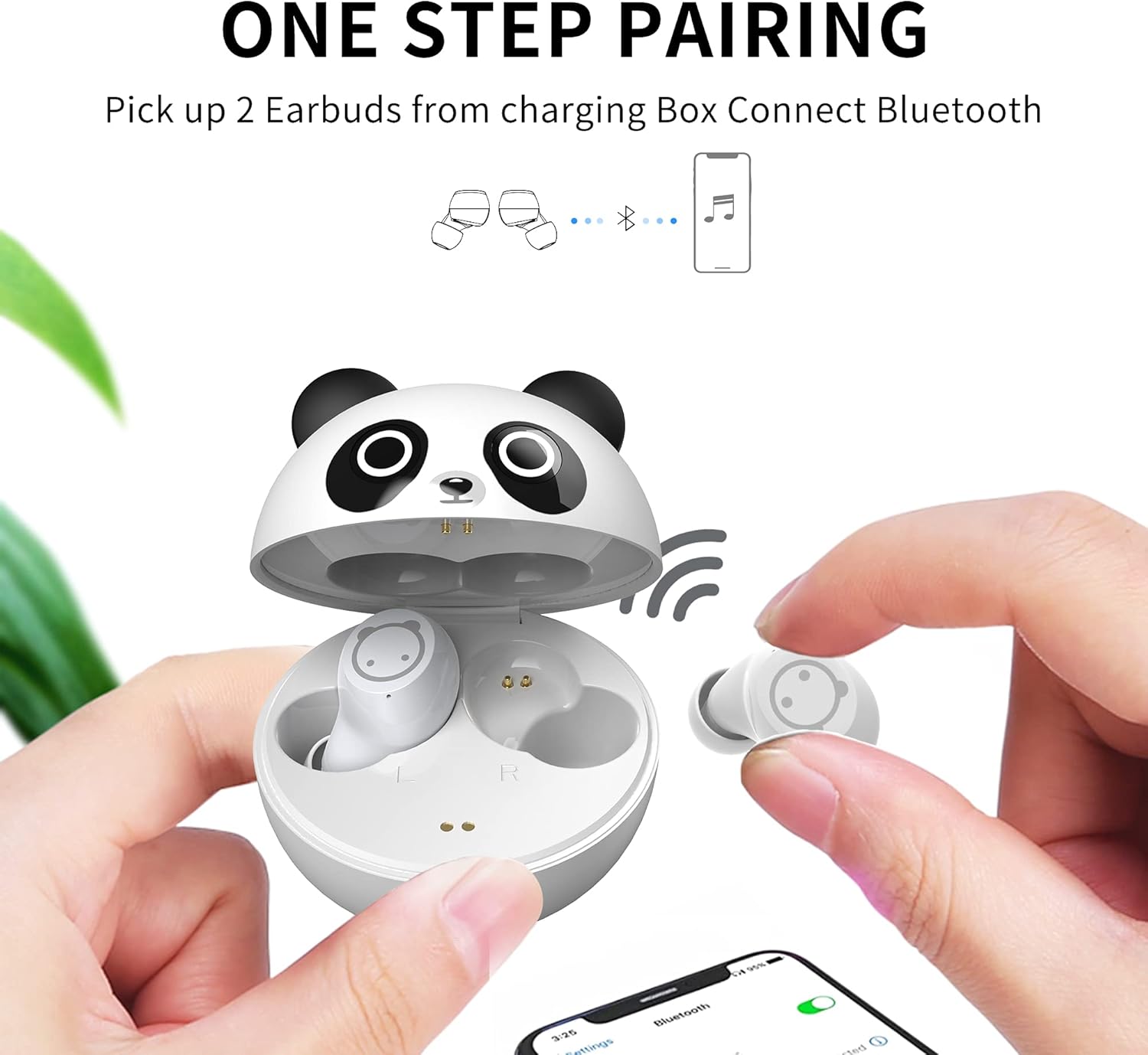
ਚਿੱਤਰ 5: ਇੱਕ-ਪੜਾਅ ਜੋੜਨ ਦੀ ਪ੍ਰਕਿਰਿਆ
4. ਓਪਰੇਟਿੰਗ ਹਦਾਇਤਾਂ
4.1 ਸਮਾਰਟ ਟੱਚ ਕੰਟਰੋਲ
The earbuds feature touch-sensitive areas for easy control of music and calls:
- ਸੰਗੀਤ ਚਲਾਓ/ਰੋਕੋ: ਕਿਸੇ ਵੀ ਈਅਰਬਡ 'ਤੇ ਇੱਕ ਵਾਰ ਟੈਪ ਕਰੋ.
- ਕਾਲ ਦਾ ਜਵਾਬ/ਸਮਾਪਤ ਕਰੋ: ਕਿਸੇ ਵੀ ਈਅਰਬਡ 'ਤੇ ਇੱਕ ਵਾਰ ਟੈਪ ਕਰੋ.
- Refuse Incoming Call: ਕਿਸੇ ਵੀ ਈਅਰਬਡ 'ਤੇ 2 ਸਕਿੰਟਾਂ ਲਈ ਦਬਾ ਕੇ ਰੱਖੋ।
- ਅਗਲਾ ਟਰੈਕ: Long touch the Right (R) earbud for 2 seconds.
- ਪਿਛਲਾ ਟਰੈਕ: Long touch the Left (L) earbud for 2 seconds.
- ਸਰਗਰਮ ਆਵਾਜ਼ ਸਹਾਇਕ: ਕਿਸੇ ਵੀ ਈਅਰਬਡ 'ਤੇ ਤਿੰਨ ਵਾਰ ਕਲਿੱਕ ਕਰੋ।
- ਵਾਲੀਅਮ ਐਡਜਸਟਮੈਂਟ: Press and hold the Left earbud to decrease volume, press and hold the Right earbud to increase volume.

ਚਿੱਤਰ 6: ਈਅਰਬਡ ਟੱਚ ਕੰਟਰੋਲ
4.2 ਈਅਰਬਡਸ ਪਹਿਨਣਾ
ਵਧੀਆ ਆਵਾਜ਼ ਦੀ ਗੁਣਵੱਤਾ ਅਤੇ ਆਰਾਮ ਲਈ, ਸਿਲੀਕੋਨ ਈਅਰ ਟਿਪਸ ਚੁਣੋ ਜੋ ਤੁਹਾਡੇ ਕੰਨਾਂ ਵਿੱਚ ਸਭ ਤੋਂ ਵਧੀਆ ਫਿੱਟ ਹੋਣ। ਈਅਰਬਡਸ ਨੂੰ ਹੌਲੀ-ਹੌਲੀ ਆਪਣੇ ਕੰਨ ਨਹਿਰ ਵਿੱਚ ਪਾਓ ਅਤੇ ਉਹਨਾਂ ਨੂੰ ਸੁਰੱਖਿਅਤ ਕਰਨ ਲਈ ਥੋੜ੍ਹਾ ਜਿਹਾ ਮਰੋੜੋ।

Figure 7: Earbud Worn Comfortably in Ear
5. ਰੱਖ-ਰਖਾਅ
5.1 ਸਫਾਈ ਅਤੇ ਸਟੋਰੇਜ
- ਈਅਰਬੱਡਾਂ ਅਤੇ ਚਾਰਜਿੰਗ ਕੇਸ ਨੂੰ ਨਿਯਮਿਤ ਤੌਰ 'ਤੇ ਨਰਮ, ਸੁੱਕੇ ਕੱਪੜੇ ਨਾਲ ਸਾਫ਼ ਕਰੋ।
- ਕੰਨਾਂ ਦੇ ਸਿਰੇ ਹਟਾਓ ਅਤੇ ਉਹਨਾਂ ਨੂੰ ਹਲਕੇ ਸਾਬਣ ਅਤੇ ਪਾਣੀ ਨਾਲ ਸਾਫ਼ ਕਰੋ, ਫਿਰ ਦੁਬਾਰਾ ਜੋੜਨ ਤੋਂ ਪਹਿਲਾਂ ਚੰਗੀ ਤਰ੍ਹਾਂ ਸੁਕਾਓ।
- ਈਅਰਬੱਡਾਂ ਨੂੰ ਉਹਨਾਂ ਦੇ ਚਾਰਜਿੰਗ ਕੇਸ ਵਿੱਚ ਸਟੋਰ ਕਰੋ ਜਦੋਂ ਉਹਨਾਂ ਦੀ ਸੁਰੱਖਿਆ ਅਤੇ ਉਹਨਾਂ ਨੂੰ ਚਾਰਜ ਰੱਖਣ ਲਈ ਵਰਤੋਂ ਵਿੱਚ ਨਾ ਹੋਵੇ।
- ਈਅਰਬੱਡਾਂ ਨੂੰ ਬਹੁਤ ਜ਼ਿਆਦਾ ਤਾਪਮਾਨਾਂ ਜਾਂ ਸਿੱਧੀ ਧੁੱਪ ਵਿੱਚ ਕੱਢਣ ਤੋਂ ਬਚੋ।
5.2 ਪਾਣੀ ਪ੍ਰਤੀਰੋਧ
The earbuds are IPX5 sweat resistant, meaning they can withstand sweat and light splashes of water. They are not designed for submersion in water. Ensure the earbuds are dry before placing them back in the charging case.

Figure 8: IPX5 Sweat Resistant Earbuds
6. ਸਮੱਸਿਆ ਨਿਪਟਾਰਾ
ਜੇਕਰ ਤੁਹਾਨੂੰ ਆਪਣੇ ਈਅਰਬੱਡਾਂ ਨਾਲ ਕੋਈ ਸਮੱਸਿਆ ਆਉਂਦੀ ਹੈ, ਤਾਂ ਕਿਰਪਾ ਕਰਕੇ ਹੇਠਾਂ ਦਿੱਤੇ ਆਮ ਹੱਲ ਵੇਖੋ:
- ਈਅਰਬੱਡ ਜੋੜੇ ਨਹੀਂ ਬਣ ਰਹੇ: Ensure both earbuds are out of the case and in pairing mode. Turn off and on your device's Bluetooth, then try pairing again.
- ਇੱਕ ਈਅਰਬਡ ਤੋਂ ਕੋਈ ਆਵਾਜ਼ ਨਹੀਂ ਆ ਰਹੀ: Place both earbuds back in the charging case, close the lid, then open it again and try reconnecting. Ensure both earbuds are charged.
- ਚਾਰਜਿੰਗ ਮੁੱਦੇ: Check if the USB-C cable is securely connected to both the case and the power source. Ensure the charging contacts on the earbuds and inside the case are clean and dry.
- Volume too low or high: Adjust the volume using the touch controls on the earbuds or directly on your connected device. Note that these earbuds are designed with a safe volume limit for children.
- ਰੁਕ-ਰੁਕ ਕੇ ਕਨੈਕਸ਼ਨ: Ensure your device is within the Bluetooth range (up to 10 meters) and there are no significant obstacles between the earbuds and your device.
7 ਨਿਰਧਾਰਨ
| ਵਿਸ਼ੇਸ਼ਤਾ | ਨਿਰਧਾਰਨ |
|---|---|
| ਮਾਡਲ ਦਾ ਨਾਮ | ZY-K62 |
| ਬਲੂਟੁੱਥ ਸੰਸਕਰਣ | 5.1 |
| ਬਲੂਟੁੱਥ ਰੇਂਜ | 10 ਮੀਟਰ |
| ਸ਼ੋਰ ਕੰਟਰੋਲ | ਸਰਗਰਮ ਸ਼ੋਰ ਰੱਦ |
| ਪਾਣੀ ਪ੍ਰਤੀਰੋਧ ਦਾ ਪੱਧਰ | IPX5 (ਪਸੀਨਾ ਰੋਧਕ) |
| ਕੰਟਰੋਲ ਕਿਸਮ | ਕੰਟਰੋਲ ਨੂੰ ਛੋਹਵੋ |
| ਆਈਟਮ ਦਾ ਭਾਰ | 0.634 ਔਂਸ |
| ਸ਼ਾਮਿਲ ਭਾਗ | ਚਾਰਜਿੰਗ ਕੇਸ |
8. ਵਾਰੰਟੀ ਅਤੇ ਸਹਾਇਤਾ
For warranty information or technical support, please refer to the contact details provided with your purchase or visit the official AMAFACE website. Our customer service team is available to assist you with any questions or concerns regarding your AMAFACE Kids Wireless Earbuds K62.
Video 2: This video highlights the design and features of the AMAFACE K62 Kids Wireless Earbuds, showcasing the panda charging case and the earbuds themselves.