
1. ਜਾਣ-ਪਛਾਣ
Welcome to the user manual for your new Avtex W195TS Smart TV. This television is specifically designed for mobile living, offering versatile power options (12V, 24V, and 240V) and a range of smart features, including Wi-Fi, Bluetooth, and an integrated Freesat satellite decoder. This manual provides essential information for setting up, operating, maintaining, and troubleshooting your device to ensure optimal performance and enjoyment.
2 ਸੁਰੱਖਿਆ ਜਾਣਕਾਰੀ
ਟੈਲੀਵਿਜ਼ਨ ਦੀ ਵਰਤੋਂ ਕਰਨ ਤੋਂ ਪਹਿਲਾਂ ਕਿਰਪਾ ਕਰਕੇ ਸਾਰੀਆਂ ਸੁਰੱਖਿਆ ਹਦਾਇਤਾਂ ਨੂੰ ਧਿਆਨ ਨਾਲ ਪੜ੍ਹੋ। ਭਵਿੱਖ ਦੇ ਹਵਾਲੇ ਲਈ ਇਸ ਮੈਨੂਅਲ ਨੂੰ ਆਪਣੇ ਕੋਲ ਰੱਖੋ।
- ਬਿਜਲੀ ਦੀ ਸਪਲਾਈ: ਸਹੀ ਵੋਲਯੂਮ ਨੂੰ ਯਕੀਨੀ ਬਣਾਓtage is used (12V, 24V DC or 240V AC). Do not overload power outlets.
- ਹਵਾਦਾਰੀ: ਹਵਾਦਾਰੀ ਦੇ ਖੁੱਲ੍ਹਣ ਨੂੰ ਨਾ ਰੋਕੋ। ਸਹੀ ਹਵਾ ਦੇ ਪ੍ਰਵਾਹ ਲਈ ਟੀਵੀ ਦੇ ਆਲੇ-ਦੁਆਲੇ ਢੁਕਵੀਂ ਜਗ੍ਹਾ ਦਿਓ।
- ਪਾਣੀ ਅਤੇ ਨਮੀ: ਟੀਵੀ ਨੂੰ ਮੀਂਹ ਜਾਂ ਨਮੀ ਦੇ ਸੰਪਰਕ ਵਿੱਚ ਨਾ ਪਾਓ। ਤਰਲ ਪਦਾਰਥਾਂ ਨਾਲ ਭਰੀਆਂ ਚੀਜ਼ਾਂ ਟੀਵੀ 'ਤੇ ਨਾ ਰੱਖੋ।
- ਸਫਾਈ: ਸਫਾਈ ਕਰਨ ਤੋਂ ਪਹਿਲਾਂ ਟੀਵੀ ਨੂੰ ਅਨਪਲੱਗ ਕਰੋ। ਨਰਮ, ਸੁੱਕੇ ਕੱਪੜੇ ਦੀ ਵਰਤੋਂ ਕਰੋ। ਤਰਲ ਕਲੀਨਰ ਜਾਂ ਐਰੋਸੋਲ ਕਲੀਨਰ ਦੀ ਵਰਤੋਂ ਨਾ ਕਰੋ।
- ਪਲੇਸਮੈਂਟ: Place the TV on a stable, flat surface or mount securely to a wall/bracket. Avoid direct sunlight or heat sources.
- ਸਰਵਿਸਿੰਗ: ਇਸ ਉਤਪਾਦ ਦੀ ਖੁਦ ਸੇਵਾ ਕਰਨ ਦੀ ਕੋਸ਼ਿਸ਼ ਨਾ ਕਰੋ. ਸਾਰੀਆਂ ਸੇਵਾਵਾਂ ਨੂੰ ਯੋਗ ਸੇਵਾ ਕਰਮਚਾਰੀਆਂ ਦੇ ਹਵਾਲੇ ਕਰੋ.
3. ਪੈਕੇਜ ਸਮੱਗਰੀ
Before setup, please check that all items are present in the box:
- Avtex W195TS ਸਮਾਰਟ ਟੀ.ਵੀ
- ਬੈਟਰੀਆਂ ਨਾਲ ਰਿਮੋਟ ਕੰਟਰੋਲ
- 12V/24V DC ਪਾਵਰ ਕੇਬਲ
- 240V AC ਪਾਵਰ ਅਡੈਪਟਰ
- ਟੇਬਲ ਸਟੈਂਡ (ਜੇ ਲਾਗੂ ਹੋਵੇ)
- ਉਪਭੋਗਤਾ ਮੈਨੁਅਲ (ਇਹ ਦਸਤਾਵੇਜ਼)
4. ਉਤਪਾਦ ਖਤਮview
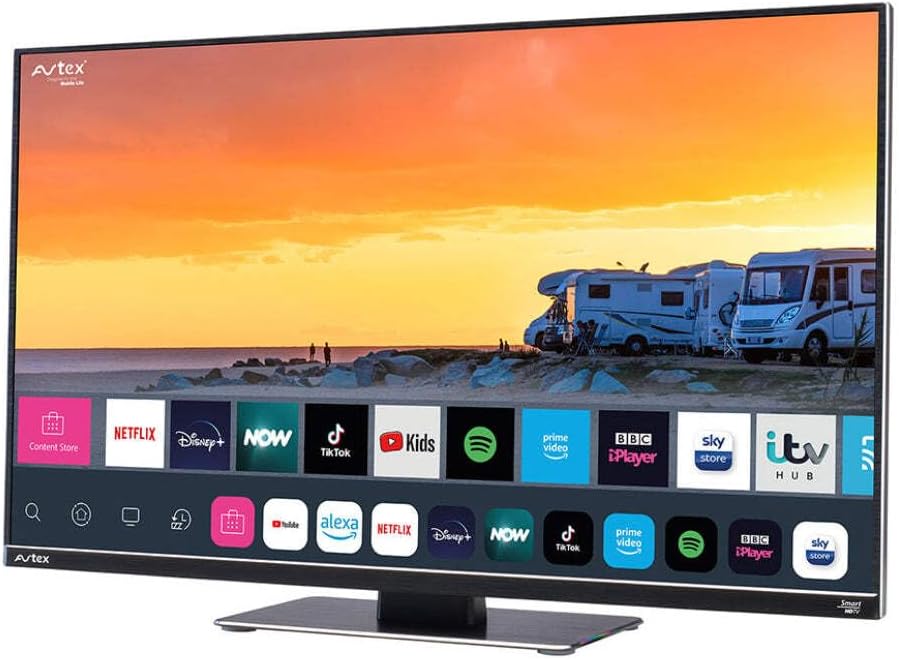
Figure 4.1: Avtex W195TS Smart TV Front View
This image shows the Avtex W195TS Smart TV from a slight angle, highlighting its slim design and the vibrant display. The screen shows a user interface with icons for popular streaming services like Netflix, Disney+, Now, TikTok, Kids, Spotify, Prime Video, BBC iPlayer, Sky Store, and ITV Hub. The background on the screen depicts a scenic view of motorhomes parked near a beach at sunset. The Avtex logo is visible on the top left and bottom left of the TV frame.
4.1. ਪੋਰਟ ਅਤੇ ਕਨੈਕਸ਼ਨ
- HDMI ਪੋਰਟ: For connecting external devices like Blu-ray players, game consoles, or set-top boxes.
- USB ਪੋਰਟ (2): For media playback from USB drives or connecting USB accessories.
- ਐਂਟੀਨਾ ਇਨਪੁਟ: For connecting a terrestrial TV antenna.
- ਸੈਟੇਲਾਈਟ ਇੰਪੁੱਟ: For connecting a satellite dish for Freesat or other satellite services.
- DC ਪਾਵਰ ਇੰਪੁੱਟ: For 12V/24V DC power connection.
- ਏਸੀ ਪਾਵਰ ਇਨਪੁਟ: For 240V AC power connection via adapter.
- ਈਥਰਨੈੱਟ ਪੋਰਟ: ਵਾਇਰਡ ਨੈੱਟਵਰਕ ਕਨੈਕਸ਼ਨ ਲਈ।
- ਆਡੀਓ ਆਉਟਪੁੱਟ: ਬਾਹਰੀ ਆਡੀਓ ਸਿਸਟਮ ਜਾਂ ਹੈੱਡਫੋਨ ਕਨੈਕਟ ਕਰਨ ਲਈ।
5. ਸੈੱਟਅੱਪ
5.1. Installing the Stand (Optional)
- ਸਕਰੀਨ ਨੂੰ ਨੁਕਸਾਨ ਤੋਂ ਬਚਾਉਣ ਲਈ ਟੀਵੀ ਦਾ ਮੂੰਹ ਨਰਮ, ਸਾਫ਼ ਸਤ੍ਹਾ 'ਤੇ ਧਿਆਨ ਨਾਲ ਰੱਖੋ।
- ਸਟੈਂਡ ਨੂੰ ਟੀਵੀ ਦੇ ਤਲ 'ਤੇ ਮਾਊਂਟਿੰਗ ਹੋਲਜ਼ ਨਾਲ ਇਕਸਾਰ ਕਰੋ।
- ਪ੍ਰਦਾਨ ਕੀਤੇ ਪੇਚਾਂ ਦੀ ਵਰਤੋਂ ਕਰਕੇ ਸਟੈਂਡ ਨੂੰ ਸੁਰੱਖਿਅਤ ਕਰੋ।
5.2 ਪਾਵਰ ਕਨੈਕਸ਼ਨ
The Avtex W195TS supports multiple power inputs:
- 12V/24V DC: Connect the supplied 12V/24V DC power cable to the DC input on the TV and to your vehicle's 12V or 24V power outlet.
- 240V ਏਸੀ: Connect the supplied 240V AC power adapter to the AC input on the TV, then plug the adapter into a standard 240V AC wall socket.
ਨੋਟ: Do not connect both DC and AC power simultaneously.
5.3. Antenna/Satellite Connection
- Terrestrial TV: Connect your aerial cable to the 'ANTENNA IN' port.
- Satellite TV (Freesat): Connect your satellite dish cable to the 'SATELLITE IN' port.
5.4. ਸ਼ੁਰੂਆਤੀ ਪਾਵਰ ਚਾਲੂ ਅਤੇ ਪਹਿਲੀ ਵਾਰ ਸੈੱਟਅੱਪ
- Connect the TV to power and press the power button on the remote control or TV.
- The First-Time Setup Wizard will appear. Follow the on-screen prompts to select your language, country, and time zone.
- Perform an automatic channel scan for both terrestrial and satellite channels.
- ਆਪਣੇ ਨੈੱਟਵਰਕ ਦਾ ਨਾਮ ਚੁਣ ਕੇ ਅਤੇ ਪਾਸਵਰਡ ਦਰਜ ਕਰਕੇ ਆਪਣੇ Wi-Fi ਨੈੱਟਵਰਕ ਨਾਲ ਕਨੈਕਟ ਕਰੋ।
6. ਓਪਰੇਟਿੰਗ
6.1. ਰਿਮੋਟ ਕੰਟਰੋਲ ਫੰਕਸ਼ਨ
Familiarize yourself with the remote control buttons for easy navigation and control of your TV's features.
- ਪਾਵਰ ਬਟਨ: ਟੀਵੀ ਨੂੰ ਚਾਲੂ/ਬੰਦ ਕਰਦਾ ਹੈ।
- ਸਰੋਤ ਬਟਨ: Selects input sources (HDMI, USB, TV, Satellite).
- ਖੰਡ +/-: ਵਾਲੀਅਮ ਪੱਧਰ ਨੂੰ ਵਿਵਸਥਿਤ ਕਰਦਾ ਹੈ।
- ਚੈਨਲ +/-: ਟੀਵੀ ਚੈਨਲ ਬਦਲਦਾ ਹੈ।
- ਨੈਵੀਗੇਸ਼ਨ ਬਟਨ (ਉੱਪਰ/ਹੇਠਾਂ/ਖੱਬੇ/ਸੱਜੇ/ਠੀਕ ਹਨ): ਮੀਨੂ ਨੈਵੀਗੇਸ਼ਨ ਅਤੇ ਚੋਣ ਲਈ।
- ਸਮਾਰਟ ਹੱਬ/ਹੋਮ ਬਟਨ: Accesses the Smart TV interface.
- ਐਪ ਬਟਨ: Dedicated buttons for popular streaming apps (if available).
6.2. ਸਮਾਰਟ ਟੀਵੀ ਵਿਸ਼ੇਸ਼ਤਾਵਾਂ
Your Avtex W195TS is equipped with smart TV capabilities:
- ਐਪ ਸਟੋਰ: Download and install various applications for streaming, news, and entertainment.
- ਸਟ੍ਰੀਮਿੰਗ ਸੇਵਾਵਾਂ: Access pre-installed or downloaded apps like Netflix, Disney+, Prime Video, BBC iPlayer, etc. (subscription may be required).
- Web ਬਰਾਊਜ਼ਰ: ਆਪਣੇ ਟੀਵੀ 'ਤੇ ਸਿੱਧਾ ਇੰਟਰਨੈੱਟ ਬ੍ਰਾਊਜ਼ ਕਰੋ।
- ਸਕ੍ਰੀਨ ਮਿਰਰਿੰਗ: Connect your smartphone or tablet to display content on the TV screen (compatibility may vary).
6.3. ਬਲੂਟੁੱਥ ਕਨੈਕਟੀਵਿਟੀ
Pair Bluetooth devices such as headphones or external speakers for enhanced audio experience.
- Go to the TV's settings menu.
- Select 'Bluetooth' or 'Connected Devices'.
- Enable Bluetooth and put your device into pairing mode.
- ਜੋੜਾ ਬਣਾਉਣ ਲਈ ਸੂਚੀ ਵਿੱਚੋਂ ਆਪਣੀ ਡਿਵਾਈਸ ਚੁਣੋ।
6.4. USB ਰਾਹੀਂ ਮੀਡੀਆ ਪਲੇਬੈਕ
Insert a USB drive into one of the USB ports to view ਫੋਟੋਆਂ ਖਿੱਚੋ, ਵੀਡੀਓ ਚਲਾਓ, ਜਾਂ ਸੰਗੀਤ ਸੁਣੋ।
- The TV will usually prompt you to open the media player.
- ਆਪਣੇ ਰਾਹੀਂ ਨੈਵੀਗੇਟ ਕਰੋ fileਰਿਮੋਟ ਕੰਟਰੋਲ ਦੀ ਵਰਤੋਂ ਕਰਦੇ ਹੋਏ।
7. ਰੱਖ-ਰਖਾਅ
7.1. ਟੀਵੀ ਸਾਫ਼ ਕਰਨਾ
- ਸਕਰੀਨ: ਸਕਰੀਨ ਨੂੰ ਨਰਮ, ਲਿੰਟ-ਮੁਕਤ ਕੱਪੜੇ ਨਾਲ ਹੌਲੀ-ਹੌਲੀ ਪੂੰਝੋ। ਜ਼ਿੱਦੀ ਨਿਸ਼ਾਨਾਂ ਲਈ, ਥੋੜ੍ਹਾ ਜਿਹਾ ਡੀampਕੱਪੜੇ ਨੂੰ ਪਾਣੀ ਜਾਂ ਸਕ੍ਰੀਨ-ਵਿਸ਼ੇਸ਼ ਸਫਾਈ ਘੋਲ ਨਾਲ ਧੋਵੋ (ਸਿੱਧਾ ਸਕ੍ਰੀਨ 'ਤੇ ਸਪਰੇਅ ਨਾ ਕਰੋ)।
- Casing: ਟੀਵੀ ਸੀ ਨੂੰ ਪੂੰਝਣ ਲਈ ਇੱਕ ਨਰਮ, ਸੁੱਕੇ ਕੱਪੜੇ ਦੀ ਵਰਤੋਂ ਕਰੋ।asing. ਘਸਾਉਣ ਵਾਲੇ ਕਲੀਨਰ ਜਾਂ ਘੋਲਨ ਵਾਲੇ ਪਦਾਰਥਾਂ ਤੋਂ ਬਚੋ।
7.2. ਸਾਫਟਵੇਅਰ ਅੱਪਡੇਟ
Periodically check for software updates to ensure your TV has the latest features and bug fixes. Updates can usually be found in the TV's settings menu under 'System' or 'Software Update'.
8. ਸਮੱਸਿਆ ਨਿਪਟਾਰਾ
If you encounter issues with your Avtex W195TS, refer to the following common problems and solutions:
| ਸਮੱਸਿਆ | ਸੰਭਵ ਕਾਰਨ | ਹੱਲ |
|---|---|---|
| ਕੋਈ ਸ਼ਕਤੀ ਨਹੀਂ | Power cable not connected; no power from outlet. | Check power cable connection; test outlet with another device; ensure correct voltage (12V/24V/240V)। |
| ਕੋਈ ਤਸਵੀਰ ਨਹੀਂ, ਪਰ ਆਵਾਜ਼ ਮੌਜੂਦ ਹੈ | Incorrect input source selected; faulty cable. | Press the 'Source' button on the remote to select the correct input; check HDMI/antenna cables. |
| ਕੋਈ ਆਵਾਜ਼ ਨਹੀਂ, ਪਰ ਤਸਵੀਰ ਮੌਜੂਦ ਹੈ | ਵੌਲਯੂਮ ਮਿਊਟ ਜਾਂ ਬਹੁਤ ਘੱਟ ਹੈ; ਬਾਹਰੀ ਆਡੀਓ ਸਿਸਟਮ ਸਮੱਸਿਆ ਹੈ। | Unmute volume or increase level; check connections to external audio devices. |
| ਵਾਈ-ਫਾਈ ਨਾਲ ਕਨੈਕਟ ਨਹੀਂ ਕੀਤਾ ਜਾ ਸਕਦਾ | ਗਲਤ ਪਾਸਵਰਡ; ਰਾਊਟਰ ਦੀ ਸਮੱਸਿਆ; ਟੀਵੀ ਰਾਊਟਰ ਤੋਂ ਬਹੁਤ ਦੂਰ ਹੈ। | Re-enter Wi-Fi password; restart router; move TV closer to router or use an extender. |
| ਰਿਮੋਟ ਕੰਟਰੋਲ ਕੰਮ ਨਹੀਂ ਕਰ ਰਿਹਾ | Dead batteries; obstruction; pairing issue. | Replace batteries; remove obstructions; re-pair remote if it's a Bluetooth remote. |
9 ਨਿਰਧਾਰਨ
| ਵਿਸ਼ੇਸ਼ਤਾ | ਨਿਰਧਾਰਨ |
|---|---|
| ਬ੍ਰਾਂਡ | Avtex |
| ਮਾਡਲ ਨੰਬਰ | AVTEX W195TS |
| ਸਕਰੀਨ ਦਾ ਆਕਾਰ | 19.5 ਇੰਚ |
| ਮਤਾ | 1080p (ਪੂਰਾ HD) |
| ਆਕਾਰ ਅਨੁਪਾਤ | 16:9 |
| ਕਨੈਕਟੀਵਿਟੀ ਤਕਨਾਲੋਜੀ | ਬਲੂਟੁੱਥ, HDMI, ਵਾਈ-ਫਾਈ |
| ਕੁੱਲ USB ਪੋਰਟ | 2 |
| ਵੋਲtage | 12 ਵੋਲਟ, 24 ਵੋਲਟ, 240 ਵੋਲਟ |
| ਆਈਟਮ ਦਾ ਭਾਰ | 2.5 ਕਿਲੋਗ੍ਰਾਮ |
| ਮਾਡਲ ਸਾਲ | 2018 |
10. ਵਾਰੰਟੀ ਅਤੇ ਸਹਾਇਤਾ
Your Avtex W195TS Smart TV comes with a manufacturer's warranty. Please refer to the warranty card included in your product packaging for specific terms and conditions, including warranty period and coverage details. Keep your proof of purchase for warranty claims.
For technical support, troubleshooting assistance beyond this manual, or warranty inquiries, please contact Avtex customer service through their official website or the contact information provided with your product. When contacting support, please have your model number (AVTEX W195TS) and serial number ready.