
1. ਜਾਣ-ਪਛਾਣ
The Progenion PR-450C is a quiet, versatile, and professional air purifier equipped with advanced air purification technology and modern sensor capabilities. Designed to provide clean air, this powerful device offers a solution for various indoor environments, including living rooms, bedrooms, offices, smoking areas, bird rooms, and waiting rooms. This manual provides essential information for the safe and effective operation and maintenance of your air purifier.
2. ਸੁਰੱਖਿਆ ਨਿਰਦੇਸ਼
ਕਿਰਪਾ ਕਰਕੇ ਉਪਕਰਣ ਦੀ ਵਰਤੋਂ ਕਰਨ ਤੋਂ ਪਹਿਲਾਂ ਸਾਰੀਆਂ ਸੁਰੱਖਿਆ ਹਦਾਇਤਾਂ ਨੂੰ ਧਿਆਨ ਨਾਲ ਪੜ੍ਹੋ। ਇਹਨਾਂ ਹਦਾਇਤਾਂ ਦੀ ਪਾਲਣਾ ਨਾ ਕਰਨ ਦੇ ਨਤੀਜੇ ਵਜੋਂ ਬਿਜਲੀ ਦਾ ਝਟਕਾ, ਅੱਗ ਲੱਗ ਸਕਦੀ ਹੈ, ਜਾਂ ਗੰਭੀਰ ਸੱਟ ਲੱਗ ਸਕਦੀ ਹੈ।
- Always ensure the power cord is fully inserted into the outlet.
- ਉਪਕਰਣ ਨੂੰ ਖਰਾਬ ਕੋਰਡ ਜਾਂ ਪਲੱਗ ਨਾਲ ਨਾ ਚਲਾਓ।
- ਏਅਰ ਪਿਊਰੀਫਾਇਰ ਨੂੰ ਪਾਣੀ ਜਾਂ ਹੋਰ ਤਰਲ ਪਦਾਰਥਾਂ ਤੋਂ ਦੂਰ ਰੱਖੋ।
- ਏਅਰ ਇਨਲੈਟਸ ਜਾਂ ਆਊਟਲੈਟਸ ਨੂੰ ਨਾ ਰੋਕੋ।
- ਸਫਾਈ ਕਰਨ ਜਾਂ ਕੋਈ ਵੀ ਰੱਖ-ਰਖਾਅ ਕਰਨ ਤੋਂ ਪਹਿਲਾਂ ਉਪਕਰਣ ਨੂੰ ਅਨਪਲੱਗ ਕਰੋ।
- ਇਹ ਉਪਕਰਣ ਘੱਟ ਸਰੀਰਕ, ਸੰਵੇਦੀ, ਜਾਂ ਮਾਨਸਿਕ ਯੋਗਤਾਵਾਂ, ਜਾਂ ਅਨੁਭਵ ਅਤੇ ਗਿਆਨ ਦੀ ਘਾਟ ਵਾਲੇ ਵਿਅਕਤੀਆਂ (ਬੱਚਿਆਂ ਸਮੇਤ) ਦੁਆਰਾ ਵਰਤੋਂ ਲਈ ਨਹੀਂ ਹੈ, ਜਦੋਂ ਤੱਕ ਉਹਨਾਂ ਨੂੰ ਉਹਨਾਂ ਦੀ ਸੁਰੱਖਿਆ ਲਈ ਜ਼ਿੰਮੇਵਾਰ ਕਿਸੇ ਵਿਅਕਤੀ ਦੁਆਰਾ ਉਪਕਰਨ ਦੀ ਵਰਤੋਂ ਬਾਰੇ ਨਿਗਰਾਨੀ ਜਾਂ ਹਦਾਇਤ ਨਹੀਂ ਦਿੱਤੀ ਜਾਂਦੀ। .
- Do not use the appliance in environments with flammable or explosive gases.
3. ਉਤਪਾਦ ਖਤਮview
Familiarize yourself with the components of your Progenion PR-450C air purifier.
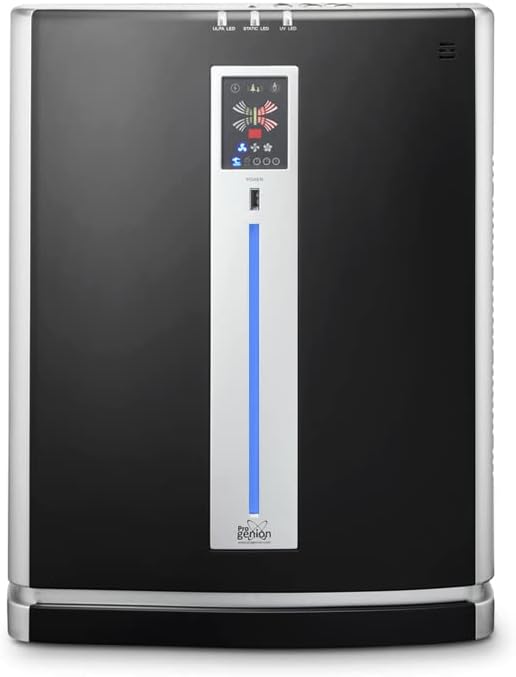
ਚਿੱਤਰ 3.1: ਸਾਹਮਣੇ view of the Progenion PR-450C Air Purifier.

ਚਿੱਤਰ 3.2: ਪਾਸੇ view of the Progenion PR-450C Air Purifier.
3.1. ਕੰਟਰੋਲ ਪੈਨਲ
The main control panel is located on the front of the unit, featuring intuitive touch buttons and an air quality indicator bar.
3.2. ਰਿਮੋਟ ਕੰਟਰੋਲ
The device can also be operated using the included remote control.

ਚਿੱਤਰ 3.3: Remote control for the PR-450C Air Purifier.
4. ਸੈੱਟਅੱਪ
- ਅਨਪੈਕਿੰਗ: ਏਅਰ ਪਿਊਰੀਫਾਇਰ ਨੂੰ ਇਸਦੀ ਪੈਕਿੰਗ ਤੋਂ ਧਿਆਨ ਨਾਲ ਹਟਾਓ। ਭਵਿੱਖ ਵਿੱਚ ਸਟੋਰੇਜ ਜਾਂ ਟ੍ਰਾਂਸਪੋਰਟ ਲਈ ਪੈਕੇਜਿੰਗ ਨੂੰ ਸੰਭਾਲ ਕੇ ਰੱਖੋ।
- ਪਲੇਸਮੈਂਟ: Place the air purifier on a flat, stable surface. Ensure there is adequate space (at least 20 cm) around the air inlets and outlets for optimal airflow. Avoid placing it near heat sources or in direct sunlight.
- ਫਿਲਟਰ ਸਥਾਪਨਾ: The filters are typically pre-installed but may have protective packaging. Open the filter compartment (usually at the back or side) and remove any plastic wrapping from the HEPA, ULPA, and Active-Carbon filters. Reinsert them correctly according to the markings.
- ਪਾਵਰ ਕਨੈਕਸ਼ਨ: ਪਾਵਰ ਕੋਰਡ ਨੂੰ ਇੱਕ ਸਟੈਂਡਰਡ ਇਲੈਕਟ੍ਰੀਕਲ ਆਊਟਲੈਟ ਵਿੱਚ ਲਗਾਓ।
5. ਓਪਰੇਟਿੰਗ ਹਦਾਇਤਾਂ
The Progenion PR-450C offers both manual and automatic operation modes.
5.1. ਪਾਵਰ ਚਾਲੂ/ਬੰਦ
ਦਬਾਓ ਪਾਵਰ ਯੂਨਿਟ ਨੂੰ ਚਾਲੂ ਜਾਂ ਬੰਦ ਕਰਨ ਲਈ ਕੰਟਰੋਲ ਪੈਨਲ ਜਾਂ ਰਿਮੋਟ ਕੰਟਰੋਲ 'ਤੇ ਬਟਨ।
5.2. Sensor Mode (Automatic Operation)
ਦਬਾਓ ਸੈਂਸਰ button to activate sensor technology. An air quality measurement will begin, lasting approximately 5 minutes, during which the indicator bar will be red. Once the measurement is complete, the indicator bar will turn blue, indicating that sensor technology is active. The device will then automatically adjust ventilation levels based on the detected air quality.
5.3. Manual Mode and Timer
ਦਬਾਓ ਮੋਡ button to switch between different operating modes, including manual mode and timer mode. In manual mode, you can control settings independently.
5.4. ਪੱਖਾ ਸਪੀਡ ਕੰਟਰੋਲ
ਦਬਾਓ ਸਪੀਡ button to select from 3 different fan speeds. Note: This function is not active when sensor mode is enabled.
5.5. Anion / Ionizer Function
ਦਬਾਓ ANION / IONIZER button to switch the open ionization function on or off. The 4 ionization brushes, located at the upper rear of the device, produce millions of negative ions to neutralize airborne viruses and bacteria.

ਚਿੱਤਰ 5.1: Illustration of negative ion release for air purification.
5.6. Static / Electrostatic Filter Function
ਦਬਾਓ STATIC / ELECTROSTATIC FILTER button to switch this section on or off. This filter captures coarse dust particles and ionizes passing air, neutralizing airborne virus particles and bacteria. This filter does not require replacement.

ਚਿੱਤਰ 5.2: Illustration of the electrostatic filter in action.
5.7. UV-C Lamp ਫੰਕਸ਼ਨ
ਦਬਾਓ UV-LIGHT / UV-C Lamp button to switch the UV-C lamp on or off. When activated, passing air is exposed to UV-C light, which neutralizes airborne virus particles and bacteria.

ਚਿੱਤਰ 5.3: Illustration of the UV-C lamp neutralizing microorganisms.
6. ਰੱਖ-ਰਖਾਅ
ਨਿਯਮਤ ਰੱਖ-ਰਖਾਅ ਸਰਵੋਤਮ ਪ੍ਰਦਰਸ਼ਨ ਨੂੰ ਯਕੀਨੀ ਬਣਾਉਂਦਾ ਹੈ ਅਤੇ ਤੁਹਾਡੇ ਏਅਰ ਪਿਊਰੀਫਾਇਰ ਦੀ ਉਮਰ ਵਧਾਉਂਦਾ ਹੈ।
6.1. Electrostatic Filter Cleaning
The electrostatic filter does not require replacement. Clean it once a week using a vacuum cleaner with a brush attachment and a slightly damp cloth to remove accumulated dust and particles.
6.2. HEPA/ULPA and Active-Carbon Filter Replacement
The HEPA/ULPA and Active-Carbon filters have a limited lifespan and will need to be replaced periodically. The frequency depends on usage and air quality. Refer to the indicator on the control panel or consult the manufacturer's guidelines for replacement intervals. Always use genuine Progenion replacement filters.
6.3 ਆਮ ਸਫਾਈ
Wipe the exterior of the unit with a soft, dry cloth. Do not use abrasive cleaners or solvents. Ensure the unit is unplugged before cleaning.
7. ਸਮੱਸਿਆ ਨਿਪਟਾਰਾ
ਜੇਕਰ ਤੁਹਾਨੂੰ ਆਪਣੇ ਏਅਰ ਪਿਊਰੀਫਾਇਰ ਨਾਲ ਸਮੱਸਿਆਵਾਂ ਆਉਂਦੀਆਂ ਹਨ, ਤਾਂ ਹੇਠ ਲਿਖੀਆਂ ਆਮ ਸਮੱਸਿਆਵਾਂ ਅਤੇ ਹੱਲ ਵੇਖੋ:
| ਸਮੱਸਿਆ | ਸੰਭਵ ਕਾਰਨ | ਹੱਲ |
|---|---|---|
| ਯੂਨਿਟ ਚਾਲੂ ਨਹੀਂ ਹੁੰਦਾ | No power; power cord not connected; power outlet malfunction. | Check power cord connection; try a different outlet; ensure power switch is on. |
| ਕਮਜ਼ੋਰ ਹਵਾ ਦਾ ਪ੍ਰਵਾਹ | Filters are dirty or clogged; air inlets/outlets blocked. | Clean or replace filters; ensure no obstructions around the unit. |
| ਅਸਧਾਰਨ ਰੌਲਾ | Foreign object inside; unit not on a stable surface; fan issue. | Turn off and unplug, check for foreign objects; place on a stable surface. If noise persists, contact support. |
| Air quality indicator always red/poor | Sensor is dirty; genuinely poor air quality. | Clean the air quality sensor (refer to maintenance section); allow unit to run longer in sensor mode. |
If the problem persists after attempting these solutions, please contact Progenion customer support.
8 ਨਿਰਧਾਰਨ
| ਵਿਸ਼ੇਸ਼ਤਾ | ਨਿਰਧਾਰਨ |
|---|---|
| ਮਾਡਲ ਨੰਬਰ | ਪੀਆਰ-450ਸੀ |
| ਫਿਲਟਰ ਦੀ ਕਿਸਮ | HEPA, ULPA, Active-Carbon, Electrostatic |
| ਕਵਰੇਜ ਖੇਤਰ | 80 m² ਤੱਕ |
| Ionizer Output | 8,000,000 ਆਇਨ/cm³ |
| ਯੂਵੀ-ਸੀ ਐਲamp ਜੀਵਨ | Approx. 6000 operating hours |
| ਮਾਪ (H x W x D) | 58.5 x 45 x 23.7 ਸੈ.ਮੀ |
| ਵੱਧ ਤੋਂ ਵੱਧ ਬਿਜਲੀ ਦੀ ਖਪਤ | 55 ਡਬਲਯੂ |
| Minimum Power Consumption (Night Mode) | 35 ਡਬਲਯੂ |
| ਭਾਰ | 10.5 ਕਿਲੋਗ੍ਰਾਮ |
| ਸ਼ੋਰ ਪੱਧਰ | 55 dB ਤੱਕ |
| ਕੰਟਰੋਲ ਵਿਧੀ | ਟੱਚ ਪੈਨਲ, ਰਿਮੋਟ ਕੰਟਰੋਲ |
| ਪ੍ਰਮਾਣੀਕਰਣ | CE |
9. ਵਾਰੰਟੀ ਅਤੇ ਸਹਾਇਤਾ
Progenion products are manufactured to high-quality standards. For warranty information, please refer to the warranty card included with your purchase or visit the official Progenion website. For technical support, replacement parts, or service inquiries, please contact Progenion customer service through their official channels.