
Alarm.com V724X
Alarm.com ADC-V724X Outdoor Wi-Fi Camera User Manual
Model: V724X
ਜਾਣ-ਪਛਾਣ
The Alarm.com ADC-V724X is an advanced outdoor Wi-Fi camera designed to enhance the security of your property. It features High Dynamic Range (HDR) for clear imaging, two-way audio for communication, 1080p resolution, and a wide 117-degree field of view. Equipped with Video Analytics and IR Night Vision, it provides intelligent detection and monitoring capabilities. The camera also includes a MicroSD card slot for local storage and boasts an IP66 ingress protection rating, ensuring durability in various outdoor conditions.
ਸੁਰੱਖਿਆ ਜਾਣਕਾਰੀ
- Ensure the camera is installed by a qualified professional or with proper safety precautions.
- Use only the specified 12VDC power supply.
- ਕੈਮਰੇ ਨੂੰ ਇਸਦੀ ਓਪਰੇਟਿੰਗ ਰੇਂਜ ਤੋਂ ਬਾਹਰ ਬਹੁਤ ਜ਼ਿਆਦਾ ਤਾਪਮਾਨਾਂ ਦੇ ਸੰਪਰਕ ਵਿੱਚ ਨਾ ਪਾਓ।
- ਲੰਬੇ ਸਮੇਂ ਲਈ ਤੇਜ਼ ਰੌਸ਼ਨੀ ਦੇ ਸਰੋਤਾਂ ਦੇ ਸਿੱਧੇ ਸੰਪਰਕ ਵਿੱਚ ਆਉਣ ਤੋਂ ਬਚੋ।
- ਕੋਈ ਵੀ ਰੱਖ-ਰਖਾਅ ਜਾਂ ਸਫਾਈ ਕਰਨ ਤੋਂ ਪਹਿਲਾਂ ਬਿਜਲੀ ਕੱਟ ਦਿਓ।
- ਬੱਚਿਆਂ ਦੀ ਪਹੁੰਚ ਤੋਂ ਦੂਰ ਰੱਖੋ।
ਪੈਕੇਜ ਸਮੱਗਰੀ
ਪੁਸ਼ਟੀ ਕਰੋ ਕਿ ਸਾਰੀਆਂ ਚੀਜ਼ਾਂ ਪੈਕੇਜ ਵਿੱਚ ਮੌਜੂਦ ਹਨ:
- Alarm.com ADC-V724X Outdoor Wi-Fi Camera
- ਮਾਊਂਟਿੰਗ ਹਾਰਡਵੇਅਰ (ਪੇਚ, ਐਂਕਰ)
- ਇੰਸਟਾਲੇਸ਼ਨ ਗਾਈਡ
- Power Adapter (12VDC)
ਸਥਾਪਨਾ ਕਰਨਾ
1. ਭੌਤਿਕ ਸਥਾਪਨਾ
The ADC-V724X camera is designed for outdoor wall mounting. Choose a location that provides the desired field of view ਅਤੇ ਤੁਹਾਡੇ Wi-Fi ਨੈੱਟਵਰਕ ਦੀ ਰੇਂਜ ਦੇ ਅੰਦਰ ਹੈ।
- ਮਾਊਂਟਿੰਗ ਸਤਹ ਤਿਆਰ ਕਰੋ: Use the included mounting template (if provided) or the camera base to mark drill holes.
- ਡ੍ਰਿਲ ਹੋਲ: Drill pilot holes for the mounting screws. Insert wall anchors if mounting into drywall or masonry.
- ਮਾਊਂਟ ਨੂੰ ਸੁਰੱਖਿਅਤ ਕਰੋ: ਦਿੱਤੇ ਗਏ ਪੇਚਾਂ ਦੀ ਵਰਤੋਂ ਕਰਕੇ ਕੈਮਰੇ ਦੇ ਮਾਊਂਟਿੰਗ ਬੇਸ ਨੂੰ ਸਤ੍ਹਾ ਨਾਲ ਸੁਰੱਖਿਅਤ ਢੰਗ ਨਾਲ ਜੋੜੋ।
- ਕੈਮਰਾ ਨੱਥੀ ਕਰੋ: Connect the camera body to the mounted base. Adjust the camera angle for optimal coverage.

ਚਿੱਤਰ 1: ਸਾਹਮਣੇ view of the ADC-V724X camera, highlighting its compact design and lens.
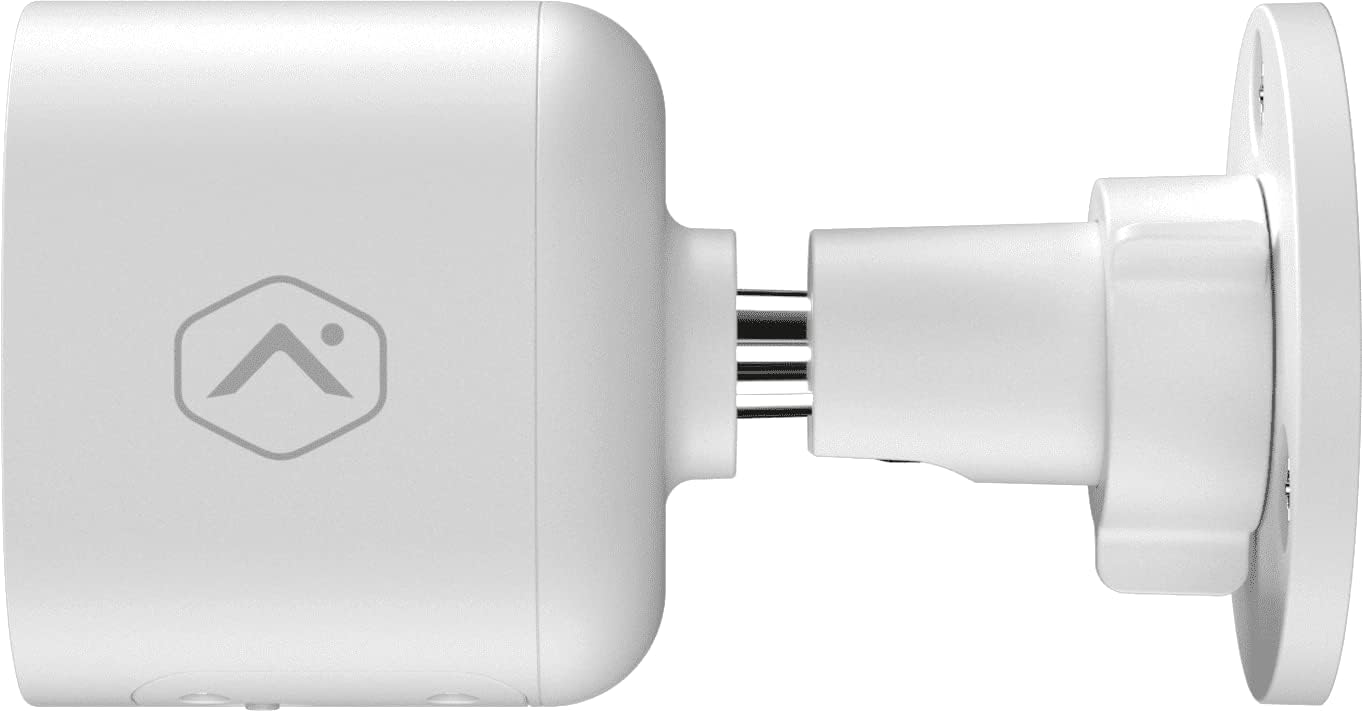
ਚਿੱਤਰ 2: ਸਾਈਡ ਪ੍ਰੋfile of the camera, illustrating how it connects to the wall mount.

ਚਿੱਤਰ 3: ਕੋਣ ਵਾਲਾ view of the camera, demonstrating its adjustable mounting capabilities.
2 ਪਾਵਰ ਕਨੈਕਸ਼ਨ
Connect the provided 12VDC power adapter to the camera's power input. Ensure the connection is secure and protected from weather elements if applicable.
3. ਨੈੱਟਵਰਕ ਕਨੈਕਸ਼ਨ (ਵਾਈ-ਫਾਈ)
The ADC-V724X connects to your network via Wi-Fi (2.4 or 5 GHz). Integration with your Alarm.com system typically requires activation through your Alarm.com service provider.
- ਪਾਵਰ ਚਾਲੂ: Plug in the camera. The LED indicator will show its status (refer to LED status guide in your Alarm.com app or provider's documentation).
- Add to System: Contact your Alarm.com service provider to add the camera to your existing security system. They will guide you through the process, which often involves scanning a QR code on the camera or entering its MAC address.
- ਵਾਈ-ਫਾਈ ਕੌਂਫਿਗਰ ਕਰੋ: Your service provider will assist in connecting the camera to your home Wi-Fi network through the Alarm.com app or webਸਾਈਟ.

ਚਿੱਤਰ 4: ਪਿੱਛੇ view of the camera, displaying the QR code and product information essential for system integration.
ਕੈਮਰਾ ਚਲਾਇਆ ਜਾ ਰਿਹਾ ਹੈ
Once installed and connected, the ADC-V724X camera operates primarily through the Alarm.com Customer Webਸਾਈਟ ਅਤੇ ਮੋਬਾਈਲ ਐਪ.
ਲਾਈਵ View ਅਤੇ ਰਿਕਾਰਡਿੰਗ
- ਲਾਈਵ ਫੀਡ ਤੱਕ ਪਹੁੰਚ: Open the Alarm.com app or website, navigate to the camera section, and select the ADC-V724X to view ਇਸਦੀ ਲਾਈਵ ਫੀਡ।
- Onboard Recording (Smart View): The camera supports local recording to a MicroSD card (sold separately, up to 512 GB). This allows for continuous, encrypted recordings that can be viewed from anywhere via the Alarm.com platform.
- ਕਲਾਉਡ ਰਿਕਾਰਡਿੰਗ: Depending on your Alarm.com service plan, video clips triggered by events (e.g., motion) will be uploaded to the cloud for secure storage and access.
ਦੋ-ਪੱਖੀ ਆਡੀਓ
The camera features a built-in microphone and speaker, enabling two-way communication.
- Initiate Communication: ਲਾਈਵ ਤੋਂ view in the Alarm.com app, tap the microphone icon to speak through the camera's speaker. Release the icon to listen.
- Audio in Recorded Clips: Audio is included in recorded video clips, providing additional context for events.
Video Analytics and Alerts
Configure Video Analytics rules through your Alarm.com account to receive smarter, more relevant alerts.
- ਖੋਜ ਖੇਤਰ: Define specific areas within the camera's field of view ਮੋਸ਼ਨ ਖੋਜ ਲਈ.
- Object Classification: The camera can differentiate between people, animals, and vehicles, reducing false alerts.
- ਚੇਤਾਵਨੀ ਸੈਟਿੰਗਾਂ: Customize notifications (e.g., push notifications, email) for specific events detected by Video Analytics.
ਨਾਈਟ ਵਿਜ਼ਨ (IR)
The camera automatically switches to infrared (IR) night vision in low-light conditions, providing clear black-and-white video.
- ਆਟੋਮੈਟਿਕ ਐਕਟੀਵੇਸ਼ਨ: The camera's built-in light sensor detects ambient light levels and activates IR LEDs as needed.
- ਸਰਵੋਤਮ ਪ੍ਰਦਰਸ਼ਨ: Ensure no obstructions are blocking the IR illuminators on the camera's front.
ਰੱਖ-ਰਖਾਅ
ਕੈਮਰੇ ਦੀ ਸਫਾਈ
- ਲੈਂਸ: Gently wipe the camera lens with a soft, clean, lint-free cloth. If necessary, use a small amount of lens cleaning solution. Avoid abrasive cleaners.
- ਸਰੀਰ: ਕੈਮਰੇ ਦੀ ਬਾਡੀ ਨੂੰ ਇਸ਼ਤਿਹਾਰ ਨਾਲ ਪੂੰਝੋamp ਕੱਪੜਾ ਕਠੋਰ ਰਸਾਇਣਾਂ ਜਾਂ ਘੋਲਨ ਵਾਲੇ ਪਦਾਰਥਾਂ ਦੀ ਵਰਤੋਂ ਨਾ ਕਰੋ।
- ਬਾਰੰਬਾਰਤਾ: Clean the camera periodically, especially if installed in dusty or high-traffic areas, to ensure optimal image quality.
ਮਾਈਕ੍ਰੋਐੱਸਡੀ ਕਾਰਡ ਪ੍ਰਬੰਧਨ
The camera supports a MicroSD card for local storage. The slot is located on the bottom of the camera, protected by a cover.
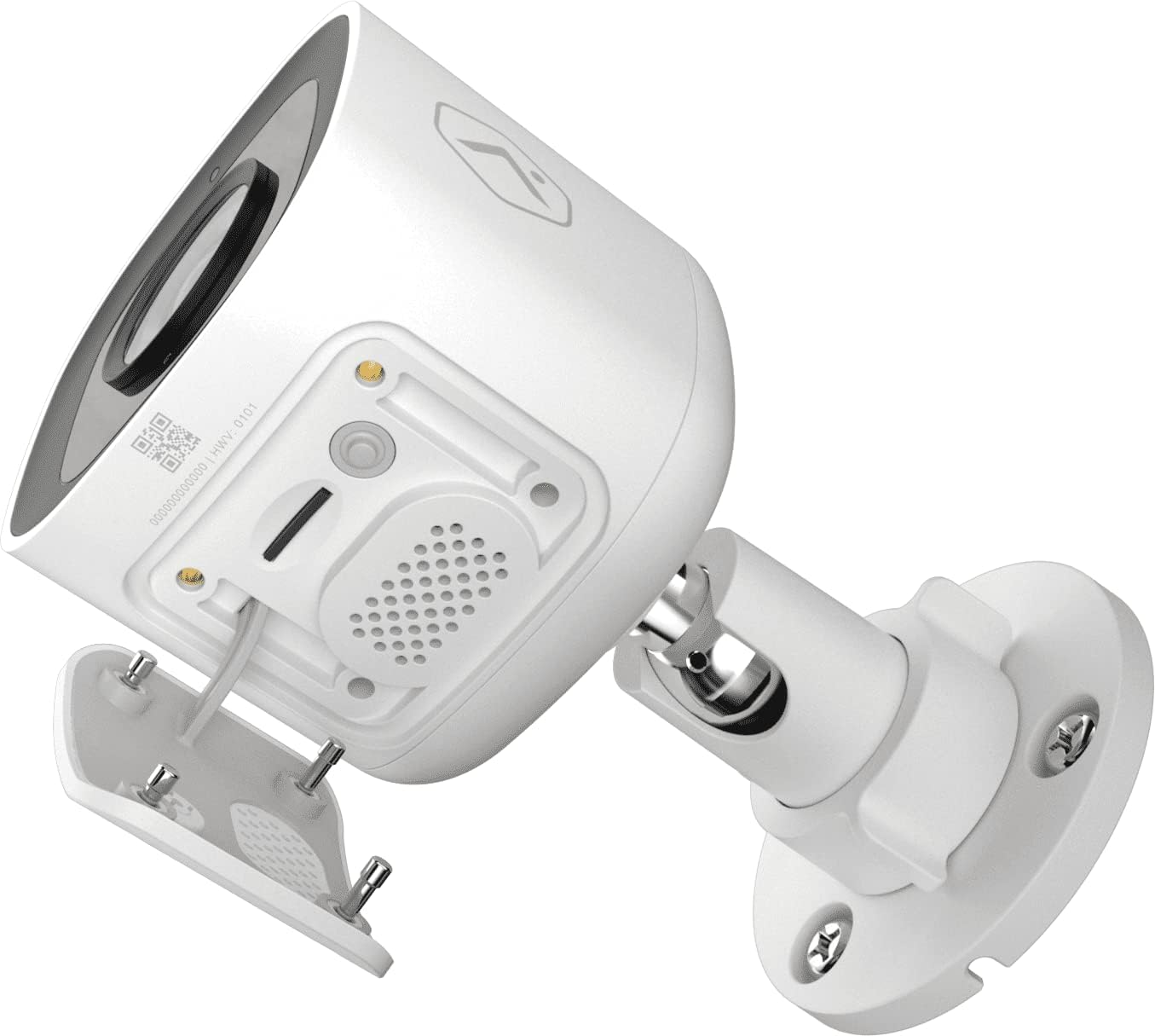
ਚਿੱਤਰ 5: ਹੇਠਾਂ view of the camera showing the access panel for the MicroSD card slot.
- ਸਥਾਪਨਾ: Carefully insert a compatible MicroSD card (up to 512 GB) into the slot until it clicks into place. Ensure the camera is powered off before insertion or removal.
- ਫਾਰਮੈਟਿੰਗ: The Alarm.com system may prompt you to format the card upon first use.
- ਬਦਲਣਾ: If the card becomes full or corrupted, replace it with a new one. Data on the card can be managed through the Alarm.com platform.
ਸਮੱਸਿਆ ਨਿਪਟਾਰਾ
| ਸਮੱਸਿਆ | ਸੰਭਵ ਕਾਰਨ | ਹੱਲ |
|---|---|---|
| ਕੈਮਰਾ ਚਾਲੂ ਨਹੀਂ ਹੋ ਰਿਹਾ | ਬਿਜਲੀ ਨਹੀਂ, ਨੁਕਸਦਾਰ ਅਡਾਪਟਰ, ਢਿੱਲਾ ਕੁਨੈਕਸ਼ਨ। | Check power outlet, ensure adapter is securely connected to camera and power source. |
| Wi-Fi ਨਾਲ ਕਨੈਕਟ ਨਹੀਂ ਕੀਤਾ ਜਾ ਸਕਦਾ | Incorrect Wi-Fi password, camera too far from router, network interference. | Verify Wi-Fi password. Move camera closer to router or use a Wi-Fi extender. Reduce interference from other devices. Contact your Alarm.com provider for assistance with network setup. |
| ਮਾੜੀ ਤਸਵੀਰ ਦੀ ਗੁਣਵੱਤਾ | Dirty lens, low light, network bandwidth issues. | Clean the camera lens. Ensure adequate lighting or check night vision settings. Verify stable internet connection. |
| ਦੋ-ਪੱਖੀ ਆਡੀਓ ਕੰਮ ਨਹੀਂ ਕਰ ਰਿਹਾ | Microphone/speaker blocked, volume too low, app settings. | Ensure nothing is obstructing the microphone or speaker. Check volume settings in the Alarm.com app. |
| No local recording | No MicroSD card, incompatible card, card full/corrupted. | Insert a compatible MicroSD card. Format the card via the Alarm.com app. Replace the card if corrupted. |
For further assistance, please contact your Alarm.com service provider.
ਨਿਰਧਾਰਨ
| ਵਿਸ਼ੇਸ਼ਤਾ | ਵੇਰਵੇ |
|---|---|
| ਮਾਡਲ ਨੰਬਰ | V724X |
| Effective Camera Resolution | 2MP |
| ਵੱਧ ਤੋਂ ਵੱਧ ਵੀਡੀਓ ਰੈਜ਼ੋਲੇਸ਼ਨ | 1920 x 1080 (1080p ਫੁੱਲ HD) |
| ਦੇ ਖੇਤਰ View (FOV) | 117-ਡਿਗਰੀ |
| ਆਡੀਓ | 2-Way Audio (Microphone and Speaker) |
| ਨਾਈਟ ਵਿਜ਼ਨ ਦੀ ਕਿਸਮ | IR (ਇਨਫਰਾਰੈੱਡ) |
| ਕਨੈਕਟੀਵਿਟੀ | Wi-Fi (2.4 or 5 GHz) |
| ਸਥਾਨਕ ਸਟੋਰੇਜ | MicroSD Card Slot (up to 512 GB, sold separately) |
| ਪ੍ਰਵੇਸ਼ ਸੁਰੱਖਿਆ ਰੇਟਿੰਗ | IP66 |
| ਬਿਜਲੀ ਦੀ ਸਪਲਾਈ | 12VDC |
| ਮਾਪ (L x W x H) | 2.5 x 2.5 x 4.5 ਇੰਚ |
| ਭਾਰ | 1.46 ਪੌਂਡ (0.66 ਕਿਲੋਗ੍ਰਾਮ) |
| ਵਿਸ਼ੇਸ਼ ਵਿਸ਼ੇਸ਼ਤਾਵਾਂ | HDR, Video Analytics, Motion Sensor |
ਵਾਰੰਟੀ ਅਤੇ ਸਹਾਇਤਾ
For warranty information and technical support, please refer to the documentation provided by your Alarm.com service provider or visit the official Alarm.com website. Support for the ADC-V724X camera is typically handled through your authorized Alarm.com dealer or installer.
ਔਨਲਾਈਨ ਸਰੋਤ:
Ask a question about this manual
Ask about setup, troubleshooting, compatibility, parts, safety, or missing instructions. Manuals+ will review the question and use this page’s manual context to help answer it.