
ANFIER W10, W12
ANFIER W10/W12 Handheld Translator User Manual
ਜਾਣ-ਪਛਾਣ
The ANFIER W10 and W12 Handheld Translators are advanced portable devices designed to facilitate communication across language barriers. These devices offer real-time voice translation, photo translation, and offline translation capabilities, making them ideal for travel, business, and learning. This manual provides detailed instructions for setup, operation, maintenance, and troubleshooting to ensure optimal use of your translator.
ਉਤਪਾਦ ਵੱਧview
The ANFIER W10/W12 translator features a compact design with an intuitive touchscreen interface. Key functions are easily accessible from the main screen.
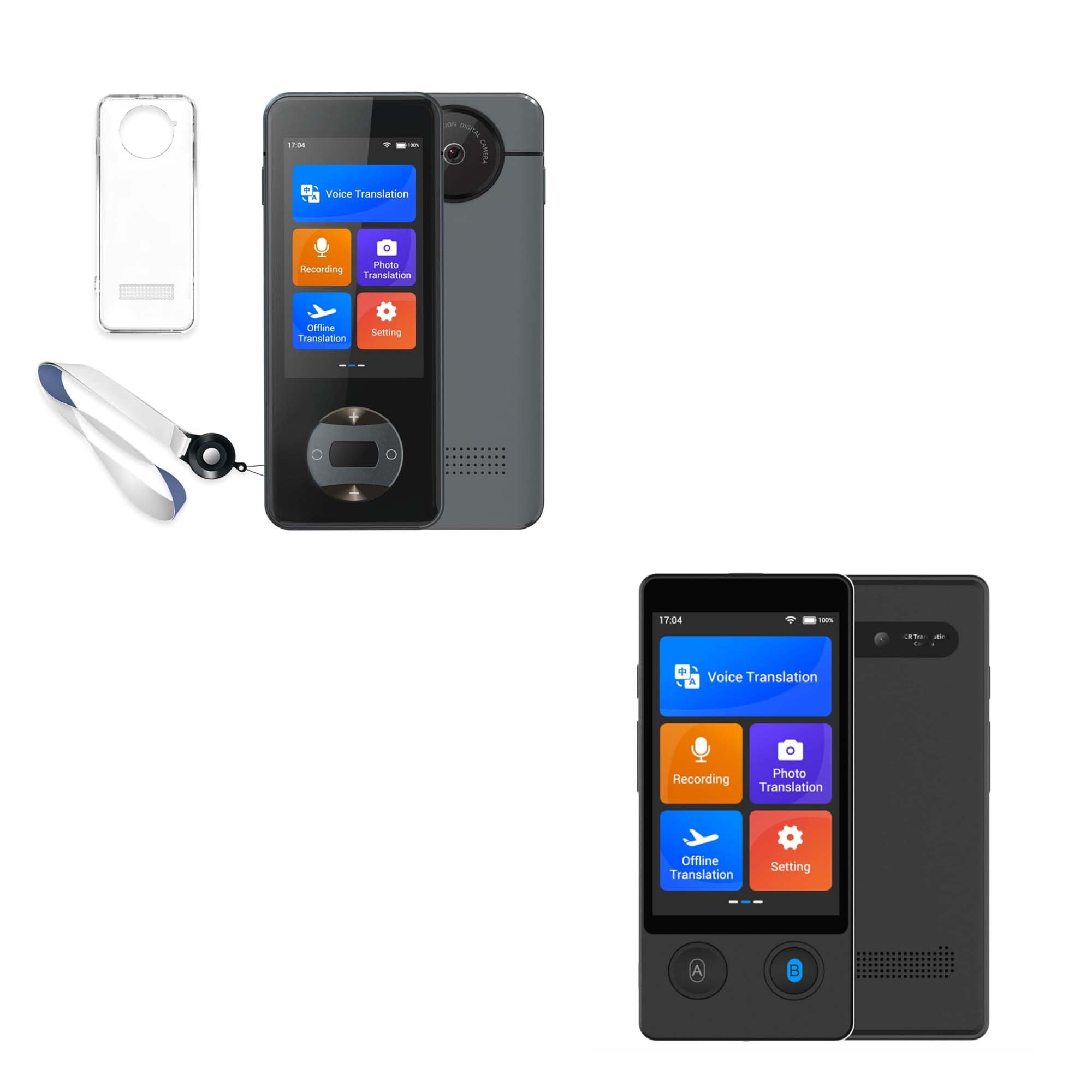
Image: Main screen interface displaying various translation functions.
ਮੁੱਖ ਵਿਸ਼ੇਸ਼ਤਾਵਾਂ:
- ਕਈ ਅਨੁਵਾਦ ਮੋਡ: Voice, Photo, and Offline translation.
- ਵਿਆਪਕ ਭਾਸ਼ਾ ਸਹਾਇਤਾ: Up to 144 languages for online voice translation, 42 languages for photo translation, and 16 languages for offline voice translation.
- High Accuracy & Speed: Achieves approximately 98% accuracy with a rapid response time of 0.5 seconds.
- ਲੰਬੀ ਬੈਟਰੀ ਲਾਈਫ: 1500 mAh battery provides up to 8 hours of continuous translation or 7 days of standby time.
- ਵੌਇਸ ਰਿਕਾਰਡਿੰਗ: Integrated recording function for capturing conversations.
- Adjustable Voice Broadcast: Option to switch between male and female voices for translation output.
ਸਥਾਪਨਾ ਕਰਨਾ
1. ਡਿਵਾਈਸ ਨੂੰ ਚਾਰਜ ਕਰਨਾ
Before first use, fully charge the translator. Connect the device to a power source using the provided USB cable. The battery indicator on the screen will show charging status. A full charge typically takes a few hours.

Image: Device highlighting its 1500 mAh battery capacity and long battery life.
2. ਪਾਵਰ ਚਾਲੂ/ਬੰਦ
- ਪਾਵਰ ਚਾਲੂ ਕਰਨ ਲਈ: Press and hold the power button (usually located on the side) until the screen lights up.
- ਪਾਵਰ ਬੰਦ ਕਰਨ ਲਈ: Press and hold the power button, then select 'Power Off' on the screen.
3. Initial Language and Wi-Fi Setup
- Upon first power-on, you may be prompted to select a system language. Follow the on-screen instructions.
- ਮੁੱਖ ਮੇਨੂ ਤੋਂ 'ਸੈਟਿੰਗਜ਼' 'ਤੇ ਜਾਓ।
- Select 'WLAN' (Wi-Fi) and connect to an available network. A stable internet connection is required for online voice and photo translation.
ਓਪਰੇਟਿੰਗ ਨਿਰਦੇਸ਼
1. Voice Translation (Online)
This mode provides real-time two-way translation for up to 144 languages.
- From the main screen, tap 'Voice Translation'.
- Select the source language (your language) and target language (the language you want to translate to) from the options.
- Press and hold button 'A' (usually indicated on the device or screen) and speak clearly in your source language. Release the button when finished. The device will translate and speak the text in the target language.
- For the other person to speak, they should press and hold button 'B' and speak in their language. The device will translate and speak in your source language.

Image: Real-time two-way voice translation interface.
2. ਫੋਟੋ ਅਨੁਵਾਦ
Translate text from images, supporting 42 languages.
- Tap 'Photo Translation' on the main screen.
- ਸਰੋਤ ਅਤੇ ਨਿਸ਼ਾਨਾ ਭਾਸ਼ਾਵਾਂ ਚੁਣੋ।
- Point the device's camera at the text you wish to translate. Ensure the text is well-lit and clear within the frame.
- Tap the capture button. The device will process the image and display the translated text on the screen.

Image: Photo translation feature in action, showing supported languages.
3. ਔਫਲਾਈਨ ਅਨੁਵਾਦ
Translate without an internet connection for 16 supported languages. Language packs must be downloaded beforehand.
- Connect to Wi-Fi. Go to 'Settings' > 'Offline download'.
- Select and download the desired language packs.
- Once downloaded, tap 'Offline Translation' from the main screen.
- Select the downloaded source and target languages.
- Use buttons 'A' and 'B' as in online voice translation to perform offline translations.

Image: Demonstrating offline voice translation capability.
4. ਰਿਕਾਰਡਿੰਗ
The device can record audio for later playback or reference.
- Tap 'Recording' on the main screen.
- ਰਿਕਾਰਡਿੰਗ ਸ਼ੁਰੂ ਕਰਨ ਲਈ ਰਿਕਾਰਡ ਬਟਨ 'ਤੇ ਟੈਪ ਕਰੋ।
- Tap the stop button to end the recording.
- Recordings can be accessed and played back from within the 'Recording' menu.
5. ਸੈਟਿੰਗਾਂ
Access various device configurations through the 'Settings' menu.
- WLAN: ਵਾਈ-ਫਾਈ ਕਨੈਕਸ਼ਨਾਂ ਦਾ ਪ੍ਰਬੰਧਨ ਕਰੋ।
- ਸਿਸਟਮ ਭਾਸ਼ਾ: Change the device's interface language.
- ਸਮਾਂ ਅਤੇ ਮਿਤੀ: ਸਮਾਂ ਅਤੇ ਮਿਤੀ ਸੈਟਿੰਗਾਂ ਨੂੰ ਵਿਵਸਥਿਤ ਕਰੋ।
- Offline download: Download and manage offline language packs.
- ਵੌਇਸ ਪ੍ਰਸਾਰਣ: Select between male and female voices for translated audio output.
- ਡਿਸਪਲੇ: Adjust screen brightness and other display settings.

Image: Settings menu showing the voice broadcast option.
ਰੱਖ-ਰਖਾਅ
ਸਫਾਈ
- Use a soft, dry, lint-free cloth to clean the device's screen and body.
- Avoid using abrasive cleaners, solvents, or aerosol sprays, as these can damage the device.
ਸਟੋਰੇਜ
- ਅਨੁਵਾਦਕ ਨੂੰ ਸਿੱਧੀ ਧੁੱਪ ਅਤੇ ਬਹੁਤ ਜ਼ਿਆਦਾ ਤਾਪਮਾਨਾਂ ਤੋਂ ਦੂਰ ਠੰਢੀ, ਸੁੱਕੀ ਜਗ੍ਹਾ 'ਤੇ ਸਟੋਰ ਕਰੋ।
- ਜੇਕਰ ਬੈਟਰੀ ਨੂੰ ਲੰਬੇ ਸਮੇਂ ਲਈ ਸਟੋਰ ਕੀਤਾ ਜਾ ਰਿਹਾ ਹੈ, ਤਾਂ ਇਹ ਯਕੀਨੀ ਬਣਾਓ ਕਿ ਬੈਟਰੀ ਦੀ ਉਮਰ ਵਧਾਉਣ ਲਈ ਇਹ ਅੰਸ਼ਕ ਤੌਰ 'ਤੇ ਚਾਰਜ ਹੋਈ ਹੈ (ਲਗਭਗ 50%)।
ਬੈਟਰੀ ਕੇਅਰ
- Do not expose the device to temperatures above 60°C (140°F).
- ਬੈਟਰੀ ਨੂੰ ਵਾਰ-ਵਾਰ ਪੂਰੀ ਤਰ੍ਹਾਂ ਡਿਸਚਾਰਜ ਕਰਨ ਤੋਂ ਬਚੋ।
- ਸਿਰਫ਼ ਦਿੱਤੀ ਗਈ ਚਾਰਜਿੰਗ ਕੇਬਲ ਜਾਂ ਪ੍ਰਮਾਣਿਤ ਸਮਾਨ ਦੀ ਵਰਤੋਂ ਕਰੋ।
ਸਮੱਸਿਆ ਨਿਪਟਾਰਾ
ਡੀਵਾਈਸ ਚਾਲੂ ਨਹੀਂ ਹੋ ਰਿਹਾ
- ਬੈਟਰੀ ਦੀ ਜਾਂਚ ਕਰੋ: Ensure the device is charged. Connect it to a power source and wait a few minutes before attempting to power on again.
- ਹਾਰਡ ਰੀਸੈਟ: If unresponsive, try pressing and holding the power button for 10-15 seconds to perform a hard reset.
Translation Not Working / Inaccurate
- ਇੰਟਰਨੈਟ ਕਨੈਕਸ਼ਨ: For online translation, verify that the device is connected to a stable Wi-Fi network.
- ਭਾਸ਼ਾ ਦੀ ਚੋਣ: Double-check that the correct source and target languages are selected.
- ਸਾਫ਼-ਸਾਫ਼ ਬੋਲੋ: Ensure you are speaking clearly and directly into the microphone. Avoid background noise.
- Offline Packs: For offline translation, confirm that the necessary language packs have been downloaded.
- Rephrase: If translation is inaccurate, try rephrasinਤੁਹਾਡੀ ਸਜ਼ਾ।
ਸਕ੍ਰੀਨ ਗੈਰ-ਜਵਾਬਦੇਹ
- ਡਿਵਾਈਸ ਰੀਸਟਾਰਟ ਕਰੋ: Power off and then power on the device.
- ਸਾਫ਼ ਸਕ੍ਰੀਨ: ਯਕੀਨੀ ਬਣਾਓ ਕਿ ਸਕ੍ਰੀਨ ਸਾਫ਼ ਹੈ ਅਤੇ ਮਲਬੇ ਜਾਂ ਨਮੀ ਤੋਂ ਮੁਕਤ ਹੈ।
ਨਿਰਧਾਰਨ
| ਮਾਡਲ | ANFIER W10 / W12 |
| ਬੈਟਰੀ ਸਮਰੱਥਾ | 1500 mAh |
| ਨਿਰੰਤਰ ਅਨੁਵਾਦ ਸਮਾਂ | 8 ਘੰਟੇ ਤੱਕ |
| ਸਟੈਂਡਬਾਏ ਸਮਾਂ | 7 ਦਿਨਾਂ ਤੱਕ |
| Online Voice Translation | 144 ਭਾਸ਼ਾਵਾਂ |
| ਫੋਟੋ ਅਨੁਵਾਦ | 42 ਭਾਸ਼ਾਵਾਂ |
| Offline Voice Translation | 16 ਭਾਸ਼ਾਵਾਂ |
| ਅਨੁਵਾਦ ਸ਼ੁੱਧਤਾ | ਲਗਭਗ 98% |
| ਜਵਾਬ ਸਮਾਂ | 0.5 ਸਕਿੰਟ |
| ASIN | B0DMFSPF52 |
| ਪਹਿਲੀ ਤਾਰੀਖ ਉਪਲਬਧ ਹੈ | 8 ਨਵੰਬਰ, 2024 |
ਵਾਰੰਟੀ ਅਤੇ ਸਹਾਇਤਾ
For detailed warranty information, technical support, or customer service inquiries regarding your ANFIER W10/W12 Handheld Translator, please refer to the official ANFIER website or contact their customer support directly. Contact details are typically available on the product packaging or the manufacturer's webਸਾਈਟ.
Ask a question about this manual
Ask about setup, troubleshooting, compatibility, parts, safety, or missing instructions. Manuals+ will review the question and use this page’s manual context to help answer it.