1. ਜਾਣ-ਪਛਾਣ
This manual provides detailed instructions for the Winnes Car Dashcam Model 24A01013-W. Please read this manual carefully before using the device to ensure proper operation and to maximize its features. Keep this manual for future reference.
The Winnes Car Dashcam is a three-channel recording system designed to capture video from the front, interior, and rear of your vehicle. It features 1080P Full HD video recording, a 3.0-inch IPS display, wide-angle lenses, G-Sensor, WDR technology, 24-hour parking mode, and loop recording.
2. ਪੈਕੇਜ ਸਮੱਗਰੀ
ਪੁਸ਼ਟੀ ਕਰੋ ਕਿ ਸਾਰੀਆਂ ਚੀਜ਼ਾਂ ਪੈਕੇਜ ਵਿੱਚ ਮੌਜੂਦ ਹਨ:
- 1 x Winnes Dashcam (Main Unit)
- 1 x Rear Camera (Lens)
- 1 ਐਕਸ ਮਾਉਂਟਿੰਗ ਬਰੈਕਟ
- 1 x Type-C Car Charger (Power Cable)
- 1 x ਹਦਾਇਤ ਮੈਨੂਅਲ
- 1 x 64GB TF Card (Micro SD Card)
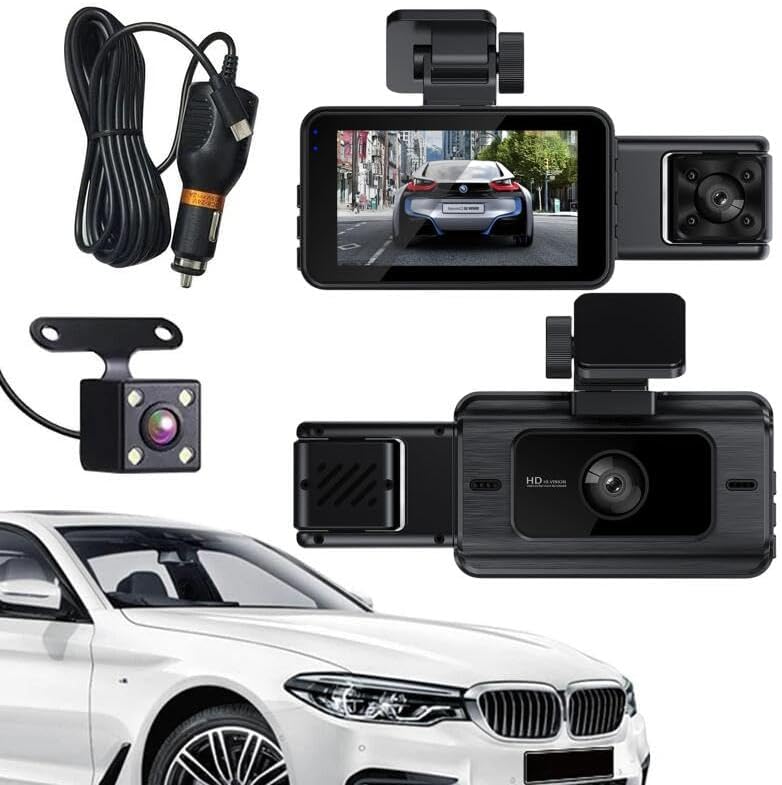
ਚਿੱਤਰ 2.1: Contents of the Winnes Car Dashcam package.
ਵੀਡੀਓ 2.1: ਅਨਬਾਕਸਿੰਗ ਅਤੇ ਸ਼ੁਰੂਆਤੀ ਓਵਰview of the Winnes Car Dashcam and its components.
3. ਉਤਪਾਦ ਖਤਮview
The Winnes Car Dashcam is equipped with advanced features to provide comprehensive vehicle surveillance.
3.1 ਮੁੱਖ ਵਿਸ਼ੇਸ਼ਤਾਵਾਂ
- ਥ੍ਰੀ-ਚੈਨਲ ਰਿਕਾਰਡਿੰਗ: Simultaneous recording from front (140°), interior (100°), and rear (100°) cameras.
- ਪੂਰੀ HD ਵੀਡੀਓ: 1080P front video resolution for clear recordings.
- 3.0" IPS ਡਿਸਪਲੇ: Provides real-time video feedback from all three cameras.
- ਸੁਪਰ ਨਾਈਟ ਵਿਜ਼ਨ ਅਤੇ ਡਬਲਯੂਡੀਆਰ: Enhanced clarity and color accuracy in low-light conditions.
- G-ਸੈਂਸਰ: ਫੂ ਨੂੰ ਆਟੋਮੈਟਿਕਲੀ ਲਾਕ ਕਰਦਾ ਹੈtage upon collision detection to prevent overwriting.
- ਲੂਪ ਰਿਕਾਰਡਿੰਗ: Overwrites the oldest unprotected files ਜਦੋਂ ਮੈਮਰੀ ਕਾਰਡ ਭਰ ਜਾਂਦਾ ਹੈ।
- 24-ਘੰਟੇ ਪਾਰਕਿੰਗ ਮੋਡ: Monitors your vehicle for collisions even when parked (no hardwire kit needed).
- ਮੋਸ਼ਨ ਖੋਜ: Records automatically when motion is detected around the vehicle.
- Wi-Fi ਕਨੈਕਟੀਵਿਟੀ: For easy access and management of recordings.
- ਮੈਮੋਰੀ ਕਾਰਡ ਸਪੋਰਟ: Supports up to 128GB TF card (64GB included).
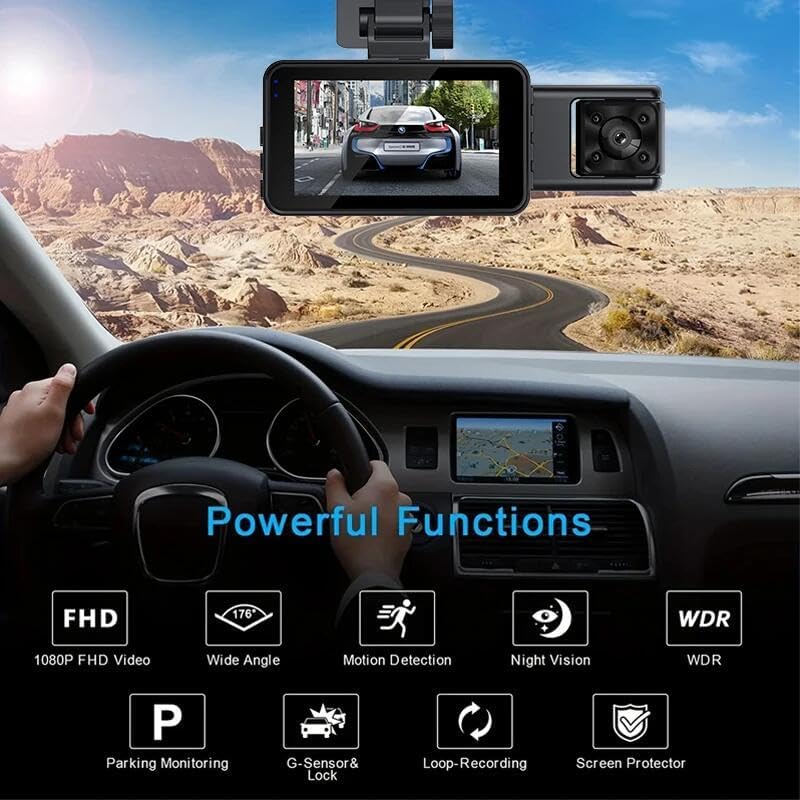
ਚਿੱਤਰ 3.1: ਵੱਧview of the dashcam's powerful functions.

ਚਿੱਤਰ 3.2: Three-channel recording capability.

ਚਿੱਤਰ 3.3: UHD Night Vision with WDR technology.
4. ਸੈੱਟਅੱਪ ਨਿਰਦੇਸ਼
4.1 ਮੈਮਰੀ ਕਾਰਡ ਪਾਉਣਾ
- ਯਕੀਨੀ ਬਣਾਓ ਕਿ ਡੈਸ਼ਕੈਮ ਬੰਦ ਹੈ।
- Locate the TF card slot on the side of the main dashcam unit.
- Insert the provided 64GB TF card (or another compatible card up to 128GB) into the slot until it clicks into place.
4.2 ਡੈਸ਼ਕੈਮ ਨੂੰ ਮਾਊਂਟ ਕਰਨਾ
- Clean the windshield area where you intend to mount the dashcam. Ensure it is free from dust and grease.
- Attach the mounting bracket to the main dashcam unit.
- Peel off the protective film from the adhesive pad on the bracket.
- Firmly press the dashcam with the attached bracket onto the chosen spot on your windshield, ideally behind the rearview ਤੁਹਾਡੇ ਵਿੱਚ ਰੁਕਾਵਟ ਤੋਂ ਬਚਣ ਲਈ ਸ਼ੀਸ਼ਾ view. Hold for a few seconds to ensure a secure bond.
4.3 ਪਿਛਲੇ ਕੈਮਰੇ ਨੂੰ ਜੋੜਨਾ
- ਮੁੱਖ ਡੈਸ਼ਕੈਮ ਯੂਨਿਟ 'ਤੇ ਨਿਰਧਾਰਤ ਪੋਰਟ ਨਾਲ ਰੀਅਰ ਕੈਮਰਾ ਕੇਬਲ ਕਨੈਕਟ ਕਰੋ।
- Route the rear camera cable neatly along the vehicle's headliner and pillar trim to the rear of the vehicle.
- Mount the rear camera on the rear windshield using its adhesive pad or screws, ensuring it has a clear view.
4.4 ਪਾਵਰ ਕੁਨੈਕਸ਼ਨ
- Plug the Type-C car charger into the dashcam's power input port.
- Insert the other end of the car charger into your vehicle's 12V power outlet (cigarette lighter socket).
- ਡਰਾਈਵਿੰਗ ਕੰਟਰੋਲਾਂ ਵਿੱਚ ਦਖਲਅੰਦਾਜ਼ੀ ਤੋਂ ਬਚਣ ਲਈ ਪਾਵਰ ਕੇਬਲ ਨੂੰ ਸਾਫ਼-ਸੁਥਰਾ ਰੂਟ ਕਰੋ।
5. ਓਪਰੇਟਿੰਗ ਹਦਾਇਤਾਂ
5.1 ਪਾਵਰ ਚਾਲੂ/ਬੰਦ
- The dashcam will automatically power on and begin recording when your vehicle's ignition is turned on (and power is supplied to the 12V outlet).
- ਇਗਨੀਸ਼ਨ ਬੰਦ ਹੋਣ 'ਤੇ ਇਹ ਆਪਣੇ ਆਪ ਬੰਦ ਹੋ ਜਾਵੇਗਾ।
- To manually power on/off, press and hold the Power button on the dashcam.
5.2 ਮੁੱਢਲੀ ਰਿਕਾਰਡਿੰਗ
- Once powered on, the dashcam will automatically start continuous loop recording.
- The 3.0-inch IPS screen will display live views from the front, interior, and rear cameras simultaneously.
- To switch between different display modes (e.g., front only, front + interior, all three), refer to the on-screen menu or dedicated buttons.

ਚਿੱਤਰ 5.1: Main dashcam unit with live view.
5.3 ਜੀ-ਸੈਂਸਰ (ਐਮਰਜੈਂਸੀ ਰਿਕਾਰਡਿੰਗ)
- ਬਿਲਟ-ਇਨ ਜੀ-ਸੈਂਸਰ ਅਚਾਨਕ ਪ੍ਰਭਾਵਾਂ ਜਾਂ ਟੱਕਰਾਂ ਦਾ ਪਤਾ ਲਗਾਉਂਦਾ ਹੈ।
- When a collision is detected, the dashcam automatically locks the current video segment, preventing it from being overwritten by loop recording.
- These locked files ਨੂੰ SD ਕਾਰਡ 'ਤੇ ਇੱਕ ਵੱਖਰੇ ਫੋਲਡਰ ਵਿੱਚ ਸਟੋਰ ਕੀਤਾ ਜਾਂਦਾ ਹੈ।

ਚਿੱਤਰ 5.2: G-Sensor collision detection and video locking.
5.4 ਲੂਪ ਰਿਕਾਰਡਿੰਗ
- The dashcam records video in continuous segments (e.g., 1, 3, or 5 minutes).
- When the memory card is full, the oldest unprotected video segments are automatically overwritten by new recordings.
- Emergency recordings (triggered by G-Sensor) are protected and will not be overwritten.

ਚਿੱਤਰ 5.3: Loop recording mechanism.
5.5 Parking Mode (24-Hour Monitoring)
- When the vehicle is parked and the dashcam detects a collision, it will automatically power on and record a protected video.
- This feature does not require a separate hardwire kit.
5.6 ਮੋਸ਼ਨ ਖੋਜ
- When enabled, the dashcam will start recording automatically if it detects motion in its field of view while parked.
- This helps capture events like someone approaching your vehicle.
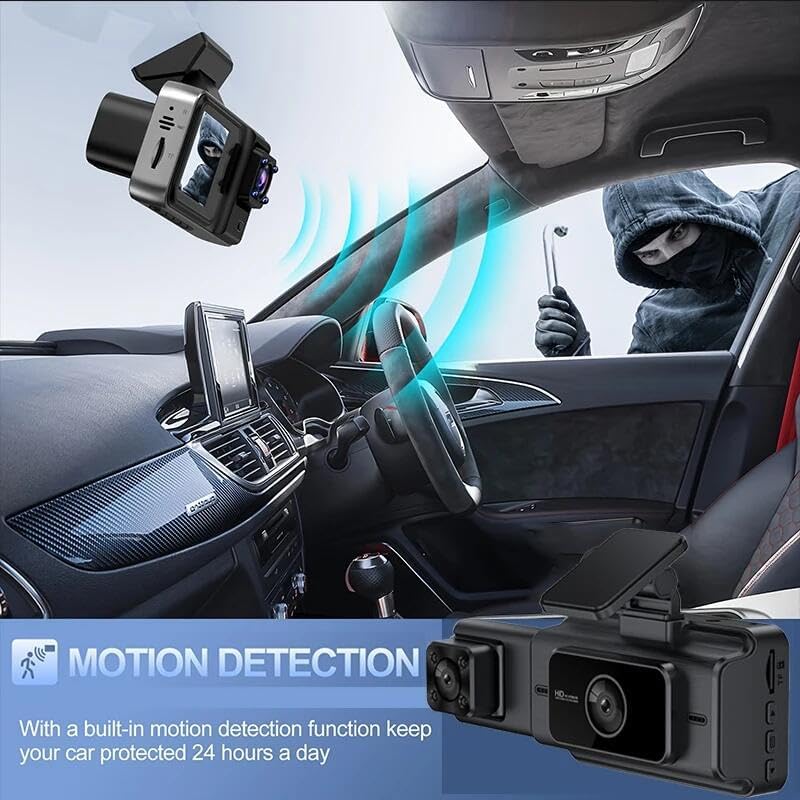
ਚਿੱਤਰ 5.4: Motion detection feature in action.
5.7 ਵਾਈ-ਫਾਈ ਕਨੈਕਟੀਵਿਟੀ
- The dashcam supports 2.4G Wi-Fi.
- Refer to the user manual's specific section on Wi-Fi connection for detailed instructions on pairing with your smartphone and accessing recordings.
5.8 ਮੀਨੂ ਸੈਟਿੰਗਾਂ
Access the menu to configure various settings such as video resolution, photo resolution, loop recording duration, G-Sensor sensitivity, parking mode, motion detection, date/time, and language.

ਚਿੱਤਰ 5.5: Full HD 1080P resolution display.
6. ਰੱਖ-ਰਖਾਅ
6.1 ਡਿਵਾਈਸ ਨੂੰ ਸਾਫ਼ ਕਰਨਾ
- Use a soft, dry cloth to clean the dashcam body and screen.
- For lenses, use a specialized lens cleaning cloth to avoid scratches.
- ਘਬਰਾਹਟ ਵਾਲੇ ਕਲੀਨਰ ਜਾਂ ਘੋਲਨ ਵਾਲੇ ਨਾ ਵਰਤੋ।
6.2 ਮੈਮੋਰੀ ਕਾਰਡ ਪ੍ਰਬੰਧਨ
- It is recommended to format the memory card periodically (e.g., once a month) to maintain optimal performance and prevent data corruption.
- Format the card directly through the dashcam's menu settings.
- Always power off the dashcam before inserting or removing the memory card.
7. ਸਮੱਸਿਆ ਨਿਪਟਾਰਾ
| ਸਮੱਸਿਆ | ਸੰਭਵ ਕਾਰਨ | ਹੱਲ |
|---|---|---|
| ਡੈਸ਼ਕੈਮ ਚਾਲੂ ਨਹੀਂ ਹੁੰਦਾ। | ਬਿਜਲੀ ਸਪਲਾਈ ਨਹੀਂ ਹੈ; ਨੁਕਸਦਾਰ ਕਾਰ ਚਾਰਜਰ; ਢਿੱਲਾ ਕੁਨੈਕਸ਼ਨ। | Check car charger connection and vehicle's 12V outlet. Ensure the car charger is functional. |
| ਰਿਕਾਰਡਿੰਗ ਅਚਾਨਕ ਬੰਦ ਹੋ ਜਾਂਦੀ ਹੈ। | Memory card full; memory card error; G-Sensor triggered too often. | Format the memory card. Replace the memory card if errors persist. Adjust G-Sensor sensitivity in settings. |
| ਵੀਡੀਓ footage ਧੁੰਦਲਾ ਜਾਂ ਅਸਪਸ਼ਟ ਹੈ। | Protective film on lens; dirty lens; poor lighting conditions. | Remove any protective film. Clean the camera lenses. Ensure sufficient lighting for optimal recording. |
| ਪਿਛਲਾ ਕੈਮਰਾ ਦਿਖਾਈ ਨਹੀਂ ਦੇ ਰਿਹਾ। | Loose connection; faulty rear camera. | ਮੁੱਖ ਯੂਨਿਟ ਨਾਲ ਪਿਛਲੇ ਕੈਮਰੇ ਦੀ ਕੇਬਲ ਦੇ ਕਨੈਕਸ਼ਨ ਦੀ ਜਾਂਚ ਕਰੋ। |
| ਵਾਈ-ਫਾਈ ਕਨੈਕਸ਼ਨ ਸਮੱਸਿਆਵਾਂ। | Incorrect password; out of range; interference. | Ensure correct Wi-Fi password. Move closer to the dashcam. Check for other wireless devices causing interference. |
8 ਨਿਰਧਾਰਨ
| ਵਿਸ਼ੇਸ਼ਤਾ | ਵੇਰਵੇ |
|---|---|
| ਮਾਡਲ ਦਾ ਨਾਮ | 24A01013-W |
| ਵੀਡੀਓ ਰੈਜ਼ੋਲਿਊਸ਼ਨ (ਸਾਹਮਣੇ) | 1920 x 1080P (FHD) |
| Video Resolution (Internal/Rear) | 640 x 480 |
| ਵੀਡੀਓ ਫਾਰਮੈਟ | AVI |
| ਡਿਸਪਲੇ | 3.0 ਇੰਚ ਆਈ.ਪੀ.ਐੱਸ |
| ਫਰੰਟ ਕੈਮਰਾ ਐਂਗਲ | 140° |
| Internal Camera Angle | 100° |
| ਪਿਛਲਾ ਕੈਮਰਾ ਐਂਗਲ | 100° |
| ਕਨੈਕਟੀਵਿਟੀ ਤਕਨਾਲੋਜੀ | Wi-Fi (2.4G) |
| ਵਿਸ਼ੇਸ਼ ਵਿਸ਼ੇਸ਼ਤਾਵਾਂ | G-Sensor, Motion Detection, WDR, Night Vision, Parking Monitoring, Loop Recording |
| ਮੈਮੋਰੀ ਕਾਰਡ ਸਪੋਰਟ | TF card up to 128GB (Class 10 or higher recommended) |
| ਬਿਜਲੀ ਦੀ ਸਪਲਾਈ | ਟਾਈਪ-ਸੀ ਕਾਰ ਚਾਰਜਰ |
| ਆਈਟਮ ਦੇ ਮਾਪ | 6.02 x 4.33 x 2.83 ਇੰਚ |
| ਆਈਟਮ ਦਾ ਭਾਰ | 11.6 ਔਂਸ |
| ਨਿਰਮਾਤਾ | ਵਿਨਸ |
9. ਵਾਰੰਟੀ ਅਤੇ ਸਹਾਇਤਾ
For warranty information and technical support, please refer to the contact details provided on the product packaging or the official Winnes webਸਾਈਟ। ਖਰੀਦਦਾਰੀ ਦੇ ਸਬੂਤ ਵਜੋਂ ਆਪਣੀ ਖਰੀਦ ਰਸੀਦ ਰੱਖੋ।


